Monthly Declaration Submission
This screen has the purpose of generating for eSocial the information of the periodic readings and any changes that may occur.
Important
To change or delete information that has already been sent to eSocial, the process must be done directly at the source of the information. In this way the system is prepared to monitor and generate the treatments automatically, sending the change layouts and exclusion.
When performing these operations manually in the database, the system does not generate the necessary pending for eSocial. This causes irreversible inconsistencies between the system database and the Government.
For this reason, it is not allowed to perform any command directly in the database without specific orientation of the Senior, especially in the tables: R030DES, R000DME, R034MAT and all with R350 * prefix.
Newspapers Readings
These layouts are those that have monthly shipping frequency and represent the amounts paid to workers. Some examples of monthly leaf information sent by these layouts are:
- Remuneration / Sheet;
- Work Payments;
- Acquirer Rural Product;
- Rural Marketing PF;
- Discharge, Simple and concomitant activity.
Check out more information on ESocial Handbook.
Operation of the screen
For the generation of the layouts:
- Inform the Competence information.
- Select the Sheet Type (Monthly or 13th) that should be generated in the archives of eSocial layouts.
- Select the Type Shipp
- ing
- on how the information from the periodic layout will be processed, according to the available option s:
- 1 - Normal (Make 1st submission or only send who had change): the periodic layouts will be processed normally according to change pending.2 - Total (Resend all employees without checking for change): all information will be generated and forwarded even if they have not changed. This option causes the totalizers values of the return layouts to be recalculated in eSocial.
- Select the checkbox for the layouts you want to generate and click Process to start.
You can also use the Selection to define coverage by companies, types of employees or employee codes.
Log
This button is enabled after the processing is completed and allows the details to be consulted.
Follow-up of the generation
The screen displays information about the progress of file generation, as follows:
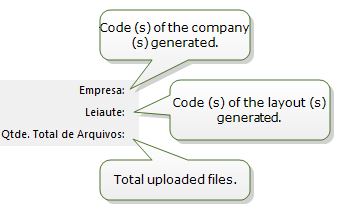
|
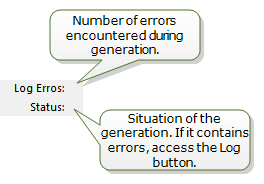
|
Logs
The log screen displays the entire generation history. If you have [ERROR] message, it must be corrected on the source screens before the next generation.
Important
The [WARNING] messages should also be checked.
 English
 Español


