Investigation of occurrences
Enables the registration and follow-up of cases using a practical method for the investigation of accidents, based on systems theory, which deals with the workplace accident as a complex phenomenon, pluricausal and dysfunction in the developer company. This method provides detailed research of the factors related to the occurrence of each accident, called accident factors or facts and identified retrospectively from the injury. The method can be regarded as an exploration of the issues involved in the occurrence of accidents.
This screen can be accessed in the following ways:
| At where | As |
|---|---|
| Record of occurrence screen (Security> Accidents> Security Occurrences, Occurrence tab) | Through the button Investigation in the bottom of the screen. In this case the connection is made to the occurrence automatically. |
| Instance registration screen (Security> Accidents> Security Occurrences, Incidents tab) | Through the button Investigation in the bottom of the screen. In this case the connection is made to the occurrence and to the accident / accident automatically. |
| Accident Register Screen (Security> Accidents> Accident Register) | Through the button Investigation in the bottom of the screen. In this case the connection is made with the occurrence (if any) and with the accident / accident automatically. |
| Security Menu> Accidents> Investigation of Occurrences | In this place it is allowed to inform the number of the occurrence and / or the data of the accident / accident. |
When this screen is accessed by any means other than the direct menu (Security> Accidents> Investigation of Occurrences), the accident / occurrence fields will be disabled. If it is necessary to inform the data of the employee, one must access the screen of investigation by the menu, or from the screens of occurrence register and accidents, situations where the information of the employee will already be filled with the data of the accident.
Occurrence Type
This field is automatically populated if the screen is called by investigation of cases or the screen of the industrial accident.
When the occurrence type is "2 - Incident", the fields Date / Time Accident are disabled, as they are only used when the type of occurrence is of type "1 - Accident".
Research Code Enter a code for this investigation.
Important
This field is automatically populated if you are registered for the Events screen or the screen of the industrial accident.
Information
Occurrence Code Inform the occurrence, when the investigation refer to an incident or leave with zero when it's accident.
Important
This field is automatically populated if registered by hit screen in menu: > Security > Accidents > Security Tab instances Terrain, through the Research button at the bottom of the screen.
Developer Inform the developer's registration when the investigation is related to a workplace accident.
Org. Unit
Inform the company site of this occurrence as organization chart.
Witnesses
Inform the witnesses who witnessed somehow the occurrence. Witnesses can be of different companies or any other person. In this case you must leave the Company, fields and Type Developer no information and register only the name of the witness.
Witness button
Click this button if you want the system to suggest the witnesses. When using this feature, the names of the witnesses will be obtained from the record of the occurrence, in the same order.
This button is visible only on this tab and remains enabled only if:
- the active user has permission to perform edits and inclusions on screen and grid;
- there is an occurrence of security informed in the investigation file.
Commission of Investigation
In this grid are registered people who make up the Commission responsible for investigating the occurrence. Generally are people who already participate in security-related programs within the company. To identify the Member of the Commission can use the following types:
- Other-with this type allows you to register any employee;
- Representative SESMT-with this type allows you to register employees who are linked in a Brigade Group, during the period of investigation;
- CIPA-representative with this type allows you to register employees who are members of CIPA, the period of investigation;
- Industry/Local Representative-with this type allows you to register local developers informed on Registration folder;
- Industry/Local Distinguished representative-with this type allows you to register employees who are not on site informed in the register;
- Top/responsible leader-with this type allows you to register any developer to the user to select the upper/leader.
Trees of causes
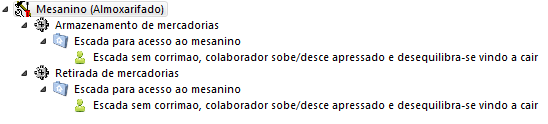
In this folder is the registration of the components of each activity to assemble the tree of causes. To register them, press the right mouse button or click on the event, which will provide a screen with the following options:
- New event-this option allows you to register the components of each activity.
- Edit event-this option allows you to change the component, its description, and its type.
- Delete event-this option allows you to delete the component. All components that are below the selected component, are also deleted.
 Veja também:
 English
 Español


