Ranges
Allows to assign several ranges to the system users/groups, to restrict data to which these users will have access.
To define the permissions for an user/group, firstly select the type of range desired and then, click the Users button. With this, a new window will be displayed, which will show all groups of users that already have any range registered.
To add permissions to a group/user which is not being displayed on this window, click Add, select it in the list and then click Details.
- Active Org. Chart Table
- Tables where user ranges are not applied
Important Guidelines on the Scope of Users in People Management | HCM
As in the permissions to access the windows, in the ranges it is possible to define values for the user groups and not only for users. For each user/group, it is possible to register at maximum three conditions, and all permissions defined for a group are reflected in its users. The limitation of three conditions for each user/group is in relation to the range window, which does not allow that several ranges be accumulated for the same user. The same definition is not valid when is internally treated by the system.
There may be cases in which an user has more than three conditions, being that they have been internally created/manipulated by the routines of range of the Human Capital Management | HCM module.
Permissions to register user group ranges can be set through the User Manager System (SGU) under Security> General Rights> Register Users Group Coverage.
Based on these statements, there are two possible scenarios, depending on the value set for the signaling Merge user / group scope conditions, in Miscellaneous> Users> Markings (FR000AUS):
- When the marking is filled in with "S - Yes", the ranges defined directly for the user will be merged with the ranges defined in the groups of which it is part.
- If "N - No" is filled in, user and group coverage will be treated individually under separate conditions.
 Example:
User groups:
GROUP1 and GROUP2 User:USER1 (belonging to both groups - GROUP1 and GROUP2)
Scene 1
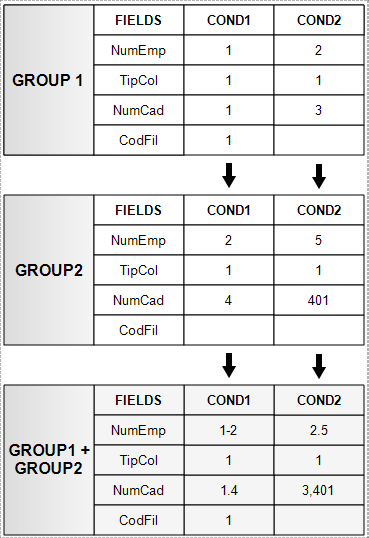
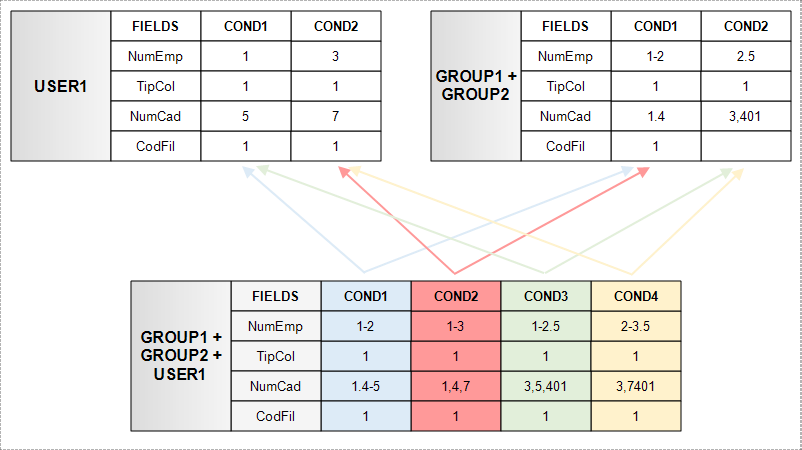
Merge user / group scope conditions = "Y - Yes"
- First, the scope of the groups to which the user belongs are summed up, as shown below:
- Next, the scope of the groups are merged into the user scope:
Scenario 2
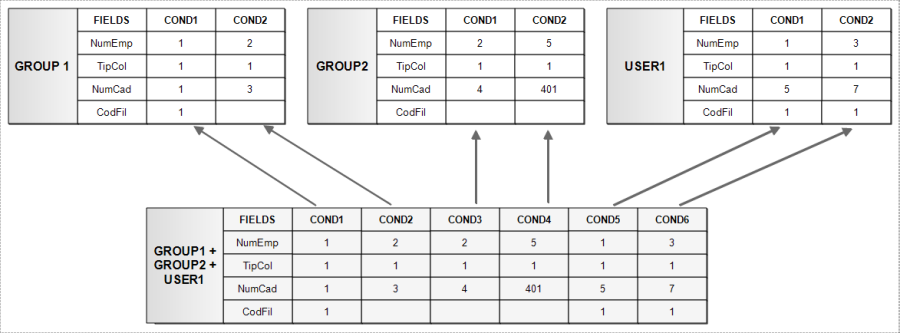
Merge user / group scope conditions = "N - No"
Each of the defined conditions, both for the groups and for the user, will be applied individually:
Blank coverage conditions
When an user or a group of users has only blank ranges, the system will not include any condition of range, allowing the user or group of users to have access to everything. However, in case an user or group of users have more than one range, the blank ranges will not be added.
Example:
GROUP OF USERS: OPERATORS
| Condition 1 | Condition 2 |
| NUMEMP=2 | NUMEMP=3 |
| CODFIL=1 | CODFIL=5 |
GROUP OF USERS: PAYROLL
| Condition 1 |
| CODEVE=1-99 |
USER GROUP: ALL
| Condition 1 |
| Blank |
USER: PETER (belongs to groups: ALL, OPERATORS and PAYROLL)
| Condition 1 |
| Blank |
The system will apply the following ranges to the user PETER:
| Condition 1 | Condition 2 | Condition 3 |
| NUMEMP=2 | NUMEMP=3 | CODEVE=1-99 |
| CODFIL=1 | CODFIL=5 |
Scope of Releases for Folha
Available to the Personnel Administration module: from version 5.5.1.9f, the system was changed to allow to register more than one condition in the Coverings of Sheet Releases, in order for the user to inform what the event condition for the respective condition of Co-workers' Coverage. However, in this case, the user must inform as many conditions of Postings to Folha as they exist for the Collaboration Scope, even if the conditions are identical.
Example:
Range of Workers:
| Condition 1 | Condition 2 | Condition 3 |
| NumEmp 1 | Numemp 2 | NumEmp 3 |
| CodFil 1 | CodFil 2 | CodFil 3 |
In this case, if it was informed in the main ranges of releases for a range of 1-10 item, the system would set the following situation:
| Condition 1 | Condition 2 | Condition 3 |
| NumEmp 1 | Numemp 2 | NumEmp 3 |
| CodFil 1 | CodFil 2 | CodFil 3 |
| CodEve 1-10 |
Notice that there was influence only in the first condition. So, with this change the user should obligatorily report the three conditions of the Entries subject to the Payroll, even if the conditions are identical, because only in this way the system will correctly build each condition.
Veja também:
 English
 Español


