Appoint Substitute
Allows that the user active in the system appoints a substitute user for the period when it is absent.
The operation of this routine depends on the Permissions on Substitute Naming of the screen
- If, at this time, "S - Summed" is informed, in the stipulated period the substitute user will have his normal access permissions added to the access permissions of the replaced user.
- If "I - Individuals" are informed, the substitute user can choose to receive only his permissions or only the user 's permissions.
Notes
- If the group user profile feature is active, when you log in to access the module, a screen with the replaced user profiles is displayed to select.
- After finishing the period, the substitute user comes back to have only its access permissions.
- Replacement can be designated only by active users who are allowed to do so. Such permission is granted inSGU (Senior Gerenciador de Usuários) the , via the Security> General Rights> Assign Substitute path.
This field is the name of the user that will be replaced. To select the user, click the Users.
Note
A substituted user can only be indicated if "S - Yes" is entered in the field Centralizes Appointment of Substitutes, of th
Corresponds to the name of the user who will do the substitution. To select the user click the Users button.
Note
In the Replaced User and Substitute User fields, only users who have already been associated with a contributor will be displayed through the Associate User to Contributor
This is due to the fact that, if one of these two options is used, the user does not have scope, with neither what to delegate nor what to assume.
Inform from which day the user replacement will be valid.
Please tell us what day the user replacement will take effect.
When making a substitution, the titular user may describe the reason for the action, such as "travel to service".
Permissions for Substitute User
If the field Permissions on Substitute Naming of the s
The groups to which the substituted user takes part in are displayed in this grid, for that the groups can be selected, which permissions must be attributed to the substitute user. Therefore, when logging as substitute from another user, it will only assume the permissions of the selected groups at the moment of the appointment register. The information displayed in this grid is recorded in the Substitutes Assignments Groups table (R701GDS). You can only change designation permissions whose end date is equal to or later than the current date, and on which the active user is replaced, that is, the designations that have been registered by himself.
When accessing the system as a substitute, there are two possible situations:
- Individual Substitute Naming Permissions ("I"): The scope of the replaced user will be applied.
- Permissions on the Appointment of Substitute Added ("S"): will be added the permissions of the substitute and replaced users.
 Examples:
User Profile Resource disabled
Considering the users and groups below:
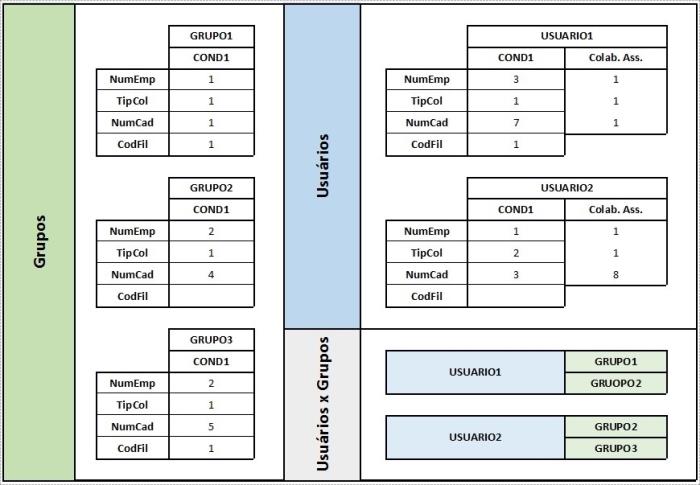
When accessing the system, the following situation exists:
Added Permissions:
- Configured for merge user and group coverage:
| "USER2" substituting "USER1" | ||||
| USER2 | USER1 | |||
| COND1 | COND2 | COND3 | COND4 | |
| NumEmp | 1-2 | 1 | 1 | 1-3 |
| TipCol | 1-2 | 1 | 1 | 1 |
| NumCad | 3-5 | 8 | 1 | 1,4,7 |
| CodFil | 1 | 1 | ||
- Configured for do not merge user and group coverage:
| "USER2" substituting "USER1" | ||||||||
| USER2 | USER1 | |||||||
| COND1 | COND2 | COND3 | COND4 | COND4 | COND1 | COND2 | COND3 | |
| NumEmp | 2 | 2 | 1 | 1 | 1 | 1 | 2 | 3 |
| TipCol | 1 | 1 | 2 | 1 | 1 | 1 | 1 | 1 |
| NumCad | 4 | 5 | 3 | 8 | 1 | 1 | 4 | 7 |
| CodFil | 1 | 1 | 1 | |||||
Individual Permissions:
- Configured for merge user and group coverage:
| "USER2" substituting "USER1" | ||
| USER1 | ||
| COND3 | COND4 | |
| NumEmp | 1 | 1-3 |
| TipCol | 1 | 1 |
| NumCad | 1 | 1,4,7 |
| CodFil | 1 | |
- Configured for do not merge user and group coverage:
| "USER2" substituting "USER1" | ||||
| USER1 | ||||
| COND4 | COND1 | COND2 | COND3 | |
| NumEmp | 1 | 1 | 2 | 3 |
| TipCol | 1 | 1 | 1 | 1 |
| NumCad | 1 | 1 | 4 | 7 |
| CodFil | 1 | 1 | ||
User Profile Resource activated
Considering the users and groups below:
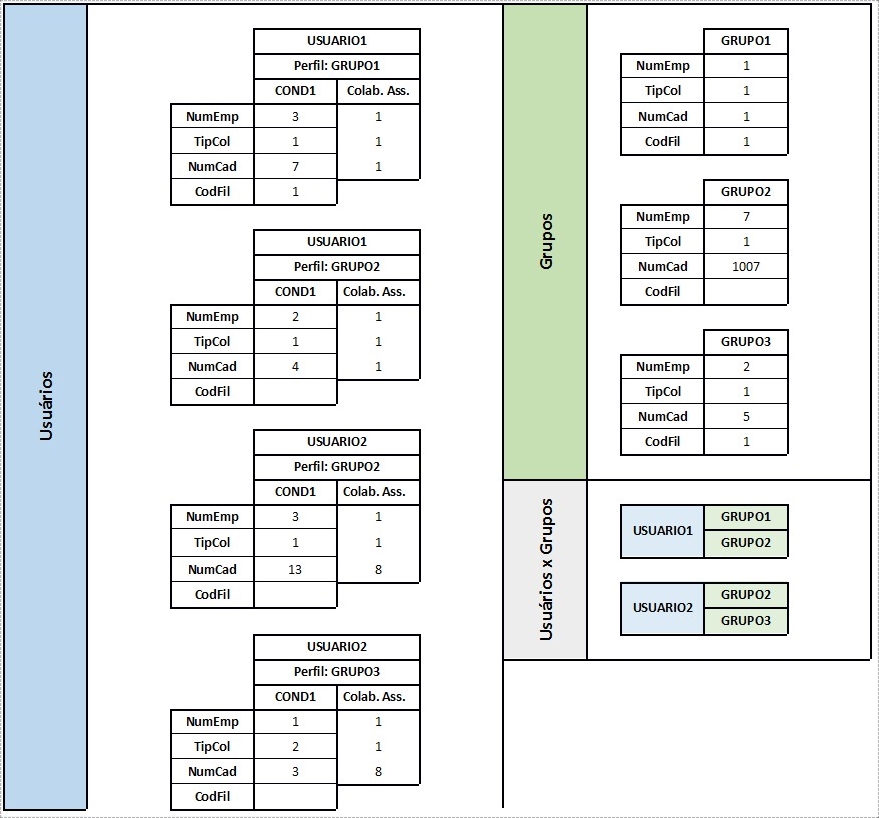
When accessing the system, the following situation exists:
Added Permissions:
- Configured for merge user and group coverage:
| "USER2" substituting "USER1" | ||||||||||
| Profile: GRUPO1 | Profile: GRUPO2 | Profile: GRUPO3 | ||||||||
| USER2 | USER1 | USER2 | USER1 | USER2 | USER1 | |||||
| COND2 | COND3 | COND4 | COND1 | COND2 | COND3 | COND4 | COND1 | COND2 | COND3 | |
| NumEmp | 1 | 1 | 1.3 | 3.7 | 1 | 1 | 2.7 | 1-2 | 1 | 1 |
| TipCol | 1 | 1 | 1 | 1 | 1 | 1 | 1 | 1-2 | 1 | 1 |
| NumCad | 8 | 1 | 1.7 | 13,1007 | 8 | 1 | 4,1007 | 3.5 | 8 | 1 |
| CodFil | 1 | 1 | ||||||||
- Configured for do not merge user and group coverage:
| "USER2" substituting "USER1" | |||||||||||||
| Profile: GRUPO1 | Profile: GRUPO2 | Profile: GRUPO3 | |||||||||||
| USER2 | USER1 | USER2 | GROUP2 | USER1 | USER2 | USER1 | |||||||
| COND1 | COND2 | COND3 | COND4 | COND1 | COND2 | COND3 | COND4 | COND5 | COND1 | COND2 | COND3 | COND4 | |
| NumEmp | 1 | 1 | 1 | 3 | 3 | 1 | 7 | 2 | 1 | 1 | 2 | 1 | 1 |
| TipCol | 1 | 1 | 1 | 1 | 1 | 1 | 1 | 1 | 1 | 2 | 1 | 1 | 1 |
| NumCad | 8 | 1 | 1 | 7 | 13 | 8 | 1007 | 4 | 1 | 3 | 5 | 8 | 1 |
| CodFil | 1 | 1 | 1 | ||||||||||
Individual Permissions:
- Configured for merge user and group coverage:
| "USER2" substituting "USER1" | ||||
| Profile: GRUPO1 | Profile: GRUPO2 | |||
| USER1 | USER1 | |||
| COND3 | COND4 | COND3 | COND4 | |
| NumEmp | 1 | 1.3 | 1 | 2.7 |
| TipCol | 1 | 1 | 1 | 1 |
| NumCad | 1 | 1.7 | 1 | 4,1007 |
| CodFil | 1 | |||
- Configured for do not merge user and group coverage:
| "USER2" substituting "USER1" | ||||||
| Profile: GRUPO1 | Profile: GRUPO2 | |||||
| USER1 | GROUP2 | USER1 | ||||
| COND2 | COND3 | COND4 | COND3 | COND4 | COND5 | |
| NumEmp | 1 | 1 | 3 | 7 | 2 | 1 |
| TipCol | 1 | 1 | 1 | 1 | 1 | 1 |
| NumCad | 1 | 1 | 7 | 1007 | 4 | 1 |
| CodFil | 1 | 1 | ||||
All appointments in which the active user is substitute or substituted are displayed in this list. When you select an appointment, your information is displayed on the screen.
Delete button
Clicking this button, if the end date of the appointment is later than the current date, it is not deleted from the database. Instead, the system will change only the end date of the appointment, replacing it with the current date.
Example:
Appointment with the following data:
Beginning: 1/1/2005
End: 2/1/2005
When deleting this appointment on 1/15/2005, it will be changed to:
Beginning: 1/1/2005
End: 1/15/2005
Veja também:
 English
 Español


