eSocial - Non-Periodic
This screen has the purpose of generating the information of the non-periodic layouts for eSocial.
Important
To change or delete information that has already been sent to eSocial, the process must be done directly at the source of the information. In this way the system is prepared to monitor and generate the treatments automatically, sending the change layouts and exclusion.
When performing these operations manually in the database, the system does not generate the necessary pending for eSocial. This causes irreversible inconsistencies between the system database and the Government.
For this reason, it is not allowed to perform any command directly in the database without specific orientation of the Senior, especially in the tables: R030DES, R000DME, R034MAT and all with R350 * prefix.
Filters
- Enter the period you want to consult;
- Select the layout;
- Select the Ordering you want to view in the To Do List grid;
- Click on the button To charge;
- Check the grid Pendencies.
The filters Company, Contributor type and collaborator are optional.
Select an item in the to-do list and use the Changes to view details of this, such as the previous value and the current value after the change. This button is only enabled for changes related to the S-2200, S-2205, S-2206, S-2300, and S-2306 layouts.
Grid Pending
The grid displays all pending, according to the filters provided. Each pendency has a specific color description that can be consulted by the button Subtitle:
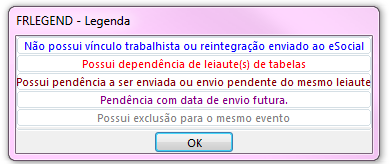
After consulting the pending issues, you should select the ones that will be sent in the column Selection, and click the Process. If errors occur, they must be corrected on the home screens before the next generation.
At the end of the process, you must use the SocialFR350STA) for manual submission and inquiry of pending status.
Generation Results
The screen displays the following information about generating the files:
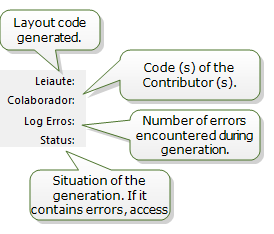
Logs
The log screen displays the entire generation history. If you have [ERROR] message, it must be corrected on the source screens before the next generation.
Important
Messages marked as [WARNING] must also be checked.
 English
 Español


