eSocial - Tables
This screen has the purpose of generating for eSocial the information of the initial and table layouts and changes that occurred during the month.
Important
To change or delete information that has already been sent to eSocial, the process must be done directly at the source of the information. In this way the system is prepared to monitor and generate the treatments automatically, sending the change layouts and exclusion.
When performing these operations manually in the database, the system does not generate the necessary pending for eSocial. This causes irreversible inconsistencies between the system database and the Government.
For this reason, it is not allowed to perform any command directly in the database without specific orientation of the Senior, especially in the tables: R030DES, R000DME, R034MAT and all with R350 * prefix.
Layouts
Initials
The initial events of tables are the information that identifies the employer. In the first shipment you must use the S-1000 - Employer / Taxpayer Information.
Table
Table events complement the initials and validate non-periodic and periodic information. They should be sent after the information event of the Employer / Contributor and before of initial registration events, both periodical and non-periodical.
Check out more information on ESocial Handbook.
Generation of layouts
The layouts displayed on the screen are positioned according to the sequence in which they are to be generated, following the prerequisites of each.
- S-1000 - Employer / Contributor Information / Public Organ
- S-1070 - Table of Administrative / Judicial Processes
- S-1005 - Table of Establishments, Works or Units of Public Organs
- S-1080 - Port Operators Table
- S-1010 - Table of Rubricas*
- S-1020 - Tax Loans Table
- S-1030 - Public Jobs Charts Table
- S-1040 - Commission Roles and Charges Table
- S-1050 - Table of Schedules/Shifts
See detailed information on each layout in the ESocial Handbook.
Operation of the screen
The screen considers the companies informed in the scope of the company. In it all selected files are generated at one time, according to the prerequisites of each event.
For the generation of the layouts:
- Enter the registration number (s) companies);
- Uncheck the table layouts (s) you do not want to generate for submission. It is not possible to uncheck the S-1000 employer / taxpayer information event as this will always be processed for change verification.
- Click on the button generate;
- Check the information displayed at the bottom of the screen.
Important
Even if there are already leaves or disconnections in eSocial for sent employees, it is necessary to resend the periodic schedules to update the totalizations in the base of the government and to generate the new DCTF.
This must be done due to a government process, because when there is a change in table layouts, the S-1200, S-1202, S-2299, or S-2399 events will not necessarily change as well. However, government totalizers can be changed, and these are recalculated only if periodic events (with the Type Shipping equal to 2 - Total (Resend all collaborators without checking for change)) are sent again, returning S-5001 and S-5002.
Buttons
Generate
This button performs the process of generating all the layouts, following the order presented in the grid. At the end of the process, you must use the ESocial Issues for manual submission and consultation of pending situations.
Log
This button is enabled after the processing is completed and allows the details to be consulted.
Note
To organize the visualization of the layouts according to your preference, click on the configuration button 
Follow-up of the generation
The screen displays information about the progress of file generation, as follows:
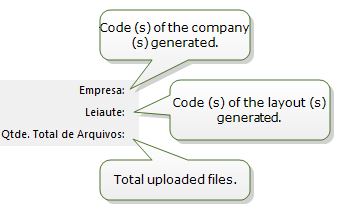
|
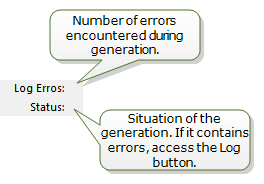
|
Logs
The log screen displays the entire generation history. If you have [ERROR] message, it must be corrected on the source screens before the next generation.
Important
The [WARNING] messages should also be checked.
 English
 Español


