Org. Chart Org. Units
They are considered as org. units: all sectors, departments, sections, branches, etc. which the company defines as: the collaborator's work place within the organizational chart structure.
In the org. chart structure the org. unit may also be called a node and it is made up of three parts:
- Identifier: (code used by the system)
- Nickname: (code used by the client)
- Position: hierarchical position of the node
The three org. unit information: identifier, nickname and position are 100% independent on each other.
The org. unit identifier will be used by the system only internally. The name of this field is NumLoc. Once the identifier value (numloc) was assigned to a node, it will never be changed. It will always be used to identify the org. unit.
Theorg. unit nickname can change without the identifier and the position of the org. unit change. The location nickname will be used in report templates, queries, the user interface, and elsewhere. The name of this field is CodLoc.
The hierarchical position of the node can change without the identifier and the nickname change. The name of this field is PosLoc and it is in the R016Hie table.
The org. units are included in the structure as follows:
- First, it is necessary to define the structure;
- Select the structure in the org. unit registration;
The first field, "Org. Chart", corresponds to the structure code that is being changed or in which the org. units are being inserted.
Period: It comprises the dates of creation and last change of the structure. A record will be saved for each change in the org. chart.
Buttons: Previous and Next are used for browsing in the records.
 Example:
in 2/1/1999, the structure was created. The system saves a record with information from this date. In 6/1/1999, it is carried out a change, then the system saves another record with these changes. In 12/31/1999, another change is done. Thus, there are already three structure records. All the records can be viewed through the buttons. The org. chart structure will be shown as it was in the corresponding period.
- By clicking the button highlighted in red, a second window will open to display the org. units. This second view allows to change the hierarchical structure of the org. units by dragging a certain org. unit of a window to the other. This is only possible in structures that do not use mask.
- The window with new change date will not be shown when:
- adding new org units,
- the property values of the org. units are changed, as the description field, creation date.
Except the Org. Unit field, this implies to report the change.
Org chart Hierarchy
It's in the structure that the org. unit are included. To include click the Structure, click the right mouse button. A menu will be displayed, with the options:
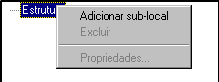
Choose: Add sub-org. unit, a code for the new org. unit will be created.
Org. Unit:

This code may be changed, by letters, numbers. It corresponds to the first level of the structure. To change it is necessary to click on it, click the right mouse button, select the properties.
Parent Node
This org. unit is subordinated directly to the Structure.
Org. Unit
It corresponds to the org. unit code, or nickname.
Org. Unit Mask
It will be the Parent Node plus the Org. unit. Example: 1.1 or Filial.Financeiro. In this case the org. unit would be 1 or Financial. (When the structure has no mask this field is equal to the Org. Unit field)
Description
Its nomenclature can be better detailed in the description of the org. unit: Example: Financial Department - Accounts Payable.
Considers PPP
This field is used only in the Security module. Inform Yes to consider this org. unit in PPP issuing, otherwise ( No), the org. unit will not be considered.
Creation Date
Creation date of the org. unit in the structure.
Extinction Date
Until this date this org. unit was active. Thus, there may not be workers with records in this org. unit, with open date or greater than this.
An alert is issued, if the validity period (creation and extinction date) be changed and there are entities of the system using these org. units out of the new period.
The entities checked are:
- Records of Org. Units (of non laid-off workers);
- Requirements;
- Position;
- Headcount per Org. Unit;
- Budget per org. unit.
Apportionment
If the company uses the routine of workforce apportionment per org. unit, the code of apportionment corresponding to that org. unit must be in this field.
The collectors in which the clocking events of Apportionment will be informed in the Apportionment folder. It happens if, in the company registration it is indicated that the company uses apportionment per org. unit.
The figures below show the structure with the org. units and the property of the Financial node - Accounts Payable:
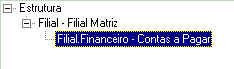
To view or register data in the user fields of this window, the mouse right button must be used on the place desired, then the option User Fields will appear (this option is shown only if the R016ORN table has user fields). When activated it will call a new window that will allow the maintenance of data. The user fields of this window refer to table R016ORN.
Limitations
The site structure of the organization chart has limits of levels and sub-levels, according to the field definition New Structure of Locations the Assignments screen (FR000ASS):
If the check is "N - No" (system default):
- Org. Chart Levels: Each node of the org. chart may have at maximum 12 levels in its hierarchy. This limitation can be seen in Figure 1, being that the node "1. Matrix "can have at most 7 levels, since it already has 5 others in its structure.
- Organizational Sub-Locations: Each location in the Organization Chart may have a maximum of 1,296 sub-sites (immediately below them, "children") in their structure. This limitation can also be seen in Figure 1, being that the node "1. Matrix "may have a maximum of 1295 sub-sites, as it already has 1 sub-site in its structure.
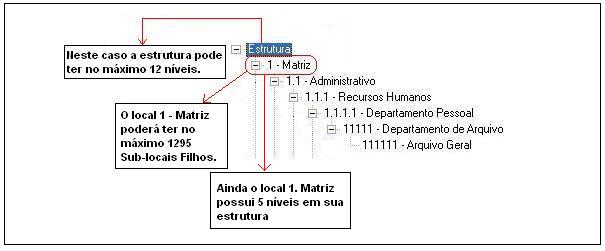
If "S - Yes", the limits are increased to 24 levels and 46,656 sub-sites. Note that this field is not natively enabled on the system, assuming the default value. If you need to use it, please contact Senior Account Executive.
Select the code of the org. chart for the registration or change of the org. units.
It allows to select two criteria for searching org. units, "Code" and "Name".
Inform the org. unit code or name to be searched, as selected in the Search For field.
When clicking the Next button, the system will find the next org. unit of the structure that meets the search criteria reported.
The org. chat org. units are registered on this window, as well as the changes are carried out here, too.
- Procedures to register an org. unit:
In the registration of a new structure: Select the Structure field; - Select the Structure field;
- Click the right mouse button. It will be shown a menu with the options:
Add Subsite sproperties
NoteThe organization chart can have up to 12 levels.
The change of the org. unit data, like name, description and apportionment are carried out in the Properties.
- Procedure for changing the hierarchy of locations:
- Select the org. unit;
- Move the org. unit to the desired position in the structure. All the org. units subordinated to the org. unit moved will continue under the same, therefore, they will be dragged along with the org. unit marked.
- After the additions and changes in structure, click the Change button. In each change it will be shown a window to inform the change date. This date will correspond to the record of change in the org. chart. They can be viewed on this window through the browsing buttons: Previous and Next.
The hierarchical position of the org. unit can change without the identifier and the nickname change. The name of this field is PosLoc and in it is in the R016HIE table.
Complement: Control of Hierarchy
Internally, the system controls this hierarchy through the POSLOC field present in the R016HIE table.
The POSLOC field identifies the hierarchy levels of org. units, being that each level has two characters, and each character can be a digit or a letter in upper case, totaling 36 values per character. As each level has two characters, each level may have 36*36-1=1295 possibilities ( -1 because '00' doesn't count). It means that a node can have at maximum 1295 direct child node.
Example
A node from the first level has a two-position POSLOC, being that the initial value is "00" (zero, zero).
A lchild node of this first level will contain as POSLOC a value of 4 positions, being "0000" (zero, zero, zero, zero).
A brother node from the first level will contain a POSLOC also with two positions, but its value will be incremented. In this case, the POSLOC will be "01" (zero, one).
A "son" of this new node from the first level contains the following POSLOC values "0100" (zero, one, zero, zero).
As follow, there is a more simplified view of the schema described above:
Hierarchical Level Posloc Node
01 "00" 1
01.01 "0000" 2
02 "01" 1
02.01 "0100" 2
02.02 "0101" 2
02.02.01 "010100" 3
03 "02" 1
04 "03" 1
As it can be seen, each two characters of the value of POSLOC is incremented by 1, and this information will define how the org. units will be hierarchically subordinated.
- For each level of the hierarchy, the org. unit receives the POSLOC from the parent more "00", because it is a new hierarchical level.
(E.g.: 02.01 has received the posloc of 02 + "00" => "01" + "00" = "0100"
-For each node inserted in a certain level, it will receive the POSLOC value from its brother immediately superior + 1.
(E.g.: 02.02 has received the posloc of 02.01 + 1 => "0100" + 1 = "0101")
POSLOC Calculation
Each pair of POSLOC values is a base number 37, being a sequence of numbers and letters (10 numbers + 27 letters).
The sequence must be: "00" to "ZZ", being that the values follow the order below:
"00" until "0Z" -> (00, 01, 02, 03, 04, 05, 06, 07, 08, 09, 0A, 0B, 0C, ..., 0Z - Totaling 37 digits)
"10" to "1Z
...
"Z0" to "ZZ
As indicated above:
Posloc: "09" + 1 = "0A"
Posloc: "0Z" + 1 = "10"
Posloc: "10" + 1 = "1A"
Posloc "1Z" + 1 = "20"
And so on.
Each POSLOC level (read every 2 characters), has its value incremented when this is "brother" of another node, as the previous example.
The more brothers a certain node has, the POSLOC value must be incremented.
This button is only visible for the org. chart table that does not use masks and as long as it is positioned in the final period. When clicking the button, the system will open a window to inform on which date the period must be created. To confirm, it will create a new period exactly equal to the last, but with the start date chosen by the user, which must be greater than the start of the current period. The previous period will be with the end date one day prior to the chosen date. In this way, the user can carry out changes in the hierarchical structure of org. units and can keep a historical record of these changes.
 English
 Español


