Restructuring of Positions
The Restructuring of Positions routine aims to facilitate the design and implementation of positions in organizations.
Through this routine it is possible:
- Create a new structure of positions and organize who will be the occupants of the them in temporary tables, thus allowing the construction of the new structure without impacting on official data;
- Generate the posts of the new structure through criteria considering, for example, the company, branch, location and position of employees.
How to make a Restructuring of Positions?
To make restructuring the steps below must be followed:
- The user creates a new signs a restructuring, informing which companies will use this new structure and the date of the restructuring;
- From this information the user may create positions of the new structure in temporary tables, by defining the features of each position;
- Finally, by firing the processing of the restructuring routine, the system creates the posts registered in the new structure and allocates the respective employees in the posts, thus effecting what was registered in the temporary tables of the system.
Information of Restructuring
To effect the restructuring of positions, first register the desired restructuring in Tables > Positions > Restructuring. On this window, it must be informed, besides the restructuring code and description:
- The Restructuring Date, that is, the date on which it is desired to effect the restructuring;
- The Position Structure which will be restructured. It will be in this structure that the jobs will be created;
- The Companies in which the restructuring will be carried out, that is, companies that will have the new structure implemented and their workers transferred to positions. In this field, the system will allow to report only companies that have the same Organization Chart table and same Structure of positions reported;
- The Type of Acting which will be used to generate records of positions. The system only accepts types of activity characterized as Main;
- The Reason of Change that will be used in the generation of records of positions;
- If necessary, it is possible to inform Comments about the restructuring.
The Situation field determines the status of restructuring, where there are the situations below:
- In Definition: This situation indicates that the restructuring is progress and that it can be changed;
- Processed with problems: This situation indicates that the restructuring has been processed and that errors occurred. In this situation the system still allows adjustments in the information and reprocessing;
- Successfully Processed: This situation indicates that the restructuring was successfully processed. Restructuring with this situation does not allow changes.
Important
When restructuring positions, the codes of positions cannot contain spaces in their extremes, which may result in inconsistencies if this practice is not adopted.
Creation of Positions Restructuring
After the registration of the restructuring, the system allows the user to register the jobs that will be created in the structure of positions informed or generate positions, according to some criteria.
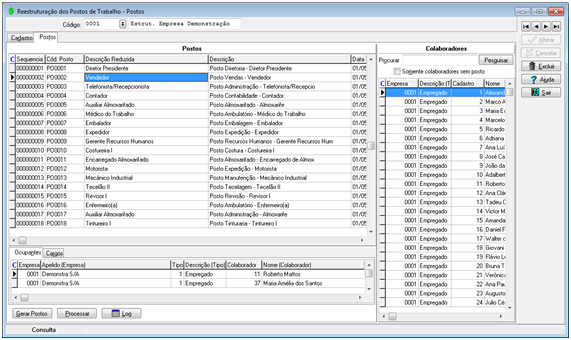
To register for the positions, the system will request the information necessary for the creation of each position, such as: code, description, profile of theposition and its features.
The system will require the user to report the features of each position as the settings of the position profile. The features defined as required in the profile will be required and the ones that are defined as disabled may not be informed by the user.
If the profile allows, the user also can set that the position has several jobs and in this case set them in the Positions tab.
The system allows the user to register and remove the workstations at any time (except in case the restructuring is successfully processed), regardless of whether there are employees working at the workstations or not.
Generation of Positions
Through the Generate Positions button, the system allows to generate the positions according to some criteria.
 Example:
In the deployment of the Positions routine, the customer can decide generating a position for each combination of Company, Branch, Org. Unit and Job that has allocated workers. It means to generate a position for each group of Workers who work at the same Company, Branch, Org. Unit and Job.
The routine of generation of positions has precisely this goal. It allows to generate the positions by defining criteria and do the automatic allocation of workers in positions created.
When activating the Generate Positions button, the system will present the window below, where the following can be defined:
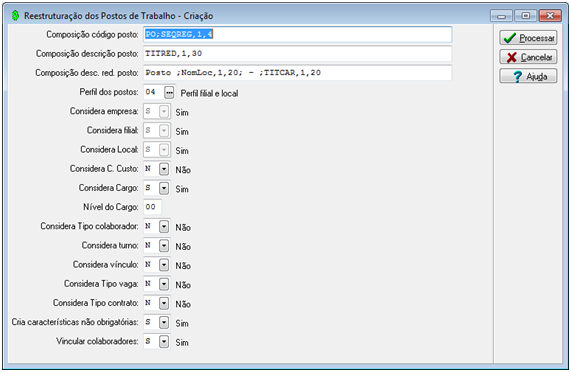
- The composition of the code, description and reduced description of the positions that will be generated;
- The code binding of a custom rule (LSP) for the generation of each job, which allows customization of the code, description and reduced description of the job during the restructuring. You can use information from other system tables if necessary.
- For each postoffice generated in the routine, the system calls the rule and allows the information in the Job Restructuring table (R017REP) to be changed (except for the Sequence field (SeqReg) that is the table key), and (R017REE) and Restructuring of workstations (R017REP) are consulted.
- In this rule you can use any system variable or programmer function that is available in the Rule Editor.
Example:Define Alpha xDesRed;
Define Alpha xDesPos;
Define Alpha xStrAcumulator;
Define Number xAcumulator;
Define Alpha xValueNameGlobal;
xNomeVariavelGlobal = "xAcumulator";
/ * Find the value of the global variable * /
GlbRetVarStr (xNomeVariavelGlobal, xStrAcumulator);
AlfaParaInt (xStrAcumulator, xAcumulator);
xAcumulator = xAcumulator + 1;
/ * Here performs the sequence break ...
In case the client will set what will be the condition to restart the code.
For example, it could define that when switching from charge, it would restart the accumulator variable.
* /
If (xAcumulator> 5) {
xAcumulator = 1;
}
IntParaAlfa (xAcumulator, xStrAcumulator);
/ * Saves the value in the global variable * /
GlbAdiVarStr (xNomeVariavelGlobal, xStrAcumulator);
/ * Here only to illustrate that the information in table R017REP * /
xDesRed = "Posto" + xStrAcumulator + "-" + R017REP.DesRed;
xDesPos = "Posto" + xStrAcumulador + "-" + R017REP.DesPos;
/ * Change job description * /
R017REP.DesRed = xDesRed;
R017REP.DesPos = xDesPos;
- The profile to be used to generate the positions. The criteria to create the profile of the positions must respect the settings of the profile of the position informed: Company, Branch, Org. Unit, Cost Center, Job, Type of Worker, Worker ID Number, Schedule, Working Time, Binding, Type of Vacancy, Type of Contract, Expense Nature. The criteria defined as required in the profile will be required and those who are defined as disabled may not be informed by the user.
- The system will allow to inform only the Position Level when the Profile allows several jobs. In this condition the system will generate the positions considering the Job of workers on the level reported. This feature only works when the system is configured to work with structured Jobs.
- Through the Creates Non-Mandatory Features, field, it is possible to define if the optional features - that were defined as criteria to create the positions - will be created in the generated positions.
- If the positions will be generated with the occupant workers bound.
Important
- For that the Considers Worker ID Number field be active, the Considers Type of Worker field must have value Y - Yes;
- For that the Considers Type of Worker field be active, the Considers Company field must have value Y - Yes;
- For that the Considers Type of Worker and Considers Company fields be active, it is necessary that on the Profiles of Position window, the Feature of the Type of Workerfield is with value different from 1 - Mandatory. Otherwise, the fields will be disabled and indicated as value Y - Yes.
Note
When generating the positions, it will be considered only workers from companies that are active on the date of the restructuring.
Allocation of Workers in the Position
After registering the positions, the user can allocate the workers from companies that will be restructured in their respective positions. It can only be allocated in the positions the active workers in the restructuring date and these may be searched using the workers search panel.
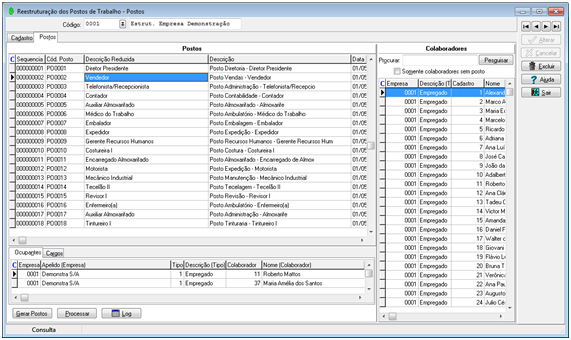
In this Panel it is possible to search for workers containing the expression reported in the Worker Name, Job Title and Code and the Org. Unit Name fields. In addition, it is also possible to search if there is any worker who has still not been allocated in one of the positions created, through the Only Workers w/o Position indication.
How to allocate a worker in a position?
To allocate an employee at a position, simply drag the worker to the respective position or to the panel of position occupants.
How to delete a worker acting in a position?
To remove the acting of an employee at a position, simply drag it from the panel of position occupants to the workers panel.
Note
The system only allows to include as operating those workers who have the same features of the position.
Processing and Realization of the Restructuring on the Database
After registering the positions and record the performance of all company workers that are active, it is possible to effect the restructuring on the database.
When using the Process button, the system will effect this restructuring and will run the following database operations:
- All registered positions in the restructuring will be included in the respective structure of positions;
- The structure of positions will be registered as active structure for companies restructured, considering the date of restructuring;
- The workers will be transferred from positions on the date of restructuring, whereas the new positions where they carry out;
- The records of the active workers who do not have main acting, will have its end date assigned to the date prior to restructuring.
The system will process the restructuring only if all active workers of restructured companies are allocated in some position. To check if there is any worker who is not allocated in a position, clear the search field and set it to search for Only workers w/o position.
If the restructuring process occurs w/o problems, it will be registered with the situation "Successfully Processed" and can no longer be changed.
If a problem occurs in the process, the situation will be registered with "Processed w/ problems" and the system will return the operations performed, returning the database to its original state before the process starts.
It is important to note that all transactions are recorded in a Log with the code "144 - Restructuring of Positions". To view these Logs you can use the Log in the restructuring screen or use the Logs query screen in Miscellaneous> Logos> Processes.
Definition of Composition for the code of Positions Descriptions
Through the fields of composition it is possible to set how to structure the code and description for each Position that will be created.
To set this composition, the syntax below must be used, where:
Syntax: <constante>,<posicao inicial>,<qtd. de caracteres>;
Constant: The constant defines the information that will be used for making the composition.
It is only possible using the constants to compose the code and the description of the position when the feature is not disabled on the Profile.
The system predicts the constants below:
- SEQREG -> Sequential number
- NUMEMP -> Code of the position company
- CODFIL -> Code of the position branch
- CODLOC -> Code of the position org. unit
- CODCAR-> Code of the position job
- NUMEMP -> Code of the position company
- NOMFIL (Name of branch office)
- DESTUR (Turn description)
This constant can be used only when the Considers Company and Considers Branch options are indicated in the generation of the positions.
- NOMLOC-> Name of the position org. unit
- TITCAR-> Title of the position job
- TITRED (Tít. reduced from the office position)
Initial position and qtd. of characters: Determines which part of the constant will be considered in the composition. In addition to the above constants, one can define a "free text" to make the composition. In this case it must be informed the starting and ending position.
The ";" allows to concatenate several constants.
Composition Examples:
Example 1
TITCAR,1,40; - ;NOMLOC,1,40; - ;NOMFIL,1,20;
In this example the system will generate the title of the position, the name of the position org. unit and name of the branch of the position, all spaces separated by a hyphen: "Security Work Technician - Security - Matrix S/A". If it is not inserted hyphen and space between a constant and another, separated by semicolons, the description is as follows: "Security Work TechnicianSecurityMatrix S/A".
Example 2
POSITION ;SEQREG,1,4
In this example the system will generate the code of positions composing the text "POSITION " and a sequential number of 4 positions, as follows:
- “POSITION 0001”
- “POSITION 0002”
- “POSITION 0003”
- ...
 English
 Español


