REP-P integration
The Electronic Time Recorder via Program, known by the acronym REP-P, is a solution that performs electronic time control with more agility, transparency and effectiveness, following the guidelines of Ordinance 671.
Published in 2021, Ordinance 671 of the Ministry of Labor and Social Security updated topics relating to labor legislation, such as employment records, employee registration, professional learning, time control, among other legal provisions. It consolidates several rules related to time recording. Replacing Ordinances 373 and 1510, the regulation simplifies and reduces bureaucracy in labor legislation related to the management of hours worked, promoting greater transparency and efficiency in working hours control practices.
According to this Ordinance, marking collectors are equipment, physical devices or programs (software) capable of receiving and transmitting markings to the REP-P. Therefore, REP-P is not the watch/device/interface where the employee records the appointments, but rather the program that receives and stores the appointments and generates the tax files.
Ronda senior X integrates with the REP-P solution developed by Senior. In environments where it is not possible to use the application to clock in, you can use the devices.
Integration between Ronda senior X and Ponto Mobile
Integration with Ponto Mobile is done automatically, if the person and branch are already registered in this system. There is no need to register the device with Ponto Mobile, as this is done automatically when integrating the first appointment.
When the manufacturer's driver sends the point record to Ronda senior X, the person's registration in Ronda senior X is associated with their registration in Ponto Mobile, using the registered CPF number.
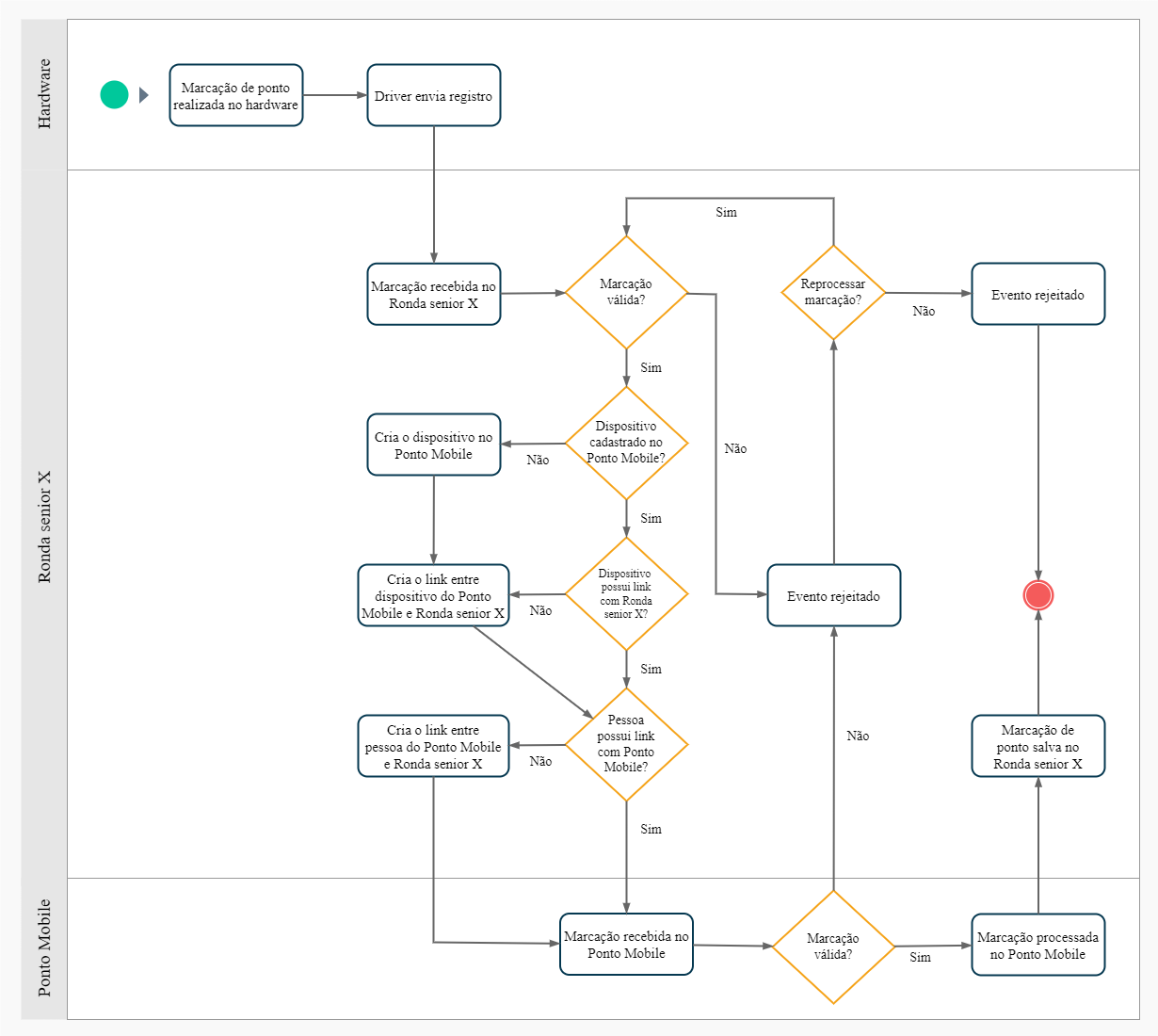
What you can do:
 Register a REP-P manager device
- On the senior X Platform, access the Access and Security Management | Round X > Access control > Devices;
- Register the device following the standard procedures described indevices page, paying attention to the differences listed in the following steps;
- When setting theManager type, select the "REP-P" option;
- Fill in the fieldsLatitude It is Longitude, reporting the latitude and longitude positions of the device's location. This data is necessary for integration with Ponto Mobile;
- Register the device's readers (still following the instructions on the page mentioned in step 2) and define the permissions for it. For these procedures, follow the standard for a REP-C device.





