Integrator

Integrate information between the systems:

See the about pageIntegrations with other systems to find out which records can be integrated. For information about the variables that can be used in this process, see the pageIntegration Variables.

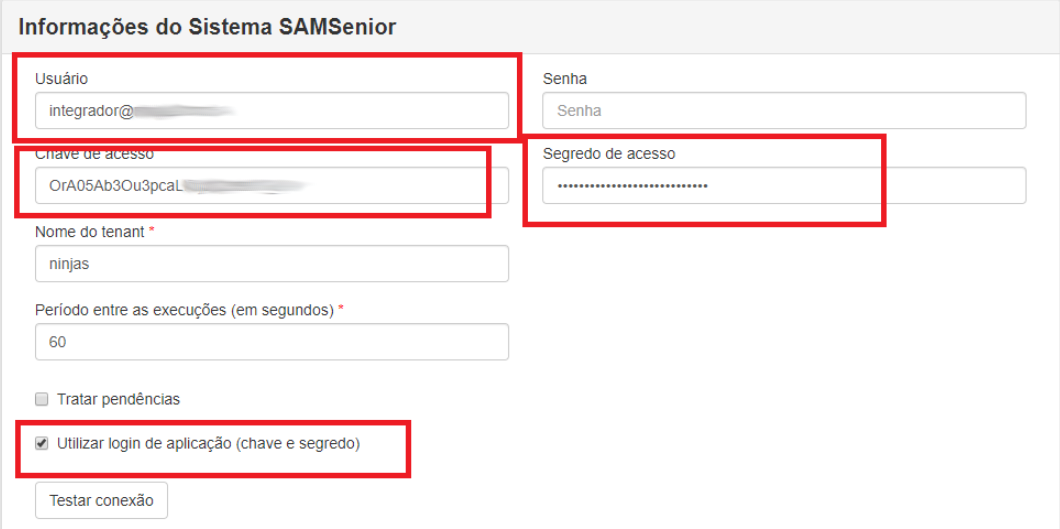
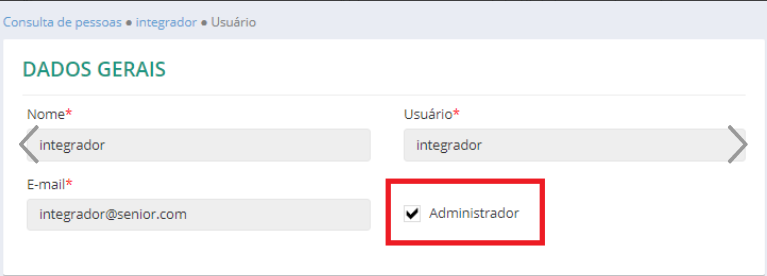
You can log in to the Integrator using username and password or key and secret:

What you can do:

Run the prerequisites to install the integrator

To perform the integration, check thehybrid environment installation prerequisites, considering that the Ronda senior X Integrator uses Open JDK 11.

Then, check the other requirements to install the Integrator:

  1. Installation ofOpen JDK 11;
  2. Inclusion of the "JAVA_HOME_SAM" environment variable with the value of the directory where Open JDK 11 was installed. For example: C:\jdk-11.0.2\ .
  3. Comments

    • The following features depend on RabbitMQ:
      • Ordinance Management;
      • Synchronization of Biometrics between Ronda Senior and Ronda senior X.
    • When the machine has a JAVA_HOME environment variable pointing to a 32-bit version of Java, the Integrator ends up trying to use it at startup as well, which causes the Integrator service not to start. In this situation, use the Integrador.exe file located in the Integrador 32 Bit folder.
Install the integrator
  1. On senior X Platform, go to Access Control and Security Management > Downloads;
  2. click inTo go down the Ronda senior X Integrator and extract the folder on the desired server;
  3. Run the create-service.bat file. With this, the SAM-Integrator service is created.
  4. Note

    If the client's Rabbit is shared, that is, if it uses VIRTUAL_HOST, it is necessary to configure its create-service.bat file, changing the VIRTUAL_HOST property, as in the following example:

    set VIRTUAL_HOST=senior

    When the Rabbitno uses VIRTUAL_HOST, it should look like this: set VIRTUAL_HOST=/

  5. In Windows Services, start the SAM-Integrador service.
Configure the Integrator

After installing the Integrator:

  1. In Senior Round, go to Miscellaneous > Assignments > Miscellaneous (FR000ASS) > Senior Round X tab and:
    1. Set the optionIntegrates with Ronda senior X asYes;
    2. Mark all the information you want to integrate as Yes.
  2. Note

    If you have People Management | HCM, go to Miscellaneous > Assignments (FR000ASS) > Senior Round X tab and set the optionIntegrates with Ronda senior X asYes. Additionally, in the Integration panel, setYes for each type of Record you wish to integrate via Pending;

  1. In the directory where the Integrator was installed, open the fileconfig.prop
      erties
    1. in edit mode sync.company.idfilterand:If you want to define specific companies to be included in the initial load of Employees, Employee Credentials/Badges, Senior Round X Users and Role Suspensions/Leave Leaves, define their codes in the parameter, separating each company with a comma. Example:sync.company.idfilter=1,2,5
    2. card.company.branch.filterIf you want to define specific filters to be integrated in the initial load and in the handling of pending companies and branches for Senior Ronda Employee Credentials/Badges, you can use the parameter, leaving the company codes separated by semicolons and the branch codes within the brackets, separated by a comma. Example:card.company.branch.filter=1[1,2,3,6];2[];3[2];4
      • server.portIf necessary, change the values of the following parameters (they already come with suggested
      • sync.accessevents.batchsize values): - identifies the server port; - defines the number of access and point markings processed at a time, from Ronda senior X (Senior cloud) to Ronda Senior (on-premise database). The highest possible value is 50, as this is the maximum number of events to be collected per batch;
      • sync.pendencies.batchsize - defines the number of pending issues handled at a time;
      • sync.accessevents.frequency - defines the search frequency for appointments from Ronda senior X (Senior cloud) to Ronda Senior (on-premise database);
      • card.technology – defines the default credential technology to be associated with the badges assigned in the Senior Ronda, for those who do not have technology assigned on the badge screenBadge Pre-Registration. Possible values are: 1 – bars; 2 – proximity; 3 – Smart Card;
      • devices.status.sync.timeout - defines the time to process pending device statuses. The minimum value is 30 and the defa
      • devices.status.sync.pendencies.batchsizeult is 60; - defines the device status backlog batch size.

    ImportantThe other parameters must not be changed in the config.properties file; they must be configured in the Integrator Settings tab, as described in step 5.

Importante

Os demais parâmetros não devem ser alterados no arquivo config.properties; eles devem ser configurados na guia Configurações do Integrador, conforme descrito no passo 5.

  • Access the Integrator by opening the browser and entering the server and port where it is configured (for example: http://localhost:8075);
  • On the Settings tab, in the Local System Information pane:
    • Ent
    • er the data to connect with Ronda Senior;The fi
    • eld
    • URL
    for JDBC connection must contain the same information available in this field in the Configuration Center, in Database > Senior Round;Test the connection.
  • Still on the Settings tab, in the System Information panelSAMSenior, you will findtwo authentication methods:
  • Inform theTenant's name Senior round X;
  • Inform thePeriod between runs (in seconds);
  • Select theStandard badge technology;
  • If you integrate with the Ronda Senior system, select the optionHandle pending issues to allow the Integrator to process the pending issues necessary to send the data to Ronda senior X. Also select, on the Integration tab, t
    he option

    Third Party Companies, Contracts and Contrac

    t History

    to indicate that this data should be loaded;ImportantThe Integrator will load Other Companies when the contract is registered.

    The Integrator will load the current Contracts.

    The Integrator will load the current records, binding the third party to the contract in Senior Round X.
  • Test the connection;
  • If there is integration between Senior Ronda and Ordinance Management or Third Party Management, fill in the RabbitMQ On Premise information:User,Password It isAddress of connection;
  • Click on the buttonTo save.
  • Configure the Integrator for use with the Virtual lobby

    Access the documentationVirtual concierge for all information.

    Important

    The Integrator is not approved for use in Internet Explorer. If you want to use a browser, we suggest Edge, Chrome or Firefox.

    Integrator operation via initial load and pendencies

    The initial load is the first sending of information from Ronda Senior to Ronda seniorHandle pending issues in the Integrator settings.

    Important

    In the Integrator settings, the optionIntegrated with Ordinance Management must be checked before starting the initial charge.

    Carry out the initial charge
    1. On the Integrator, access the Integration tab;
    2. Select the information you want to integrate;
    3. Click on Process;
    4. The system will show the Registers with errors, the Registers sent and the Status. If there are any registers with errors, you can consult them with the Details button, which opens a log.

    Initial charge order:

    • Miscellaneous: Physical Locations;
    • Devices: Devices;
    • Collaborators: People;
    • Employees: Employee Badges/Credentials;
    • Devices: Permissions;
    • Collaborators: Paper Permission/Association;
    • Employees: Leaves/Suspensions;
    • Employees: Scales/Access bands;
    • Employees: Temporary Blocking;
    • Miscellaneous: Ordinances;
    • Miscellaneous: Holidays;
    • Visitors: Visitors;
    • Visitors: Type of visit;
    • Visitors: Badges/Credentials;
    • Students: Students;
    • Students: Student Badges/Credentials;
    • Student Responsible: Student Responsible;
    • Student Responsible Persons: Badges/Credentials Student Responsible Persons;
    • Patients: Patients;
    • Patients: Patient Badges/Credentials;
    • CCTV: CCTV Servers;
    • CCTV: CCTV cameras;
    • Organizational Structure: Companies;
    • Organizational Structure: Branches;
    • Organizational Structure: Positions;
    • Organizational Structure: Cost Centers;
    • Organizational Structure: Organizational Chart Locations;
    • Organizational Structure: Other Companies;
    • Organizational Structure: Contracts;
    • Miscellaneous: Users;
    • Miscellaneous: Photos;
    • Miscellaneous: Person not grateful;
    • Biometrics.
    Registers integrated in the initial load

    These are the records sent from Ronda Senior to Ronda senior X:

    Type of Register What is imported With data from the following Ronda Senior table
    Workers People All workers, third parties and partners who have any document registered. R034FUN or R034CPL
    ID Cards/Credentials All ID card records which have the STAATU field set as 1. R038HCH
    Role suspensions/leaves All leaves where the end date is zero or greater than the current date. R038AFA
    Role association/permission Associating people with created permission roles. R034DAC
    Scales/Access Ranges

    Association of people with access lanes.

    R070CON
    Temporary Block Employee blocking R070BLO
    Visitors Visitors All visitors (normal, escort, patient's visitor, patient's escort, driver, assistant) who have an open ID card record. R090VIS
    ID Cards/Credentials All open ID card records. R090HCH or R097AIN
    Types of Visit All types of visits. FR090TVI
    Students Students All students who have an open situation record which does not block access. R073ALU or R073HSA
    ID Cards/Credentials All ID card records with the STAATU field set to 1 and that belong to students who have an open situation record which does not block access. R073HCH
    People responsible for students People responsible for students All people responsible fro students. R073RES
    ID Cards/Credentials All open ID card records. R073HCR
    Patients Patients All patients. R097PAC
    ID Cards/Credentials All open ID card records. R097INT
    CCTV Servers All Digifort CCTV servers.  
    Cameras All cameras that are active (STADSP = 1) and connected to Digifort servers. R058DSP
    Devices Devices All devices (Ronda Senior) in the categories: terminal, controller board, controller module, reader, input interface and output interface. R058DSP
    Permissions All permissions registered in Ronda Senior that are associated with devices integrated with Ronda senior X. R058PRM, R058RLP, R058GRP, R058GRL
    Other Holidays All holidays. R002FEC or R002FEM
    Lobbies All lobbies. R058POR
    Physical Locations All physical locations, if there is no physical location registered in Ronda senior X. R058PLF
    Users   R034USU
    Not grateful person   R090PNG
    Photos   R034FOT, R090VIS
    Organizational structure Companies All associations between people and the organizational structure item, in addition to the structure registration. R038HFI
    Branches R038HFI
    Cost centers R038HCC
    Positions R038HCA
    Organizational charts R038HLO
    Other companies R038HCT
    Contracts R038HCT
    Third Party Management Contracts All current or future contracts. R032EMC
    Contract Histories All current or future contract histories. R038HCT
    Biometrics All Finger Print biometrics R070BIO

    Observation

    To be able to send theregistration of access lanes From Senior Round to Senior Round X, the following procedures are required:

    • Enable the integration of scales in the Assignments screen of the legacy system (Senior Round and/or People Management | HCM);
    • Change the optionControl time range for2 - Checks only access range in the employee's Access Settings;
    • Carry out the initial loading of stopovers/access lanes.
    Configure the pendencies

    Pending issues ensure that information continues to be integrated from Ronda Senior to Ronda senior X, when there are additions, edits or deletions. They only do not apply for Servers, CCTV Cameras and Lobbies.

    For the pendencies to be generated, go to the Configurations tab and check the Handle Pendencies option.

    Configure integrations in Ronda senior X

    For the registrations of third-party companies and contracts to be carried out, this must be defined in the Ronda senior X system. This configuration is done in the registrations of third-party companies and contracts, respectively, by checking the optionIntegrated withSenior Ronda on each of these screens.

    Manual pendency generation

    Manage manual pending issues to assign roles to people, through Ronda Senior or People Management | HCM. To do this, implement a rule to generate the pendency that will be handled by the Integrator.

    This type of pendency has two types: one in which the association start and end dates/times are provided and another one which does not require this information. When the pendency is generated without the start and end dates/times, the association will be inserted with the current date/time for the start and without an end date/time.

    Example of a rule containing the two pendency types:

    definir alfa aParametros;
    definir alfa aRetorno;
    definir alfa aNumEmp;
    definir alfa aTipPes;
    definir alfa aTipCol;
    definir alfa aNumCad;
    definir alfa aIdtPes;
    definir alfa aNomePapelSAM;
    definir alfa aIdRegister;
    definir alfa aDataInicial;
    definir alfa aHoraInicial;
    definir alfa aDataFinal;
    definir alfa aHoraFinal;
    definir alfa aPapelUsoProvisorio;

    /*Converte os valores para ficar com a quantidade de dígitos necessários.*/
    ConverteNumero(R034FUN.NumEmp, "9999", "numero", aNumEmp);
    ConverteNumero(R034FUN.TipCol, "99", "numero", aTipPes);
    ConverteNumero(R034FUN.TipCol, "9", "numero", aTipCol);
    ConverteNumero(R034FUN.NumCad, "999999999", "numero", aNumCad);

    /*Coloca espaços para completar os 23 caracteres necessários para o idtpes de colaborador.*/
    aIdtPes = "        " + aTipPes + aNumEmp + aTipCol + aNumCad;

    /*Nome do papel no Ronda senior X que deseja atribuir para a pessoa.*/
    aNomePapelSAM = "Usuário de REP";

    /**************************************************************************
    Associação de papel para a pessoa.
    Datagrama: 23 dígitos - identificador da pessoa (idtpes)
               Sem limite dígitos - nome do papel

    **************************************************************************/
    aIdRegister = aIdtPes + aNomePapelSAM;

    /*******************************************************************************************************
    Associação de papel para a pessoa com data e hora de início e término.
    Datagrama: 23 dígitos - identificador da pessoa (idtpes)
               08 dígitos - data inicial, formato: ddmmaaaa, exemplo: 15/08/2019 = 15082019
               04 dígitos - hora inicial em minutos, exemplo: 08:00 = 0480
               08 dígitos - data final, formato: ddmmaaaa, exemplo: 31/08/2019 = 31082019. Data zerada (sem data final) deve ser: 31121900
               04 dígitos - hora final, exemplo: 18:00 = 1080
               01 dígitos - papel de uso provisório: S ou N
               Sem limite dígitos - nome do papel
    ******************************************************************************************************/
    aDataInicial = "15082019"; /*Data início: 15/08/2019*/
    aHoraInicial = "0480"; /*Hora início: 08:00*/
    aDataFinal = "31082019"; /*Data término: 31/08/2019*/
    aHoraFinal = "1080"; /*Hora término: 18:00*/
    aPapelUsoProvisorio = "N";

    aIdRegister = aIdtPes + aDataInicial + aHoraInicial + aDataFinal + aHoraFinal + aPapelUsoProvisorio + aNomePapelSAM;

    /*
    Monta os parâmetros para passar para a stored procedure. Pode escolher qual tipo de pendência gerar, passando ou não a data e hora de início e término para a associação do papel. Para isto, basta seguir o datagrama escolhido.

    6 = Rotina de associação de papel para pessoa
    1 = Operação (1 - Inserir, 2 - Alterar, 3 - Excluir)
    Observação: Para o IdRegister que não passa a data e hora de início e término, só estão disponíveis as operações 1 e 3.
    */
    aParametros = "6, 1, " + aIdRegister;

    /*Executa a stored procedure SP_SAM_PENDENCIES que insere a pendência na tabela para o Integrador processar.*/
    ExecSP("SP_SAM_PENDENCIES", aParametros, aRetorno);

    Registers integrated via pendencies

    These are the records that Ronda Senior sends to Ronda senior X:

    Type of Register The integration is triggered when a register is Note
    added modified deleted in the following Senior Round table...
    Workers People x x x R034FUN or R034CPL  
    ID Cards/Credentials x x x R038HCH When a badge history is deleted in Senior Round, it is only finalized in Senior Round X with the current date and time.
    Role suspensions/leaves x x x R038AFA  
    Employee blocking x x x R070BLO  
    Visitors Visitors x x x R090VIS  
    ID Cards/Credentials x x x R090HCH or R097AIN When a badge history is deleted in Senior Round, it is only finalized in Senior Round X with the current date and time.
    Students Students x x x R073ALU or R073HSA  
    ID Cards/Credentials x x x R073HCH When a badge history is deleted in Senior Round, it is only finalized in Senior Round X with the current date and time.
    People responsible for students People responsible for students x x x R073RES  
    ID Cards/Credentials x x x R073HCR When a badge history is deleted in Senior Round, it is only finalized in Senior Round X with the current date and time.
    Patients Patients x x x R097PAC  
    ID Cards/Credentials x x x R097INT When a badge history is deleted in Senior Round, it is only finalized in Senior Round X with the current date and time.
    Devices x x x R058DSP The modification pendency is only generated when a modification is made in the device's description, physical location and, in the case of readers, the entry and exit physical locations.
    Other Holidays x x x R002FEC or R002FEM  
    Lobbies x x x R058POR  
    occurrences x     R090OCP, R090OCE or R090OAE  
    Access and Clocking Events x     The pendency is generated by CSM Center, before inserting the register in table R070ACC The processing of these pendencies is made through batches (as defined in the configurations file) or at the end of the Integrator cycle.
    Device Alarms x     R062ALM with the TIPALM field set as 0 or 1
    Device Notification x     R062ALM with the TIPALM field different from 0 or 1
    Physical Location x x x R058PLF The modification pendency is only generated when the description of the physical location is modified.
    Organizational structure Companies x x x R038HFI  
    Branches x x x R038HFI  
    Cost centers x x x R038HCC  
    Positions x x x RR038HCA  
    Organizational charts x x x R038HLO  
    Other companies x x x R038HCT  
    Contracts x x x R038HCT  
    Third Party Management Contracts x x x R032EMC  
    Contract Histories x x x R038HCT  
    Biometrics x x x R070BIO Only Finger Print type biometrics will be integrated
    Particularities of the initial load and pendencies People integration
    • The person is found by the document number in the system. Therefore
      • :
      • If the person already exists in Senior Ronda
      If it does not already exist in Ronda senior X, it is created and associated with the role corresponding to the type of person.
    • A default role is defined in the People Integration, according to the following rules:
      • Workers assume the employee, third party or partner role;
      • Visitors, patients and patient visitors receive this role when the credential is assigned and the role is finished with the credential termination;
      • Patient escorts receive this role according to the hospitalization movement and its start and end dates;
      • Students receive this role when they have a situation record in effect which grants access, respecting the start and end of the record;
      • People responsible for students receive the corresponding role.
    • In the case of non-grata people without permitted entry (fieldAllow Entry from Ronda Senior's non-grata person register defined as "Does not enter"):
      • Are integrated as blocked:
        • In the initial load of people;
        • In the integration of pending issues, if they become non-grata without entry allowed after the initial charge.

        In these cases, the person information integrates the Reason for blocking and the Unblocking procedure.

      • They are no longer considered blocked (in the pendency generation):
        • When they become personae non grata with allowed entry;
        • When they are no longer personae non grata.
    • It is not recommended to setPhone Mask in the registration of international locations in Ronda senior
    • If the employee is blocked in Senior Ronda, he will also be blocked in Senior Ronda X with a Temporary type block, his status will be considered Blocked and his roles will be suspended. When the employee is unblocked in Ronda Senior, the block in Ronda senior X will be ended, his status will be Active and the suspensions generated by the block will be ended.
    Credentials integration

    To send the credentials integration, the people integration must have already been executed. And to process absences, the person must have a role associated with him or her.

    Note

    What in Ronda Senior is called removal, in Ronda senior X is role suspension. And what is called a badge in People Management | HCM and in the Senior Ronda, in the senior Ronda X is credential.

    For the situation where access is blocked, you must be informedGenerates separation on the Situations screen, in Tables > Situations (FR010SIT), in Ronda Senior.

    Physical location integration
    • This integration must be done before the initial loading of devices, because, when the devices are integrated, their physical location must appear in Ronda senior X;
    • The Ronda Senior physical location structure to be integrated cannot exist in Ronda senior X. Because of this, what can be done, if you want to use the initial load for the physical locations, is: delete the physical locations that are already in Senior round X or use the already available resource of Association of physical locations;
    • The physical locations of Ronda Senior, of the typeControlled area, are not sent to Ronda senior X, as it is not possible to associate devices with this type of physical location, and such association is mandatory in Ronda senior X.
    Device integration
    • They get the "Integrated" situation in their register. Therefore, they are not charged to the owner of Ronda senior X, as they are considered to be the owner of Ronda Senior. Devices with the "Integrated" status are also shown in Occurrence Management Monitoring;
    • They are not considered in the Contingency application and by the Ronda senior X SDK;
    • When a device is deleted in Ronda Senior, such deletion is replicated in Ronda senior X. If an exception occurs and the deletion of the device in Ronda senior X is not completed, the deleted device is inactivated;
    • When using Point Management with Ronda senior X, the devices must be registered in both systems and, in the Integrator, these registrations must be associated. It is necessary to associate the readers of the device registered with Ronda senior X, with the collector registered with Ponto Gestão;
    • If a device already integrated with Ronda senior X is inactivated in Ronda Senior, it is also inactivated in Ronda senior
    • The status (online or offline) of Ronda Senior integrated devices with Ronda senior X is sent by CSMCenter and can be monitored in Monitoring;
    • You can make some changes to Ronda Senior X integrated Ronda Senior devices:
      • Define whether toGene
      • rate occurrence
      • when an input is alarmed;
      Inform the type of occurrence to be generated when an occurrence ofMonitored events.
    User integration

    When the senior X Platform login is integrated with SGU (Senior User Management), the Integrator does not include the user: it only associates the person with the user, which is automatically created by senior X Platform. The documentation on how to integrate of people from SGU is on the platform.

    Another possibility is for the Ronda senior X integrator to import SGU users. In this case, only an initial load of SGU users occurs in Ronda senior X.

    Integration of contracts and third-party companies

    When records of contracts and third-party companies are integrated with Ronda Senior, only information that belongs only to Third-Party Management (that is, that does not exist in the Ronda Senior system) can be changed.

    Furthermore, in the third-party company, it is only allowed to change the approval flow process, register and attach documents.

    Companies without identification documents will not be integrated into Third Party Management. The CNPJ, CEI or CPF must be included in the third-party company's registration for it to be integrated. This is done in the Ronda Senior system, in the Other Companies register, by filling in the fieldsRegistration Type It isRegistration Number.

    Biometrics integration

    Finger Print biometrics will be integrated. For more information, see the documentation forOrdinance Management Integrator.

    Integration with Ordinance Management

    Integrate all items from Ronda Senior Ordinance Control to Ronda senior X Ordinance Management. For more information, see the documentation forOrdinance Management Integrator.

    Integration with Third Party Management

    Integrate information from Ronda Senior Third Party Control into Ronda senior X Third Party Management. Find out more in the documentationThird Party Management Integrator.

    Verify and handle non-integrated pendencies
    1. In the Integrator, click on the Pendencies tab;
    2. In the Consultation panel, use the date filters and define the Routine you want to verify, then click on Apply filter;
    3. The Pendency errors list panel might show that no pendency with errors was found, or otherwise display the ones that have errors. In that case:
      1. Click on the pending issue listed and see the error description;
      2. Treat the problem highlighted in the Senior Round;
      3. Select the column check boxResend in the pending issue(s) addressed;
      4. click in Resend and wait for the successful resend notice.

    Integrator operation through associations

    Associations are used to link registered data independently between systems, like a "from/to" table.

    Device association

    This association makes it possible to send Ronda senior X appointments to People Management | HCM, for customers who have the Time and Cafeteria Control module and wish to import access and/or point markings into the database. Associate readers, input and output interfaces, or delete this association.

    This information will be inserted in the access/clocking events table. If no "from/to" configuration is found in the devices, the events will not be imported.

    Physical locations association

    Call from all locations except Ronda Senior controlled areas. The physical location of Ronda Senior points to a physical location of Ronda senior X and is thus considered equivalent. This association can also be deleted.

    Just like the association of types of occurrences, the association of physical locations is essential to process pending inclusion of occurrences between Ronda Senior and Ronda senior X.

    Association of types of occurrences

    Link all types of incidents. The type of occurrence of Ronda Senior is linked to that of Ronda senior X so that there is equivalence. This association can also be deleted.

    Just like the association of physical locations, it is essential to process pending inclusion of occurrences from Ronda Senior to Ronda senior X.

    The information is taken from the following screens:

    Note

    Only occurrences are sent. Deletions and changes are not controlled.

    Situations

    When using integration in People Management | HCM and Senior Ronda

    Note

    The change must be carried out before the initial absence load.

    Functioning of the Integrator by sending information from Ronda senior X to Ronda Senior

    This is the information that is integrated:

    Routine What must be configured for the integration to occur When the integration occurs Senior Round table in which the record is inserted
    Access and Clocking Events Ronda senior X and Ronda Senior device registrations must be associated on the Integrator device association screen. At each Integrator cycle, a Ronda senior X service is consulted to check if there is any new marking. R070ACC and R070CRI
    Virtual Lobby
    1. In the Integrator, access the tabWeb service configuration and configure the base URL of the Ronda Senior web services, theDoor, OUser and thePassword;
    2. Check the Synchronize virtual lobby checkbox.
    Every second, the service searches for new People and Credentials in Ronda senior X.
    • Person: R034FUN or R034CPL
    • Credential: R090HCH or R097AIN
    Person In the Ronda Senior solution, implement process rule 890 - Insert people from Ronda senior X into the Ronda Senior temporary table. When a new person is registered, the sp.Synccom.senior.g5.sp.sam.pessoa web service sends this information to Ronda Senior, which uses rule 890 to insert the record into the product table. R034FUN or R034CPL
    Credential In the Ronda Senior solution, implement per-process rule 891 - Insert Ronda senior X credentials into Ronda Senior temp table. When a new credential is generated, the sp.Synccom.senior.g5.sp.sam.credencial web service sends this information to Ronda Senior, which uses rule 891 to insert the record into the product table. R090HCH or R097AIN