
Integrator
Procedure for installing the Integrator and configuring RabbitMQ for a hybrid environment on Windows, using the Systems Installer.
Architecture
Senior X services are contracted in the cloud but with data integration from the systems database that is in the on-premises environment. Data integration occurs through the Integrator and RabbitMQ components installed on-premises and communicating with the cloud securely. To do this you need:
- senior X cloud environment;
- Senior systems database on on-premises;
- RabbitMQ and Integrator installed on-premises;
- RabbitMQ exposed on the internet to allow communication from the cloud;
- configured and secure communication between RabbitMQ Shovel in the cloud and RabbitMQ on-premises via the internet.
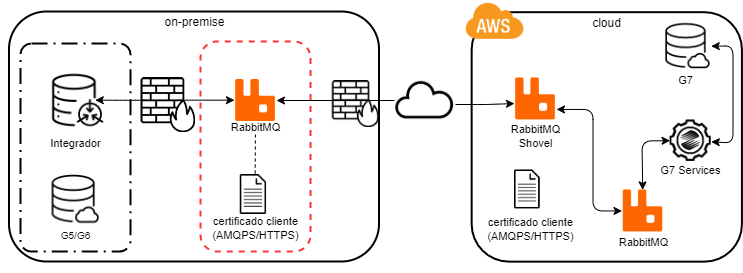
Prerequisites
 Artifacts
- Senior systems installation media: installation package distributed for deployment in the user environment;
- RabbitMQ, version 3.6.9 or higher, installed and running.
Security
- Ports published on the internet on-premises:
- with digital certificate, by default they are: 5671 (AMQPS) and 15671 (HTTPS);
- without digital certificate, by default they are: 5672 (AMQP) and 15672 (HTTP).
- Inbound rules for the on-premises firewall. Allow source traffic from IP 52.67.76.60 (AWS);
- Digital certificate (recommended):
- On-premises, the certificate is used to encrypt communication between on-premises and the cloud via the AMQPS and HTTPS protocols;In the cloud, the client certificate is used to ensure secure, cloud-initiated communication with RabbitMQ on-premises. It is necessary toUpload of the client certificate in the tenant settings, in the cloud;The certificate is not required to be internationally authorized.
Accesses
- Systems shared folder to obtain configuration information available in the systems configuration file, in the Senior Configuration Center;
- Systems database. For the SQL Server database, only versions 2012, 2014, 2016 and 2017 are approved.
- RabbitMQ via AMQP.
Data replication
Data replication consists of four steps:
- Search for pending issues in monitored tables that have not yet been addressed;
- Read the data corresponding to pending issues;
- Publish an event with this data;
- Mark the pending issue as resolved.
The concept of zero being null from the G5 systems database is considered. Therefore, if the field has a zero value and can receive a null value, this will be the value sent. For example, a VARCHAR field in the Oracle database that has the value ' ' (blank space) will be sent as null.
Replication tables
Monitor the pending issues generated by the G5 base triggers that are registered for this purpose. This registration is made in the RTC_REPLICATIONDEF table with the data:
- id: query range for the domain;
- idreplicator: erp_aws;
- tablename: name of the G5 table to receive the triggers.
Then, make the database consistency by CBDS.
Identifying missing triggers
Commands to identify missing or, in the case of Oracle, invalid database triggers:
Oracle
select * from(
select'RTC_'||Upper(tablename)||'_I' nm from rtc_replicationdef
union
select'RTC_'||Upper(tablename)||'_D' nm from rtc_replicationdef
union
select'RTC_'||Upper(tablename)||'_U' nm from rtc_replicationdef
) sts where not exists(
select 1 from (select object_name, status from user_objects where object_type ='TRIGGER' and UPPER(object_name) like'RTC_%')sts2
where sts2.object_name = sts.nm and status ='VALID')
SQL Server
select * from(
select'RTC_'+Upper(tablename)+'_I' nm from dbo.rtc_replicationdef
union
select'RTC_'+Upper(tablename)+'_D' nm from rtc_replicationdef
union
select'RTC_'+Upper(tablename)+'_U' nm from rtc_replicationdef
) sts where not exists(
select 1 from (select name from sysobjects where xtype ='TR' and UPPER(name) like 'RTC_%')sts2
where sts2.name = sts.nm)
Clearing backlogs
The Integrator only calls theStored Procedure CLEARREPLICATION at service startup. However, if it is necessary to clear the ETL Integrator's backlogs more frequently, schedule an automatic process in the solution, calling thisStored Procedure.
Using the ETL Integrator
Currently, any senior version X system can use the ETL integrator, but only a few choose to use it. Check the types of integration used by each senior version X solution:
- HCM X: uses its own integrator (if you choose to use the ETL Integrator and the HCM Integrator simultaneously, you must doadditional settings to ensure the correct functioning of the integration);
- ERP X: integration is done with events for replications;
- Round X: uses its own integrator;
- CRM X: uses its own integrator;
- TMS X: integration done via Windows services in Delphi;
- Routing: uses its own integrator;
- Freight Management/FIS: integration done via SDL;
- Yard Management/YMS: uses the ETL integrator to integrate ERP G5 data.
Which integrators to use?
| HCM Integrator | G7 Integrator | Wiipo Integrator | BI Gateway Integrator | Konviva Integrator | SAM Integrator | Nexxera Integrator | ETL/DML Integrator | |
|---|---|---|---|---|---|---|---|---|
| People management | ||||||||
| Enterprise Resource Planning | ||||||||
| People Management + Business Management (Without Management Panel) | ||||||||
| Unification of Bases – ERP Primary Base | ||||||||
| People Management + Business Management (With Management Panel) | ||||||||
| Unification of Bases – HCM Primary Base | ||||||||
| Timekeeping App 1.0/2.0 (With Management Panel) | ||||||||
| Timekeeping App 1.0/2.0 (Without Management Panel) | ||||||||
| Agriculture | ||||||||
| Management Panel | ||||||||
| Collaborate | ||||||||
| Wiipo | ||||||||
| Management Layer | ||||||||
| Konviva | ||||||||
| Access and Security Management | ||||||||
| Skyline – Bank Van | ||||||||
| WMS |



