
Roles and Permissions - Colabbe - Digital Hiring
About roles and permissions
papers serve to associate users with positions within the organization or activities that will be performed. Users associated with the same role share the same access permissions to HCM. Therefore, it is important that roles are created in such a way that it is possible to apply them to multiple users.
The configuration of the roles is done by the resource ofPaper Management of the senior X platform and can be accessed at: Technology > Administration > Authorization > Role Management.
Types of Access Controlled by Permission Resources
- Screens that the user assigned to that role can access
- Actions that the user can perform within a process
- Scope filters
that restrict types of information to which the user has accessNoteNew scope filters that are associated with roles have a minimum time for them to take effect for the associated users. To learn more, see thedocumentation in the Senior X Platform Handbook
.
Colabbe Permissions
Domain/Service: hcm / onboarding
Electronic signature
| Feature name | Permission description | Associated path |
|---|---|---|
| contract (res://senior.com.br/hcm/onboarding/entities/contract) |
Permissions required for the HR:
|
Colabbe — Digital Hiring > Electronic Signature |
| contractModel (res://senior.com.br/hcm/onboarding/entities/contractModel) |
||
| DOC Studio specific permissions |
Colabbe's system uses DOC Studio features to manage documents. Therefore, these permissions are necessary for the HR have access to the features of uploading files and creating folders to store documents. |
- |
Register
Important
The features in the table below are dependent on each other. For the menus to be visible, enable the features in the order they are listed below.
| Activation order | Feature name | Permission description | Associated path |
|---|---|---|---|
| 1 | Registers (res://senior.com.br/hcm/onboarding/registration) |
Permissions for the HR to view the general menu of registers. |
Colabbe — Digital Hiring > Registers |
| 2 | Company register (res://senior.com.br/hcm/onboarding/entities/company) |
Permissions for the HR view the company register menu and manage this register. |
Colabbe — Digital Hiring > Registers > Companies |
| 3 | Branch (res://senior.com.br/hcm/onboarding/entities/branchOffice) |
Permissions for the HR to view the branch register menu and manage this register. |
Colabbe — Digital Hiring > Registers > Branches |
| 4 | Professional board (res://senior.com.br/hcm/onboarding/entities/professionalAdvice) |
Permissions for the HR to view the professional boards register menu and manage this register. |
Colabbe — Digital Hiring > Register > Professional Advice |
| 5 | Job position (res://senior.com.br/hcm/onboarding/entities/jobPosition) |
Permissions for the HR to view the job position register menu and manage this register. |
Colabbe — Digital Hiring > Registers > Job positions |
The registers below have no dependencies on each other and can be enabled in any order:
| Feature name | Permission description | Associated path |
|---|---|---|
| Bank (res://senior.com.br/hcm/onboarding/entities/bank) |
Permissions for the HR to view the bank institution register menu and manage this register. |
Colabbe — Digital Hiring > Registers > Bank |
| Level of education (res://senior.com.br/hcm/onboarding/entities/degreeOfEducation) |
Permissions for the HR to view the level of education register menu and manage this register. |
Colabbe — Digital Hiring > Registers > Level of education |
| Nationality (res://senior.com.br/hcm/onboarding/entities/nationality) |
Permissions for the HR to view the nationality register menu and manage this register. |
Colabbe — Digital Hiring > Registers > Nationality |
| Religions (res://senior.com.br/hcm/onboarding/entities/religion) |
Permissions for the HR to view the religion register menu and manage this register. |
Colabbe — Digital Hiring > Registers > Religions |
| Terms of Use (res://senior.com.br/hcm/onboarding/entities/termOfPrivacy) |
Permissions for the HR to view the terms of consent register menu and manage this register. |
Colabbe — Digital Hiring > Registers > Terms of consent |
Invite and pre-hiring templates
| Feature name | Permission description | Associated path |
|---|---|---|
| Invite template (res://senior.com.br/hcm/onboarding/entities/inviteModel) |
|
Colabbe — Digital Hiring > Invite Templates |
| Pre-hiring (res://senior.com.br/hcm/onboarding/entities/inviteModel) |
|
Colabbe — Digital Hiring > Pre-hirings |
Note
If you want to disable the editing of Invite Templates and Pre-hirings, you need to uncheck both the Edit and the Add action.
Range by assignee
To grant a range by assignee, you can use the All filter of the Pre-hiring data feature.
To find this filter, group permissions by Feature and search for Pre-hiring data.
Then activate the desired actions (Add, Edit, View and Delete) and click on the filter icon
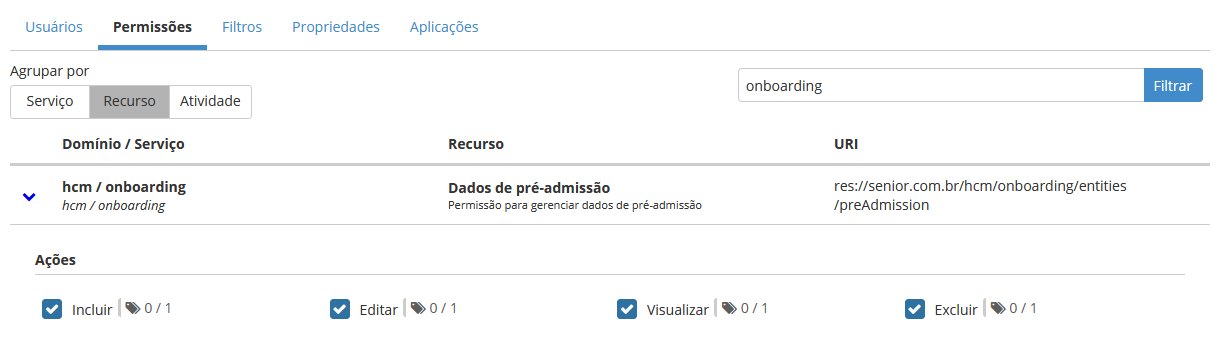
When enabling this filter, the information will be presented in the Analytics and Pre=hirings screens.
This change must be made when pre-hiring invites will also be viewed by users of a given role, as shown in the examples below:
- My invites: intended for users with the profile of unit managers, that is, those who do not have an HR role, but are responsible for hiring.
- All Invites: intended for HR users, who are usually at headquarters, but can also be at larger units.
 English
 Español


