API Query
Provide a REST-type API that returns database queries.
API Query Listing
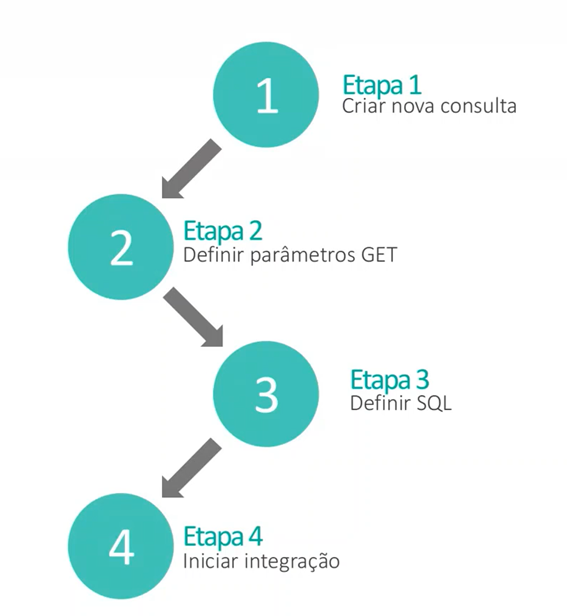
The listing screen displays all the Query APIs in the environment, allowing users to view the Method Name (equivalent to the endpoint generated for the integration call), last modification date, active integration indicator, and the URL parameters that can be sent.
In the actions tab, you can call the endpoint URL, go to the editing screen, delete the record, export (for backups or migration) or navigate to the integration monitoring screen.
Creating an API Query
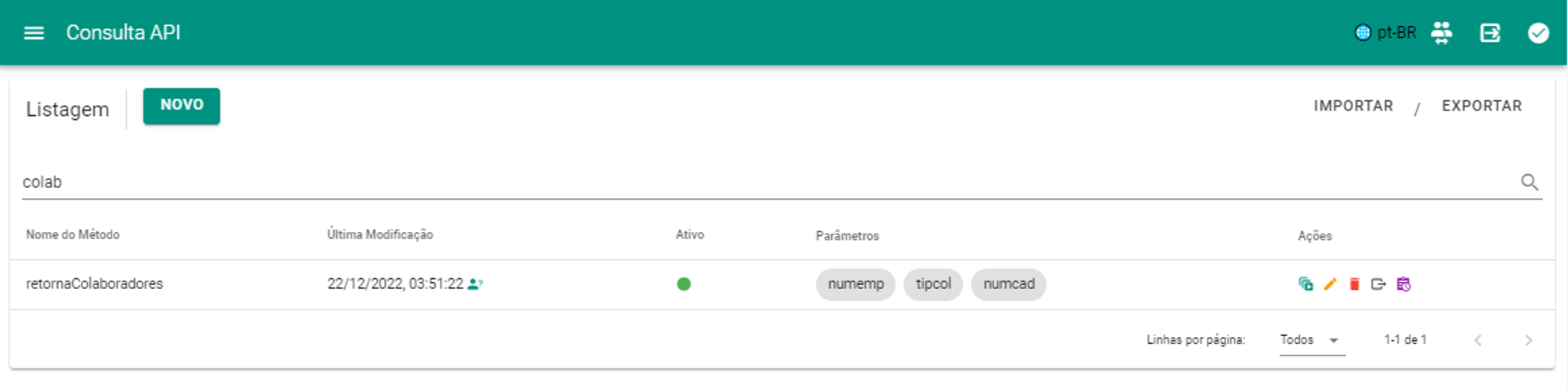
Available fields and their respective functionalities:
- Method name: Endpoint identifier;
- Database: CadastroDB record in which the query will be executed;
- Integration queue: Execution context within the environment, scope of processing queues;
- URL Parameters: Values that can be used to dynamically feed the query with URL parameters;
- Active: Defines whether the endpoint can be called;
- SQL Field: Defines the SQL query that will be processed by the database. You can receive the values of URL Parameters with the syntax ofreplace dedicated ( :parameterName ).
- Authorization: Defines a headerAuthorization in the endpoint that serves as a usage key so that it is not made available in an open manner.
- Web Service Authorization Type: None (public), Bearer (hardcoded) or Basic Auth (associated with a Platform Credential record);
- Authentication Token: Token or Credential to be associated with the Web Service Authorization Type.
Calling an API Query
The URL to call the QueryAPI can be obtained after performing an API test, with the URL parameters already indicated (if they have been defined):

The endpoint generated by CONNECT has the format HOST/ENVIRONMENT/FUNCTIONALITY/IDENTIFIERS, for example:

Example of a call with Authorization
curl --location --request GET 'https://seniorconnect.com.br:9010/connect-demo/consultaapi/Db-Senior-Exercicios/busca-r034fun-numcad/?numcad=12' \
--header 'Authorization: Bearer MyBearerToken'