Hour bank
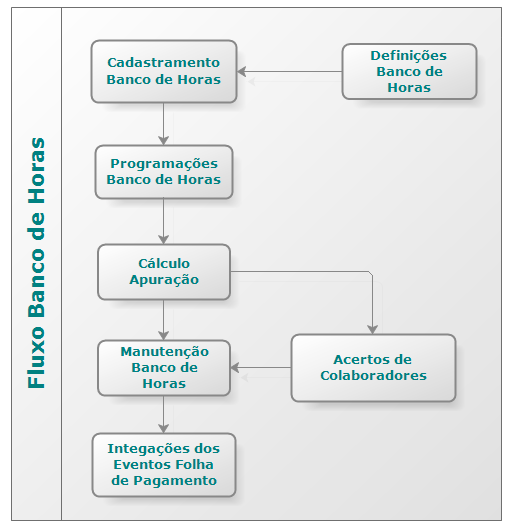
To use the Bank of hours is necessary to register the Bank of hours in this option by setting the periods, situations, events and the coverage of the Bank. The indications valid for all banks are made in Bank > Calculations of Hours > Settings.
The calculation of the hours Bank is held in the calculation of the situations, where they are generated the launches of overtime and absences to the Bank, and in the integration of events, where debit entries are generated for overtime not compensated and that they will be paid, or credit for fouls that were not compensated and that are being discounted.
After held reading markings, you can only perform maintenance releases generated by Checking through the hits of collaborators. In calculations of Bank Hours > > Maintenance you can enter new releases or change already typed releases. This screen also displays the postings generated by calculation, but does not allow you to change them.
In the calculation of integration will be generated the hours that exceeded the limit of credit/debit cards and Bank the hours that were not compensated in the stipulated time frame.
The hours of the Bank can be found through query screen, in calculations of Bank Hours > > queries and report templates, in calculations of Hours > Bank > List.
Below the information flow of the Bank of Hours:
Bank of hours Enter a code for the Hour bank. The Ponto Control and Canteen module allows the registration of up to 999 hours banks.
Description
Enter a description / name for the bank. The description can be up to 30 characters long.
Information
Maximum Daily Work Credit There may be a daily limit of hours to be cashed at the Bank.
 Example:
02:00 limit overtime
The developer did 05:00 overtime in one day, 02:00 hours are thrown at the Bank of hours and the other 03:00 time is stored in the table R011EST-Overflows the bounds of the Hour bank, to be generated in the integration of the events to the payroll.
Maximum Daily Credit on Days off It is considered for calculation of the Bank of Hours, only for days off.
Example:
- Maximum Credit Daily Working Days = 02:00
- Maximum Credit Diary Days off = 02:00
- Maximum daily work + Credit = 00:00
Which exceed this total hours (Off) will be stored in the Hour bank.
Maximum Daily Work + Credit Inform the upper limit of the normal hours worked + overtimes on the day. Which exceed the total hours reported in this field will not be stored in the hours and Yes in the table R011EST-Overflows the bounds of the Hour bank, to be generated in the integration of the events to the payroll, which will be paid in the month.
Maximum Daily Debit There may be a daily limit of hours to be charged at the Bank.
Example:
02:00 limit hours faults
The collaborator made 5:00 PM absences in one day, 2:00 AM are posted to the time bank and the other 3:00 AM are stored in a table to be generated in the Integration of events to the payroll.
Weekly Maximum Credit Can be set for the Bank of hours a weekly limit hours that should go to the Bank.
Example:
04:00 limit overtime a week. In this example, the week begins on Monday and ends on Sunday. (See assignment in calculations > Hour bank > Settings > Lock of the week.)
The workerdid:
- Monday 01:00 overtime
- Tuesday 04:00 overtime
- Friday 01:00 overtime
- On Sunday is checked the surplus, 02:00 hours, which will be stored in a table to be generated in the integration of the events to the payroll.
Weekly Maximum Debit Can be set for the Bank of hours a weekly limit hours that should go to the Bank.
Example:
04:00 hours limit fouls per week. In this example, the week begins on Monday and ends on Sunday. (See assignment in calculations > Hour bank > Settings > Lock of the week.)
The workerdid:
- Monday 01:00 time lack
- Tuesday 04:00 hours faults
- Friday 1:00 am Missing
- On Sunday is checked the surplus, 02:00 hours, which will be stored in a table to be generated in the integration of the events to the payroll.
Maximum Monthly Credit Can be set for the Bank of hours a monthly limit of hours that should go to the Bank.
Example:
20:00 overtime limit per month. In this example, it is assumed for the month the period of calculation of 26/10 to 25/11. (See Calculation mark> Bank of Hours> Settings> Closing of the Month.)
The workerdid:
- Day 30/10 = 04:00 hours
- Day 03/11 = 03:00 hours
- Day 06/11 = 03:00 hours
- Day 09/11 = 02:00 hours
- Day 10/11 = 03:00 hours
- Day 14/11 = 04:00 hours
- Day 16:00 = 03:00 hours
- Total = 22:00 hours
On day 25/11 is made the closing month. The 20 hours should go to the bank and two hours will be generated in Integration for the payroll.
Monthly Maximum Debit Can be set for the Bank of hours a monthly limit of hours that should go to the Bank.
Example:
20:00 hours limit fouls per month. In this example, it is assumed for the month the period of calculation of 26/10 to 25/11. (See Calculation mark> Bank of Hours> Settings> Closing of the Month.)
The workerdid:
- Day 30/10 = 04:00 hours
- Day 03/11 = 03:00 hours
- Day 06/11 = 03:00 hours
- Day 09/11 = 02:00 hours
- Day 10/11 = 03:00 hours
- Day 14/11 = 04:00 hours
- Day 16:00 = 03:00 hours
- Total = 22:00 hours
On day 25/11 is made the closing month. The 20 hours should go to the bank and two hours will be generated in Integration for the payroll.
Separate Closings in Periods The hours of the Bank can be administered as follows:
- S - Separate Locks in Periods
- N - Do not Separate Locks in Periods
Maximum Credit in the Period
Can be set for the Bank of hours a limit per period, the hours we should go to the Bank. This field will only be available if in the field of hours the field Separate Closings in Periods = "S".
Examples:
Example 1:
20 hours overtime limit per period. In this example, the period will be considered six months (from January to June) and the respective calculation periods from 12/26 to 11/25 until 5/26 to 6/25. (See Calculation mark> Bank of Hours> Settings> Closing of the Month.)
The workerdid:
- Day 30/01 = 04:00 hours.
- Day 03/02 = 03:00 hours.
- Day 26/02 = 03:00 hours.
- Day 01/03 = 02:00 hours.
- Day 10/03 = 03:00 hours.
- Day 14/04 = 04:00 hours.
- Day 06/05 = 03:00 hours.
- Total = 22:00 hours
The closing of the period will be on 06/25, but as on 06/05 the limit has already passed 20 hours, so in the integration of 5/25 will be paid the surplus, that is, 20 hours remain in the bank for payment at the end of the period and two hours will be generated in Integration for the payroll.
Example 2:
Bank hours with maximum credit in the period of 20 hours.
- Month 1 = 10:00 hours.
- Month 2 = 03:00 hours.
- Month 3 = 10:00 am = 7:00 am bank credit and 3:00 pm overflow.
- Month 4 = -4: 00 hours.
- Summary = 10:00 + 3:00 + 7:00 - 4:00 = 16:00.
- Total bank hours = 4pm.
- Total overflow hours = 03:00.
In month 3 the bank limit was exceeded, so the hours that broke the bank limit will be paid in the integration.
Negative hours were performed after the bank overflow, so the system does not discount the negative hours of the overflow, but the hours bank.
Maximum Debit in the Period
Can be set for the Bank of hours a limit per period, the hours we should go to the Bank. This field will only be available if in the field of hours the field Separate Closings in Periods= "S".
Example:
20 hour limit is missing per period. In this example, it is assumed the 6 months period (January to June), and the respective periods of calculation of 26/12 to 25/01 to 26/05 to 25/06. (See assignment in calculations > Hour bank > > Lock Settings.)
The workerdid:
- Day 30/01 = 04:00 hours.
- Day 03/02 = 03:00 hours.
- Day 26/02 = 03:00 hours.
- Day 01/03 = 02:00 hours.
- Day 10/03 = 03:00 hours.
- Day 14/04 = 04:00 hours.
- Day 06/05 = 03:00 hours.
- Total = 22:00 hours
The closing of the period will be on 06/25, but as on 06/05 the limit has already passed 20 hours, then in the integration of 5/25 will be discounted the surplus, that is, 20 hours remain in the bank for discount at the end of the period and two hours will be generated in Integration for the payroll.
Extending Away Periods Inform whether to extend the deadline for compensation when the developer is away.
From the moment it is determined to extend departures to some bank, the system will show the field Extend hours bank, in Tables> Situations> Registration. Should be indicated in which situations the developer must be for the Bank to be extended.
Example:
It was defined that the hours of bank 01 should be extended whenever the employee is away on the deadline for compensation with the situation "03 - Sickness". In the register of this situation you should be informed "S" in the field Extend hours bank.
After defining which banks will have their deadlines extended compensation, and in which situations of expulsion will be an extension, the dates will be extended to calculate limits of integration. For this, "S" must be informed in the field Calculate Extension at the hour bank button of the Integration Calculation screen (Calculations> Integration> Calculate). So the user can make the extension when the calculation of integration is performed, avoiding hours of bank due for that period is paid or discounted, if the developer is away without possibility to compensate them.
The calculation of the extension can be done in two different ways, according to the Separate Closing in Periods of the Bank of Hours:
- "S - Yes": the postings will always be extended for another month. Example:
Original date of compensation: 10/25/2002
If on this date the employee is removed, the new compensation date will be November 25, 2002. - "N - No": the extension will be carried out taking into account the information registered in the fields Time Limit Credit or Debt Timeout of the time bank:
- If the Credit / Debit Time Limit is monthly, the compensation date will be extended for another month. Example:
Credit / Debit Time Limit = "M".
Original date of compensation: 11/10/2003.If the employee is removed on 11/10/2003, the new date for compensation will be 11/11/03. If the employee is also on 11/11/2003, compensation will be extended for another month, and the new date will be 11/12/2003.
If the removal of the 10/11/2003 day has no end date, the system will extend the compensation always for another month until the next period is reached. In this case, in the above example, the new date of compensation would be 11/11/2003 (whereas the calculation period is 9/26/2003 to 10/25/2003). - If the Credit / Debit Time Limit is weekly, the clearing date will be extended for another week. Example:
Credit / Debit Time Limit = "S".
Original date of compensation: 11/10/2003 (Saturday).If the employee is retired on 11/10/2003, the new date for compensation will be 10/18/2003. If the employee is also on 18/10/2003, the compensation will be extended by one more week and the new date will be 10/25/2003.
If the removal of the 10/11/2003 day has no end date, the system will extend the compensation always for another week until the following period is reached. In this case, in the above example, the new date of compensation would be 11/1/2003 (whereas the calculation period is 9/26/2003 to 10/25/2003). - If the Credit / Debit Time Limit is daily, the clearing date will be extended by one more day. Example:
Credit / Debit Time Limit = "D".
Original date of compensation: 11/10/2003.If the employee is removed on 11/10/2003, the new date for compensation will be 12/10/2003. If the employee is also dismissed on 10/12/2003, the compensation will be extended for one more day and the new date will be 10/13/2003.
If the removal of the 10/11/2003 day has no end date, the system will extend the compensation always for one more day until the following period is reached. In this case, in the example above, the new compensation date would be 10/26/2003 (considering that the calculation period is from 09/26/2003 to 10/25/2003).
- If the Credit / Debit Time Limit is monthly, the compensation date will be extended for another month.
If you change the registration of a situation, understanding that it should be part of the extension, or change some distance, simply recalculate the integration of the period in question and the hour bank releases will be updated. There will be no problems in calculating the integration more than once. The bank will control not to add twice the same gap.
Notes
This treatment will be performed for both the positive hours of the bank and the negative hours.
When a compensation date is extended, to return to the original date, you must delete the offset and calculate the integration again.
If the Recalculation of Hours is executed, shall be recalculated the dates of default form, i.e., no overtime.
Consider first closing in overtime
Consider the first month of closure for the calculation of the extension of the compensation deadline. Only enabled when field Extending Away Periods is set to "Y - Yes".
Periods
Periods The time will be valid the Bank of time is set in this folder.
Can be one of the following ways:
- S - Separate Locks in Periods
- N - Do not Separate Locks in Periods
Situations
Situations
The Bank of time is processed along with the verification of situations. So when the developer lacks work or performs an extra hour, in calculating the system calculates those hours in different situations.
Example:
08:00 schedule at 12:00 and 13:00 at 18:00
Clocking events : 09:00-12:00-13:00-20:00
Calculation:
01:00 hours of delay [103] Delay
02:00 overtime [301] Extra
07:30 hours [001] work
In this example the codes between "[]" correspond to the situation codes. These situations are defined in Calculations> Calculation> Definitions> Situations.
With the Bank of hours the company can handle the extra hours and hours of absence through compensation. For this, it is necessary to define what should be added in the Bank and what will be reduced by the Bank. Taking into consideration the above calculation, the situation [103] late will be informed in the Bank of hours Situations like hours, and the situation [301] overtime will be reported as hours.
Note
By decreasing the period of situation, either increasing or decreasing the start date end date, the system checks if there is a release that will be in invalid date, i.e. the date after the end date of the situation or the release date prior to the date of beginning of the situation.
In this case, the system will display a warning indicating that "there are releases the Bank of hours X X situation that will be invalid. Recalculate the Hour bank and check the typed entries ".
Base Situation
In this field should be informed of codes shall be credited or debited from the Bank of hours.
Initial date
Enter the start date for treatment at the Bank of hours of this situation;
Final date
Enter the end date that this situation will be dealt with at the Bank of hours. After that date, the situation is no longer considered in the calculation of the hours.
If this same situation at some point part of the routine at the Bank of hours, must be included a new row in the grid with the same, stating a new start date.
Sign
This field must be informed if the situation should be added (+) or minus (-) from the Bank of hours.
Order
Indicates the order of compensation releases at the same time or in the same period. Depending on the item Compensation Type of the time bank settings, this order will be respected to make the offsets.
Example:
In this example, the Compensation Type is "1 - Day / Situation". The developer held on the same day the following hours:
- 2:00 pm (situation 301 Daytime Extras w / 50%)
- 1:00 pm (situation 302 Night Extras w / 50%)
- 3:00 hours (situation 303 Daytime Extras c / 100%)
- 0:50 hours (Extra night c/304 (100%)
The company needs the hours to be compensated in the following order:
First compensate for the night hours with 100%, then the daytime with 100%, then the night extras with 50% and finally the daytime extras with 50%.
Then in the time bank register will be defined, in the field Order:
- 4 - situation 301 Daytime extras with 50%
- 3 - situation 302 Night extras w / 50%
- 2 - situation 303 Daytime Extras c / 100%
- 1-Extra night c/304 situation 100%
The standard process is to perform compensation compensation for order status code, from lowest to highest. In the example above, would be compensated first hours of the situation after the 301 302, and so on. But the company wants first to be compensated for the time whose percentage is greater. Then the field order is possible to make this setting.
In table R011LAN, the fields: QtdPag and DatCmp, it is possible to monitor the compensation of time. When the developer has release a bank debitem the hours above, will follow the order specified for each situation. That will be:
- 0:50 - situation 304 Night Extras c / 100%
- 3:00 - situation 303 Daytime Extras c / 100%
- 1:00 - Situation 302 Night Extras c / 50%
- 02:00-301 c/day 50% Extra
Conversion to Bank (%)
The times may be posted with a different percentage.
Example:
An extra hour held may give the employee the right to compensate for two hours. In this case, the situation [301] will take the 200% conversion percentage. An hour of missing can match that the developer should make up for only an hour. So the percentage of conversion for the hour must be 100%.
Conversion to Events (%)
If the employee did not compensate for an overtime performed, which had the conversion rate to the bank of 200% (two hours in the bank to compensate), this time will be generated in an integration event. The percentage of this conversion notice from the Bank to the event can also be set.
Example:
If the conversion rate of 200% is reported in this field, the two hours that are in the bank will be changed to four hours in the event. If it is not necessary to apply any percentage in the conversion of the Bank's hours events, you must inform 100% in this field.
As there are several situations registered with different values and percentages for events, the system calculates the conversion of the hours on top of each release, not the final amount.
When setting the percentage, it is necessary to remember that this will be applied on the hours already added of the percentage applied in the conversion to the bank.
Example:
An overtime performed must be converted to the bank with an increase of 200% (two hours to be compensated). When the bank hours are converted to events, the percentage reported in the field Conversion to Events (%), 200% for example, will be applied over these two hours.
- 01:00 * 200% = 02:00-cast to the Bank
- 02:00 * 200% = 04:00-cast to Events
Items
Events The hours are for the Bank or are not compensated are generated in the integration.
For this it is necessary to inform an event to pay the hours for each situation that was registered in the Situations tab. In this way, at the time of integration, the system will check which event is associated with the unmatched launch situation, and will generate the launch times for this event.
To use only two events, one positive and one negative for hours, simply inform the same positive hours event for all credit situations and the same negative hours event for all debt situations. All registered for the Bank must have an event posted. Otherwise, the Bank releases that occur with that situation and are not compensated, will not be raised in the integration.
Important:
The reported event table should be the same as that associated with the active company. Otherwise, these situations will not be integrated when generating employee integration.
If the time bank is used by more than one company using different event tables, it is recommended that the two event tables be reported in the grid or register a time bank for each company and link the corresponding event table to each company .
Situation
Inform the situation of the time bank to which the event will be associated.
Events Tab
Inform the event table used by the company that contains the event that will be associated with the situation.
Event (of Credit)
Inform the code of the event where the payment of the hours must be generated.
Event (of Debit
Enter the code of the event where the discount of the hours should be generated.
Range
Company
Enter the codes of the companies that will use this bank. If the bank is used for all companies, or has another scope, leave this field blank.
Contributor Type
Inform the types of employees (Employee, Third, Partner) that will use this bank. If the bank is used by all employees, or has another scope, leave this field blank.
Worker Inform the records of employees who will use this bank. If the bank is used by all employees, or has another scope, leave this field blank.
Branch
Enter the codes of the branches that will use this bank. If the bank is used by all branches, or has another scope, leave this field blank.
Union
Inform the codes of the unions that will use this bank. If the bank is used by all unions, or has another scope, leave this field blank.
Bond Enter the codes of the links that will use this bank. If the bank is used by all links, or has another scope, leave this field blank.
Org. Unit
Inform the local codes that will use this bank. If the Bank is used for all sites, or have another scope, leave this field blank.
There is consistency in the scope of location not to allow local information to be Company companies with different organizational chart structures are informed. In this case you will need to register a Bank for each company.
Type Salary Inform the types of salaries that will use this bank. If the bank is used by all types of salaries, or has another scope, leave this field blank.
Job
Enter the job codes that will use this bank. If the bank is used for all positions, or has another scope, leave this field blank.
Cost center
Inform the cost center codes that will use this bank. If the Bank is used for all cost centers, or have another scope, leave this field blank.
In the Calculation Results screen, in Miscellaneous> Users> Scope, it is possible to define a Bank of Hours scope that will be applied only in the Bank of Hours Maintenance screen.
Veja também:
 English
 Español


