Definitions
Corresponds to the parameterization of the information to be used in the registration of classes, Papers, Dismissed and courses.
Reservations
Allow Delete Inform the exclusion of reservations:
- S - Yes, it allows the exclusion of reservations, respecting the information in Courses of Improvement (Collaborator or All)
- N-no, does not permit the exclusion of reservations
Note
This option is not available if the treatment of reservations for per participant.
Check Site Use the local check on reservations:
- S - Yes, the user will be alerted when the participant's location is different
- N - No, the user will not be alerted if the participant's location is different
Default Source
Giving the origin of stocks:
- Vacancies Needed
- Budget Jobs
- Slots Requested
- Need Office
- Diagnosis
- CIPA
Note
The informed source in this field is used in the registration of reservations by group or by participants, as the Reserve Administration Course ' in Various Indications >.
Default Location
Inform the default location that is used in the registration of stocks.
Note
This option is not available if the treatment of reservations for per participant.
Reason Default
Inform the standard reason that will be used in the registration of reservations.
Note
This option is not available if the treatment of reservations for per participant.
Default Slots
Corresponds to the amount of slots to be used in the registration of stocks.
Note
This option is not available if the treatment of reservations for per participant.
Reason for Booking
Inform the reason code to be used in the generation of the reserves for the evaluation routine in CS, CS Web or TR.
Note
This field is used to configure the POI routines.
Groups
Automatic Test Valid information:
- Yes, so that at the time of defining a new class, the field test are met automatically with the information registered in the course. So every time a new class is drawn up for a course that has the test item registered in its definition, the system assumes this information for all the classes that are in the course.
- N-not every new class item test should be registered. The system does not assume what is registered in the course.
Automatic Note Item Valid Information:
- Yes, so that at the time of defining a new class, are automatically populated the field note with the information registered in the course. So each time a new class is created for a course that has the Notes folder registered in its definition, the system assumes this information for all classes that are in the course.
- N-no, every new class the item note should be registered. The system does not assume what is registered in the course.
Automatic Instructional Resource
Valid information:
- Yes, so that at the time of defining a new class, automatically be filled the field instructional resource with the information registered in the course. So every time a new class is created for a course that has in its definition the item instructional resource, the system assumes this information for all the classes that are in this course.
- N-no, every class new instructional resources registered in the course will not be considered.
Deletes Waiting List
Valid information:
- S - Yes, when the employee who is on the waiting list is transferred to the grid of class participants, coordinator or by confirming the invitation on the TR Web, he / she will automatically be excluded from the waiting list of the class or other classes course);
- N-no, when the developer who is on the waiting list is transferred to the grid of participants, will remain on the waiting list with the status "pending".
Note
The main reason to keep someone on the waiting list of other classes even if it is as a participant of a class is to be able to reactivate it on the waiting list if the participant is excluded from the class.
Inclusion Rule
Inform the code rule that will be used in the inclusion of participants and > or members of the waiting list. This rule will be valid only for the WEB version.
Note
Should not be used the function message (error, text) or message (Returns, text) in this rule. These functions will cause an exception and will terminate the web instances. The alternative in this case is to assign a value to the MenLog system variable and then the Cancel (1) command;
Exclusion Rule
Inform the code rule that will be used at the exclusion of participants and > or members of the waiting list. This rule will be valid only for the WEB version.
Note
Should not be used the function message (error, text) or message (Returns, text) in this rule. These functions will cause an exception and will terminate the web instances. The alternative in this case is to assign a value to the MenLog system variable and then the Cancel (1) command;
Transfer Rule Inform the code rule that will be used in the transfer of participants in this class for the waiting list for another class. This rule will be valid only in the WEB version.
Note
Should not be used the function message (error, text) or message (Returns, text) in this rule. These functions will cause an exception and will terminate the web instances. The alternative in this case is to assign a value to the MenLog system variable and then the Cancel (1) command;
Substitution Rule Inform the code rule that will be used in the substitution of a participant to this course > class. This rule will be valid only in the WEB version. Note: the replacement will be referenced in the waiting list of the replaced and this will be deleted from your class back to the waiting list.
Note
Should not be used the function message (error, text) or message (Returns, text) in this rule. These functions will cause an exception and will terminate the web instances. The alternative in this case is to assign a value to the MenLog system variable and then the Cancel (1) command;
Weight Rule
Inform the code rule that will be used in the inclusion of notes of the course and participants in Courses > Courses > Processing Tables-> notes and Training Classes folder > Set-Notes folder. For the rule can be used the system variable "SomNotPes" that aims to sum the value of the weights and compare to a certain limit informed in the rule.
Travel Expense
Allows it to be made available on the screen class definition a shortcut to launch the expenditure per course. Valid information:
- S - Yes, the Course button will be available in the class register
- No, the costs for screen access course will be by menu option (Training Classes > > > Expenses per course)
Local Expenditure
Allows it to be made available on the screen class definition a shortcut to launch Local expenditure in the class. Valid information:
- Yes, will be made available in the register of the Local button class.
N-no, access to Local expenses screen will be menu option (> Training > Classes > Expenses per site).
Cost center expenditure
Allows it to be made available on the screen class definition a shortcut for the release of expenses by cost center in the class. Valid information:
- S - Yes, the [C.Cost] button will be available in the class register.
- N-no, access the screen costs by cost center will be the menu option (> Training > Classes > Expenses By cost center).
Participating Expense
Allows it to be made available on the screen class definition a shortcut to launch the expenditure per participant in the class. Valid information:
- S - Yes, the Participant button will be available in the class register
- N-no, access the screen of expenditure per participant will be the menu option (Training Classes > > > Expenses per participant)
Zero Expense items Allows the release of screens costs per course, per site and per participant, are informed values reset to zero. These screens are in Classes > > Training expenses or can be accessed directly by the class definition screen, through the respective buttons:
- S - Yes, you will be allowed to enter zero value in the expense items.
- N-will not be allowed to report zero value on items of expenditure.
Recalculate Load
Allows it to be recalculated the workload of the course in the history of course when evaluating a developer Training > Classes > class Assessing.
Valid information:
- S - Yes, when evaluating a class, the course time will be recalculated based on the time (s) entered on the class schedule tab.
- N-no, the load time is that defined in the class record, tab Set.
Concludes Provisional Class
Valid information:
- Yes, you will be allowed to complete a provisional class assessing.
N-no, will only be completed classes with type definition 1-confirmation and 2-participant.
Evaluation Messages
Valid information:
- S - Yes, when changing the frequency or notes in the evaluation, an alert message will be displayed.
- No alert message will be displayed to change the frequency or notes.
Coordinator Name
This field allows you to define the form of presentation of the Coordinator of the group. The Coordinator is informed on screen of definition of classes and courses on screen as well as in models. The name of the Coordinator will be the one registered in SGU (intermediate user Manager), in the user's properties, General data folder:
- User name (SGU)-uses the contents of the field "name";
- Full name of the user (SGU)-uses the contents of the "full name". In the absence of this information will be used for the name of the employee associated with the user, and in the absence of this the name of the user regardless of this parameter.
Participant Name Inform the name of the button that will be available in the directory of classes, Participants folder next to the download button.
End Model Indicate the model of report that will be generated by the button.
First name Button
Inform the name of the button that will be available in the directory of classes, Participants, the right of the screen.
Model 1 Button Indicate the model of report that will be generated by this button.
Rule 1 Button Report a rule for this first button that you can make a custom window call (SGI) through the ExecutaTelaSGI programmer function
Name 2nd Button
Inform the name of the button that will be available in the directory of classes, Participants, the right of the screen.
2nd model Button
Indicate the model of report that will be generated by this button.
Rule 2 Button Inform a rule for this 2nd button that can make a custom screen call (SGI) through the programmer's ExecuteSTAG function.
3rd Button Name
Inform the name of the button that will be available in the directory of classes, Participants, the right of the screen.
3 Button model Indicate the model of report that will be generated by this button.
Rule 3 Button Inform a rule for this 3rd button that can make a custom screen call (SGI) through the programmer's ExecuteSTAG function.
Name 4th Button
Inform the name of the button that will be available in the directory of classes, Participants, the right of the screen.
4 Button model Indicate the model of report that will be generated by this button.
Rule 4 Button Inform a rule for this 4th button that can make a custom screen call (SGI) through the programmer's ExecuteSTAG function.
Class Conflicts Indicate how the system should handle any conflicts encountered when entering records on the Schedules tab of the Class Setting screen (FR134DTU):
- 1 - Do not allow:system behavior, where an alert message is displayed when encountering the first conflict and prevents the registration.
- 2 - Ask the user:when this option is selected, the system displays the Conflicts window, containing the conflicts found for treatment. The window gives you the option to ignore them and proceed with the registration.
Documents
Company Responsible
Inform the company of the developer responsible for signing the certificates.
Charge Type
Identify the type of employees responsible for signing the certificates.
Responsible
Inform the developer responsible for record signing of certificates.
Invitation Message
Inform a message for the invitation. The system allows 100 characters.
 Example:
Invite V Our Lady. to participate in the course personnel administration.
Fired
Accept Participants Dismissed Allows employees with situation Fired can participate in training classes. Valid Information:
- S - Yes, dismissed employees may be included as participants.
- N-will not be accepted in class training employees laid off. With this set, the field Consider Fired on the screen Select participants (definition of classes) will be disabled.
Accept Participants Prior To Admission
Determine if the participants may or may not join classes initiated before the date of their admissions.
Y-Yes
N - No
Accept Laid-Off Instructors In relation to instructors can define:
- S - Yes, it allows dismissed employees to be registered as class instructors.
- N-will not be accepted that laid-off employees to participate as instructors class.
Note
This field won't be available if the instructors of courses are "People", as the Course instructors = 1 Person "in several Common-> folder People.
Accept Instructors Before Admission
Determine if the instructors may or may not courses started prior to the date of their admissions.
- Yes, allows instructors with admission date after the start of the class to be considered.
N-will not be accepted instructors with date of admission after the beginning of the class.
Note
This field won't be available if the instructors of courses are "People", as the Course instructors = 1 Person "in several Common-> folder People.
Courses
CIPA
The identification of candidates for CIPA will occur when the SM module is integrated with the database.
Brigade
Enter the course code that is related to the subject of Brigade. Based on this information, > > Queries developing Survey requirements, allows you to query on the screen or send the report survey of needs. > Development option List. Will be identified persons belonging the brigades that have or not this course in their backgrounds.
Note
The identification of the participants of the brigades will happen when the SM module is integrated with the database.
Features Service time Valid information:
Yes, lets in Employees > Courses > General History, information about the developer's time on the site and post are presented;
N-no, the dev time on site and position will not be presented.
Evaluate
In this folder are configured templates or rules that will be used in the evaluate participants of classes, as well as the questions and information on evaluating Web reaction pesos.
Group by Subject Valid information:
- Yes, the questions will be made available on the Web by reaction group assessment of subject;
- No, the questions will be presented according to the order they were registered in the folder notes in Classes > > Training Set.
Show Weight Valid information:
- Yes, the weights will be presented in the evaluation of Web reaction;
- N-no, the weights will not be presented in the evaluation of Web reaction.
- Yes, for the items of note from the quantitative and type both in the evaluation of Web reaction with table of notes will be presented a field that will make available a list of the available options or the form itself with all the options;
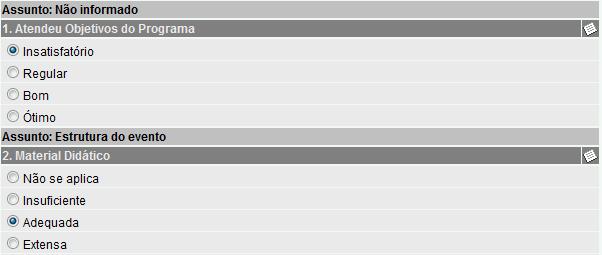
- N-no, all items of note will be presented in the WEB form.
Example:
Figure 1 (Safari browser):
Using Yes, will be demonstrated on the WEB in this way:
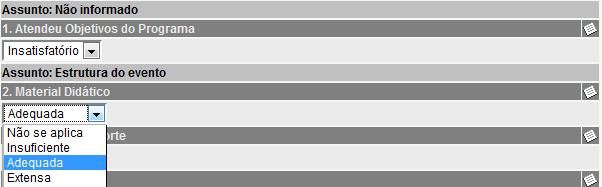
Figure 2 (Safari browser): Using no, will be demonstrated on the WEB in this way:
Notes
- For each note item the observation field will be hidden and can be called by clicking on the icon at the end of the line heading of the item.
- When the item of note does not use (Use medium = N) and has no associated notes table displays only the field of observation to answer and this will be visible. You can hide it by clicking on the icon at the end of the line heading of the item.
- When the note item uses average (Use = S Average) and has no associated notes table displays a field for entering a value between 0.00 and 999.99. The field of observation is hidden and can be displayed by clicking on the icon at the end of the row of the item header.
Release Reaction Evaluation
Valid information:
- Yes, when generating identifiers for the assessment of reaction on the WEB, on the screen to assess the situation of the class situation of evaluation of Reaction ' will be changed to 3-released;
- N-No. After the user generate reaction assessment, you will need to access the directory of classes and manually change the situation of evaluation of Reaction ' to 3-Released.
Complete Reaction Evaluation
Valid information:
- Yes, when evaluating a class will complete the evaluation of the reaction of the class, Set folder, as the Situation of ' Reaction that will be changed to 5-Completed. Will no longer be allowed to participants answered the assessments of pending reaction;
- N-No. The field ' Situation ' of the Reaction will not be changed to 5-Completed, remaining the situation 3-Released.
Efficacy evaluation Expired Information valid for the TR website:
- Yes, the evaluations of effectiveness due shall be submitted to be answered;
- N-no, the evaluations of effectiveness when the expiration date is less than the current date will not be made available.
Reaction evaluation Expired
Information valid for the TR website:
- Yes, the reaction will be overdue assessments to be answered;
- N-no, the evaluations of reaction due will not be presented.
The screen Class Assessing available training > training > Class Assessing, calculating participants ' frequency of the classes consist of the participant or the class, may be set by the user as options:
- 0-no. The determination of the frequency of participants is not performed to consist the end or the class. The user must perform the calculation for the frequency Control screen of the participants;
- 1-Yes. When the consistency of the group or participant, will be calculated using the frequency of the participant (s);
- 2-Ask. When you run the consistency of the group or participant, the user will be prompted whether or not to establish the frequency of the participant (s).
- Yes, in the evaluations of effectiveness and Web response, the code of the questions and answers will be presented as defined in the questionnaire of evaluation of effectiveness defined in class and in the Notes folder to the reaction evaluation respectively;
- No, the code the replies of the evaluations of effectiveness and reaction will not be presented, only the sequential code for the questions.
First name Button
Inform the name of the button that will be available at the bottom of the screen to assess participants from classes, which can call a template or rule. If there is no name reported is assumed the Print description.
Model 1 Button Indicate the model of report that will be generated by this button.
Rule 1 Button Inform a rule for this 1st button that can make a custom screen call (SGI) through the ExecutaSelSGI programmer function.
Inform the name of the button that will be available at the bottom of the screen to assess participants from classes, which can call a template or rule. If there is no name reported is assumed the Print description.
2nd model Button
Indicate the model of report that will be generated by this button.
Rule 2 Button Inform a rule for this 2nd button that can make a custom screen call (SGI) through the programmer's ExecuteSTAG function.
3rd Button Name
Inform the name of the button that will be available at the bottom of the screen to assess participants from classes, which can call a template or rule. If there is no name reported is assumed the Print description.
3 Button model Indicate the model of report that will be generated by this button.
Rule 3 Button Inform a rule for this 3rd button that can make a custom screen call (SGI) through the programmer's ExecuteSTAG function.
Absence
In this folder will be defined the criteria to generate the departures of employees (> instructors participants) when informed in training classes. The history of departures will be created according to the period of the Group and also in relation to timetables set. Records are generated only if the initial and final date of the class are met. If you have no time informed the folder class Schedules will be created a unique history to the end > instructor with start and end date according to the dates of the class. If there are timetables informed, will generate every day > historical schedule according to the period of the class. Will not be raised in historic days when the schedule does not cover, regardless if you are within the class.
The history of departures will have a "bond" with the class through the R038AFA fields. CodCua and R038AFA. TmaCua. These fields indicate which was the course and class who originated the distances.
Generate Removal Valid information:
- No-the distances of the instructors > participants will not be raised;
- For participants-only departures are generated for the participants of the class;
- For participants and trainers-will be raised clearances for participants and instructors.
Situation
Report the situation of removal that will correspond to the period of the training.
Contributor type
Allows you to define what kind of employee will be generated, i.e. 1-Employee, 2-and 3-Third Partner.
TW
Concept of TLT
TLT, whose acronym means Training in the workplace, refers to a form of training that is carried out in own work environment.
Uses TLT Allows you to define if the courses can be TLT.
- Uses TLT. The system allows you to inform that a course of improvement is TLT (training in the workplace).
- Does not use TLT.
Standard Family
Inform what the Standard will be used in the Family register of "Knowledge" in TLT.
Default Entity TLT You can set which the entity that is recorded in the classes of TLT.
Allows You To Delete Courses
In this field you can define whether the delete button should be displayed in the grid screen courses per site Requirements.
Allows You To Delete Knowledge
In this field you can define whether the delete button should be displayed in the grid screen Knowledgebase Requirements per site.
Default Date Requirement
You can set a default date for the local requirements of the TLT.
 English
 Español


