
Salary table
This is a matrix which makes up the salary value ranges for a group of jobs and/or job positions that have the same degree of complexity. Jobs are grouped by classes that will have salary ranges attributed to, defining the workers' remuneration. The salary table is composed of the following structure:
Salary class
Set of values organized in ranges, which correspond to the salary path in the same degree of complexity or maturity. It is used to group positions classified as having the same importance for the company, identifying them with the same class in the salary table; every wage class needs to have a name.
Salary range
Stands for each one of the values of the wage class, always starting of wage initial and respecting intervals in between yes for each job. Ranges with salary value will have to have some name and must be unique.
Salary
Consideration due to the person who occupies the job, for services performed, resulting from the employment contract. The worker's salary is defined by different ranges throughout the salary table and the class in which the job and/or position is, according to the worker's performance.
Job
Group of functions with the same nature and action amplitude, for example: Administrative Assistant, Human Resources Analyst, among others (many areas and complexities).
Job position
The job position represents a group of preset characteristics for the occupation of a position by a worker in the company. Upon allocating a worker a job position, a group of mandatory characteristics can be defined; this way, the worker records are changed in a single operation. This group makes up the profile of the job position.
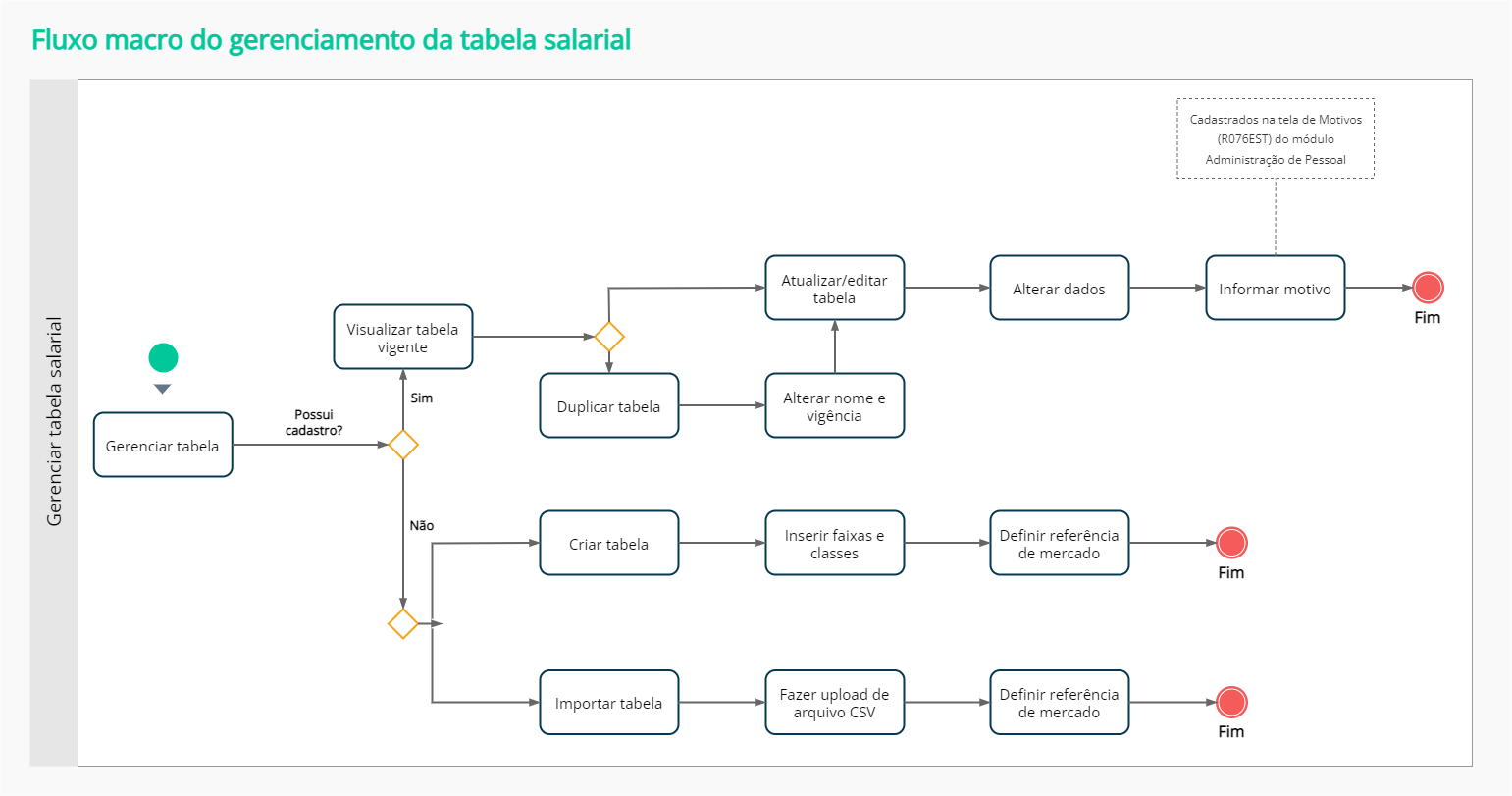
What can I do in the salary table process?
Important
The functionalities of this screen will be available according to the user's permission.
 Manage salary table
The first step to register the salary table is to choose the format in which it will be done: manually or by importing a file in .CSV format
Register table
It is possible to register a salary table manually, that is, inform value by value of each class and range of the salary table using the buttoncreate table, under Compensation management > Salary table.
Several salary ranges may be attributed to each class. However, changes made in ranges exempt from description, i.e. without a name registered, will not be saved by the system. Thus, registering the name is necessary, in addition to the monetary value of the salary range.
Classes and levels may be edited through the  icon. A edição das classes e dos níveis é realizada através do ícone
  .
.
Note that the salary ranges informed must always be increasing.
Workload

Note
Salary types are registered in the Personnel Management module and integrated with Remuneration Management.
Import table from a CSV file
It is possible to import a salary table, using the buttonimport table, under Compensation management > Salary table > Import table. In the table import process, files in the CSV format must be used, considering the following structure:
- Each field and information separated by a semicolon ( ; );
- Save it in the UTF-8 encoding model.
Example:
;F1;F2;F3
C1;1000,00;1100,00;1200,00
C2;1300,00;1400,00;1500,00
C3;1600,00;1700,00;1800,00
Visual representation
| F1 | F2 | F3 | |
| C1 | 1000.00 | 1100.00 | 1200.00 |
| C2 | 1300.00 | 1400.00 | 1500.00 |
| C3 | 1600.00 | 1700.00 | 1800.00 |
Important
Lines and columns have a 5-character limit for viewing the class and range description.
Edit table data
Whenever the table data is edited, a new revision is created with the validity date and the provided reason for the update. The previous revision is available for consultations and the date provided in the update cannot be earlier than other existing revisions in the salary table. It is also possible to change the workload of a table, that is, the table will show the calculation proportional to the number of hours worked and what you have registered in the table. When editing an existing table, you can also update it by importing a spreadsheet inexcel.
Update table
Allows you to update salary ranges of a table, from a specific date onwards, with the adjust percentage, without having to register all ranges again. When updating the table, you can select from which salary range the update will occur, as well as the end range. The update occurs only in the salary table, without impacting the workers' salary history.
Duplicate table
Allows you to duplicate an existing salary table, copying all classes, ranges and values of the selected table, with a new name and validity date.
Link a salary table to a job with a linked job title
To link a salary table to a job with a job title, go to Compensation Management > Salary Information for Jobs with Job Titles.
In addition to relating a salary table by job, it is also possible to register revisions for each job, in the Job data section, using the buttonDetail. With this, the class values and salary range can be changed, as well as the start and end dates of each review.
It is not possible to edit an existing job review. To register any change regarding the salary data of a position, it is necessary to register a new revision. This action is carried out in Compensation Management > Salary information for positions with positions > buttonActions >Link salary table to job > Job salary data revisions > buttonRegister new revision.
Information on the position and its respective positions, presented in the Remuneration Management module, comes from thework station routine and can be searched on the screen of salary tables by job, through the fields of the Filter.
You can import data from a table by uploading a file in formatcsv. This functionality aims at the user to make theImportation of Positions X Salary Tables.
After this import you will get some status notification. Such as:
- The information ofjobs X salary tables are being processed. You will receive a notification when the process is complete;
- import ofposts x pay scales completed successfully, follow the link to access the report;
- import ofposts x pay scales completed with some issues, follow the link to access the report;
- Error when importing positions x salary tables.
For the user to have permission to carry out the import, it is necessary to have permissions:
- @SecureResource(action = "Edit", name = "res://senior.com.br/hcm/remuneration/workstationGroupJobSalaryInfo"),
- @SecureResource(action = "Include", name = "res://senior.com.br/hcm/remuneration/workstationGroupJobSalaryInfo")
After that, you can name the table, choose the type of salary and how you want to reference the market values and also the effective date. Then you can click save and import.
Comments
- Validation of the link to a salary table per job takes place based on the information registered in the Compensation Management module.
- If the user has not made any entries in Compensation Management > Salary Information for Positions with Positions, the validation will consider the data registered in the on-premise module Positions and Salaries.
- The association of Positions X Positions X Salary Table is only done in G7 through the screenSalary information for jobs with linked positions.
Register market reference values in the salary table
To register the reference values of the labor market, it is necessary to choose one of the parameter optionsHow do you want to reference market values?, located on the salary table screen. The configuration options are:
- Use one of the ranges in the salary table itself as a market reference: click on the range with the desired value to select it and then enable the buttonMarket benchmark range.
- Register market reference values in a table separate from the salary table: when selecting this option, a column will be created on the left side of the salary table, entitledMarket reference values, in which HR can register values for the corresponding levels and ranges.
Important
When choosing one of the parameter optionsHow do you want to reference market values? no it will be possible to change it, except when creating a new table. However, it is possible to work around the situation by duplicating the salary table with the unwanted option and choosing the most appropriate market reference option.
 English
 Español


