
Gerar informações dos colaboradores - Integrador SST
The workers' information and register data are generated whenever any relevant worker information is modified on the HR system.
When it occurs, the integration pendencies are created, so that the information become up to date on the provider's system.
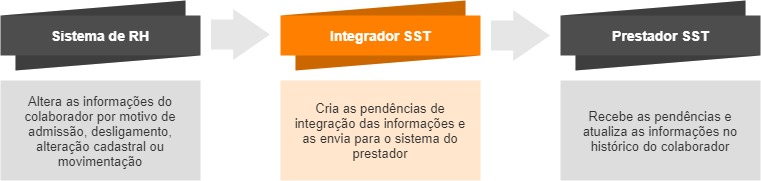
All information modified by the HR department has an integration reason. When a situation occurs, the respective worker records are updated on the OSH provider system according to the integration reason.
Possible integration reasons
Hire and layoff:
Whenever a new worker is hired (registered on the payroll system), he/she will exist on the OSH provider's system. Only after the hire, the worker will have all information updated during each change or movement that occurs.
Similarly, whenever a worker is laid off (situation changed to Fired on the payroll system), he/she will also be considered fired on the OSH provider's system.
Data change:
The integration pendencies will only be created when relevant worker information is modified on the HR system.
For example: if only the worker's nickname is changed, a pendency to integrate this change will not be created.
Later on you can see a list of information that is integrated when modified.
Movement:
The worker's records will be updated on the provider's system whenever one of the following movements occurs on the HR system:
- Cost center
- Sector (Department)
- eSocial Category
- Job
- Job position
- Branch
- Shift
- Absence
Integrated information
The tables below list the worker information that generates integration pendencies whenever they are modified:
 Pendency information
| Integrated information | Value examples | Information origin on the Personnel Management module (on premises): | |
|---|---|---|---|
| Pendency creation date and time | - |
Information managed by the system upon creating the integration pendencies. |
|
| Situation | - | ||
| Integration pendency reason | Worker hire Worker change Worker layoff Cost center record Department record eSocial category record Job record Job position record Branch record Schedule record eSocial registration number change Alteração da matrícula eSocial Initial load |
||
| Operation | Insertion Change Deletion |
||
| Date and time scheduled for the sending | - | ||
| Date and time of the sending | - | ||
| Cancellation reason | - | ||
Worker data
| Integrated information | Value examples | Information origin on the Personnel Management module (on premises): | |
|---|---|---|---|
| System field | Menu | ||
| Name | - | Name filled out in the field beside the Person's registration code | People > People Registration |
| CPF | 999.999.999-99 | CPF | |
| Social Identification Number (NIS) | 99999999999 | PIS | |
| Date of birth | 01/01/1990 | Date of Birth | |
| Gender | Male, Female | Gender | |
| Marital status | Single, Married, Divorced, Widow/Widower, Concubinage, Separated, Stable Union, Other | Marital Status | |
| Person with a Disability | Yes, No | Person with a Disability | |
| Identity Card number | 99.999.999-9 | Identity Card | |
| Identity Card state | AC, AL, AP, AM, BA, CE, DF, ES, GO, MA, MT, MS, MG, PA, PB, PR, PE, PI, RJ, RN, RS, RO, RR, SC, SP, SE, TO | ||
| Identity Card issuance date | 01/01/2020 | ||
| Identity Card issuing body | SSP (Secretariat of Public Security) | ||
| Employment record book number | 999999999 | Employment Record Book | |
| Employment record book series | 99 | ||
| Employment record book digit | 9 | ||
| Date of the Employment record book issuance | 01/01/2020 | ||
| Employment record book state | AC, AL, AP, AM, BA, CE, DF, ES, GO, MA, MT, MS, MG, PA, PB, PR, PE, PI, RJ, RN, RS, RO, RR, SC, SP, SE, TO | ||
| Registration code | 99999 | Worker | Workers > Admission Form > Employees |
| eSocial Registration | SEAAAA999999999999999999999999 | Information managed by the system, displayed above the worker's photo | |
| Hire type | Employee, Director, Rural worker, Domestic worker, Retiree, Intern, Apprentice, Public agent, Teacher, Cooperative member | Type of Contract | |
| Hire date | 01/01/2020 | Hire Date | |
| Situation | Pré-admissãoAbrange colaboradores que têm data de admissão futura. Quando chega a data da admissão, a situação é alterada automaticamente de Pré-admissão para Trabalhando., TrabalhandoAbrange colaboradores que se encontram nas situações: Trabalhando, Licença sem remuneração, Licença paga pela empresa, Licença paga pelo empregado, Licença paternidade, Aviso prévio trabalhando, Faltas, Horas extras, Situação apuração do ponto, Sobreaviso/Prontidão, Mandato sindical, Outros., FériasAbrange colaboradores que se encontram nas situações: Férias, Férias coletivas, Férias gozadas já adiantadas., DemitidoAbrange colaboradores que se encontram nas situações: Demissão, Aposentadoria., AfastadoAbrange apenas colaboradores que se encontram nas situações de afastamento que exigem a realização de algum tipo de exame: Auxílio doença, Acidente de trabalho, Demitido, Licença médica (pagto empresa), Licença acidente de trabalho (pagto empresa), Licença maternidade INSS, Licença maternidade, Maternidade empresa cidadã, Serviço militar., | Situation | |
| Worker type |
Worker, Third Party |
The OSH Integrator only integrates data of workers with the Worker and Third Party types, which are originated from the following locations of the Personnel Management module:
Workers of the Partner type are not accounted for. |
|
| Termination date | 01/01/2020 | Date of the absence record generated by the termination situation | Workers > Records > Absences |
| Reference date of the information | 01/01/2020 | Date of the integration pendency creation (information managed by the system upon creating the pendencies) | |
Notes:
- Ao registrar a admissão de um colaborador estrangeiro no Integrador SST, será preciso um CPF para admiti-lo numa empresa.
- Ao cadastrar um colaborador com data de admissão futura, o Integrador SST cria duas pendências de integração:
- uma pendência na data do cadastro, com a situação Pré-admissão
- uma pendência futura (data da admissão) com a situação Trabalhando
Informações adicionais
| Informação integrada | Exemplos de valores | Origem da informação no módulo Administração de Pessoal (on-premise) | |
|---|---|---|---|
| Campo do sistema | Menu | ||
| Código da aposentadoria especial do colaborador | - | Aposentadoria Especial | Colaboradores > Históricos > Adicionais > Colaborador |
Note
O código da aposentadoria especial corresponde ao histórico de adicional por colaborador. Esta é a informação do único histórico na versão senior X.
Worker category in eSocial
| Integrated information | Value examples | Information origin on the Personnel Management module (on premises): | |
|---|---|---|---|
| System field | Menu | ||
| Category | Items according to Table 01 of eSocial (Worker Categories) | Worker Category | Workers > Records > eSocial Category |
| From (category record start date) | - | Start date of the record of a new eSocial category. | |
Note
The eSocial category affects which workers will be added in the integration process. eSocial does not require SST data to be sent for certain categories.
View the list of categories that are considered in the integration.
Disabilities
| Integrated information | Value examples | Information origin on the Personnel Management module (on premises): | |
|---|---|---|---|
| System field | Menu | ||
| Disability code | A worker may have more than one disability | Disability | Workers > Admission Form > Employees, Disabilities tab |
| From (disability record start date) | - | Date | |
| Disability name | - | Description (Disability) | |
| Main disability of the worker | Yes, No | Deficiência que possuir a caixa de seleção Princ. Defic. marcada. | |
| Rehabilitated | Yes, No | Rehabilitated | Workers > Admission Form > Employees, Basic tab |
| Disability type in eSocial | Physical, Hearing, Vision, Mental, Intellectual, Other | Defined by the eSocial Disability Type field (Tables > General > Disability Types) which is associated with the worker's disability. | Workers > Admission Form > Employees, Disabilities tab |
Note
The integration of disability information is optional and may be changed in the integration settings.
Company
Worker's current company:
| Integrated information | Information origin on the Personnel Management module (on premises): | |
|---|---|---|
| System field | Menu | |
| Company code | Code of the company where the worker is allocated | Workers > Records > Branch |
| Corporate name of the company | Corporate name of the company where the worker is allocated | |
| Company identification code in the OSH provider | This is the identification code of the company on the OSH provider's system. It is not generated by Senior's Personnel Management solution. | |
Worker's previous company:
| Integrated information | Information origin on the Personnel Management module (on premises): | |
|---|---|---|
| System field | Menu | |
| Code of the previous company | Code of the company where the worker was allocated before the transfer | Workers > Records > Branch |
| Corporate name of the previous company | Corporate name of the company where the worker was allocated before the transfer | |
| Identification code in the OSH provider (previous company) | This is the identification code of the previous company on the OSH provider's system. It is not generated by Senior's Personnel Management solution. | |
Note
The information regarding the worker's previous company will be sent whenever they have any movement between companies in their record, regardless of the reason for the integration being a transfer.
If the worker has no transfer records, only the information regarding the current company will be sent.
Branch
Worker's current branch:
| Integrated information | Value examples | Information origin on the Personnel Management module (on premises): | |
|---|---|---|---|
| System field | Menu | ||
| Branch code | - | Code of the branch where the worker is allocated | Workers > Records > Branch |
| Branch name | - | Name of the branch where the worker is allocated | |
| Branch corporate name | - | Corporate name of the branch where the worker is allocated | |
| Registration type | CNPJ, CPF, CAEPF, CNO, CEI | Registration type of the branch where the worker is allocated | |
| Registration number | - | Registration number of the branch where the worker is allocated | |
| From (record start date) | - | Date on which the worker was hired or transferred to the branch, based on the record | |
Worker's previous branch:
| Integrated information | Value examples | Information origin on the Personnel Management module (on premises): | |
|---|---|---|---|
| System field | Menu | ||
| Code of the previous branch | - | Code of the branch where the worker was allocated before the transfer | Workers > Records > Branch |
| Name of the previous branch | - | Name of the branch where the worker was allocated before the transfer | |
| Corporate name of the previous branch | - | Corporate name of the branch where the worker was allocated before the transfer | |
| Registration type of the previous branch | CNPJ, CPF, CAEPF, CNO, CEI | Registration type of the branch where the worker was allocated before the transfer | |
| Registration number of the previous branch | - | Registration number of the branch where the worker was allocated before the transfer | |
| From (record start date) | - | Date on which the worker was hired or transferred to the previous branch, based on the record | |
Note
The information regarding the worker's previous branch will be sent whenever they have any movement between branches in their record, regardless of the reason for the integration being a transfer.
If the worker has no transfer records, only the information regarding the current branch will be sent.
Cost center
| Integrated information | Information origin on the Personnel Management module (on premises): | |
|---|---|---|
| System field | Menu | |
| Code | Code of the cost center where the worker is allocated | Workers > Records > Cost Center |
| Name | Name of the cost center where the worker is allocated | |
| From (cost center start date) | Date on which the worker was hired in the cost center, based on the record | |
Note
The integration of cost center information is optional and may be changed in the integration settings.
Job position
| Integrated information | Information origin on the Personnel Management module (on premises): | |
|---|---|---|
| System field | Menu | |
| Job position code | Code of the job position where the worker is allocated | Workers > Records > Record Maintenance |
| Job structure code | Structure of which the job position is a part | |
| Name | Name of the job position where the worker is allocated | |
| From (job position start date) | Date on which the worker was allocated in the job position, based on the record | |
Notes:
- The integration of job position information is optional and may be changed in the integration settings.
- Upon changing the job position of a worker, resulting in the change of records associated with them, a pendency will be generated for each of the changed records, also considering the option of sending this information.Example:
Upon changing a job position, where there was also a change of location and job, the system will generate three pendencies: job position, location and job.
To generate only the job position pendencies, it would be necessary to disable the sending of locations and jobs in the integration settings.
Sector (Org. Unit)
| Integrated information | Information origin on the Personnel Management module (on premises): | |
|---|---|---|
| System field | Menu | |
| Sector/org. unit code | Code of the org. unit where the worker is allocated | Workers > Records > Org. unit |
| Code of the organizational chart table of the sector/org. unit | Organizational chart of which the org. unit is a part | |
| Sector/org. unit name | Description of the org. unit where the worker is allocated | |
| From (sector/org. unit record start date) | Date on which the worker was allocated in the org. unit, based on the record | |
Note
The integration of sector information is optional and may be changed in the integration settings.
Job
| Integrated information | Information origin on the Personnel Management module (on premises): | |
|---|---|---|
| System field | Menu | |
| Job code | Code of the job performed by the worker | Workers > Records > Job |
| Job name | Name of the job performed by the worker | |
| Job structure code | Structure of which the performed job is a part | |
| From (job record start date) | Date on which the worker started performing the job, based on the record | |
Note
The integration of job information is optional and may be changed in the integration settings.
Shift
| Integrated information | Information origin on the Personnel Management module (on premises): | |
|---|---|---|
| System field | Menu | |
| Code | Code of the worker's acting schedule | Workers > Records > Schedule |
| Name | Description of the worker's acting schedule | |
| From (shift record start date) | Date on which the worker started performing with the schedule | |
| Turno da escala (1° turno, 2° turno, 3° turno, 4° turno, Misto, Geral) | Turno da Escala | Tabelas > Horários > Escalas |
Note
The integration of shift information is optional.
Absence
| Integrated information | Information origin on the Personnel Management module (on premises): | |
|---|---|---|
| System field | Menu | |
| Code | Code of the absence situation | Workers > Records > Absences |
| Description | Description of the absence situation | |
| Start | Absence Date | |
| Expected end | Expected End | |
| End | End Date | |
Notes:
- The integration of absence information is optional and may be changed in the integration settings.
- São consideradas apenas as situações de afastamentos por férias ou que exigem a realização de algum tipo de exame, tais como: Auxílio doença, Acidente de trabalho, Demitido, Licença médica (pagto empresa), Licença acidente de trabalho (pagto empresa), Licença maternidade INSS, Licença maternidade, Maternidade empresa cidadã, Serviço militar.
 English
 Español


