
Usage modes of Clocking Event 2.0 | HCM:
Deployment process of the Clocking Event 2.0 application | HCM for its correct use.
Prerequisites
- Valid licenses to use the application and senior X Platform. This license can be purchased from Senior's sales channels;
- Have a tenant created and properly configured to interact with the APIs and solutions within the platform;
- Have defined and configured the form of authentication to be used on the platform. This definition makes it possible to identify the need for additional configurations in the application deployment processes, user configuration and even in the way of communicating with the solution;
- Have users created on the platform, which will be used by solution employees. The creation directly depends on the defined form of authentication. In cases like federated authentication, users will only be created after the first login;
- Have IT infrastructure configured, so that senior X Platform addresses can be properly accessed in case of data exchange from cloud to on-premises. In case of data exchange between on-premises and cloud systems, the infrastructure that will send and receive application data must be properly configured, being able to communicate with the platform and cloud services, such as AWS S3. Please refer to the senior X Platform User Manual for more information on hybrid environment installation .
The prerequisites, on several occasions, may present the need to implement other products, for example the HCM Integrator and the configuration and parameterization of the platform for new clients.
Configure the theme on senior X Platform
Depending on the Integrator being deployed, it is necessary to create and/or integrate users and groups for the senior X Platform. Check which type of Integrator is being deployed and follow the steps below:
- HCM integrator: need to configure the roles in the senior X Platform and associate the correct users to these roles. Users will be integrated directly from the SGU to the senior X Platform. Check theHCM Integrator documentation.
- ETL Integrator: when using the ETL Integrator, the role must not be created manually in the senior X Platform, as it will be automatically integrated from the SGU (already associated with the respective users). Due to this, initially it is necessary to create Mobility groups and associate users to these groups directly in the SGU. After installing and configuring the ETL Integrator, the initial load must be carried out, which will send users and groups to the senior X Platform, where the groups will be transformed into Roles.
Important
It is not necessary to implement the ETL Integrator in the environment if the objective is only to deploy the APP - Clocking Event 2.0 , as well as it is not necessary to have the Management Panel module active in the HCM tenant to deploy the APP.
The permissions associated with roles shape the behavior of the solution for the three main people responsible: employee, manager and administrator.
After validating the users and groups/roles according to the Integrator used, it is necessary to release the permissions to the resources related to each of the roles, according to the tables below.
 Mobility - Clocking Event - Employees
| Employees | |||
|---|---|---|---|
| Add | Allow | View | |
Employee
|
x | ||
Clocking Event
|
x | ||
Overnight
|
x | ||
Mobility - Clocking Event - Managers
| Managers | |||||
|---|---|---|---|---|---|
| Edit | Delete | Add | Allow | View | |
Activation
|
x | x | x | ||
Virtual fence
|
x | x | x | x | |
Employee
|
x | x | |||
Settings
|
x | x | x | x | |
User management
|
x | ||||
Manager
|
x | ||||
Location
|
x | ||||
Clocking Event
|
x | ||||
Perimeter
|
x | x | x | x | |
Overnight
|
x | ||||
Platform users
|
x | ||||
Mobility - Clocking Event - Administrators
| Administrators | |||||
|---|---|---|---|---|---|
| Edit | Delete | Add | Allow | View | |
Administrator - Menus
|
x | ||||
|
Activation
|
x | x | x | ||
Virtual fence
|
x | x | x | x | |
Employee
|
x | x | x | x | |
Settings
|
x | x | x | x | |
Global settings
|
x | x | |||
Device
|
x | x | x | x | |
User management
|
x | ||||
import
|
x | ||||
Location
|
x | ||||
Clocking Event
|
x | ||||
|
Exported Clocking Events
|
x | ||||
Perimeter
|
x | x | x | x | |
Overnight
|
x | ||||
Platform users
|
x | ||||
Generate a different token for each session of the user
It is necessary to configure the generation of a token for each user session, in order to allow the use of the same login in authentication on different machines, with independent session. To do so, in senior X Platform, in Technology > Administration > Tenant Management > Configure, Authentication tab, check the option "Generate a different token for each user session" in the Token generation field.
Deployment scenarios
To carry out the deployment, it is essential to consider:
| How the app will be used by the client | What will be the infrastructure change needs | What other Senior and third-party systems are involved | All prerequisites can be met by the client |
The dimensions of the needs vary according to each client, and some require greater deployment effort than others. Therefore, considering the reality of each one, the deployment process can be divided into different types:
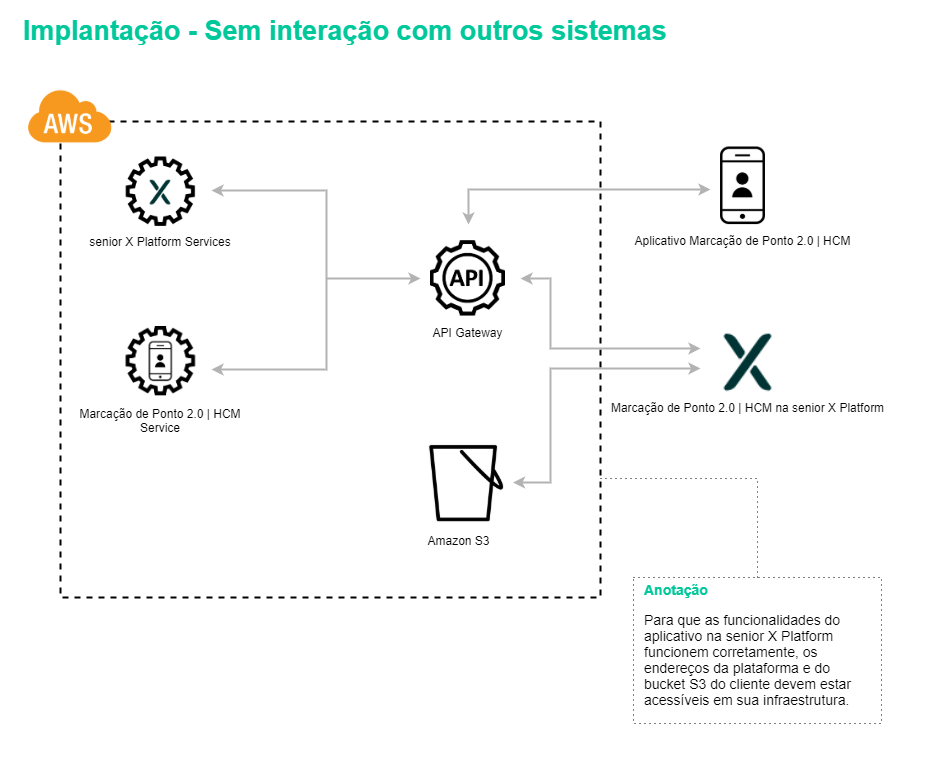
Without interaction with other systems
For clients in which the system deployment will be done only for use through the senior X Platform, with no other system interacting with the solution, the deployment consists of configuring the default roles and associating users within these roles.
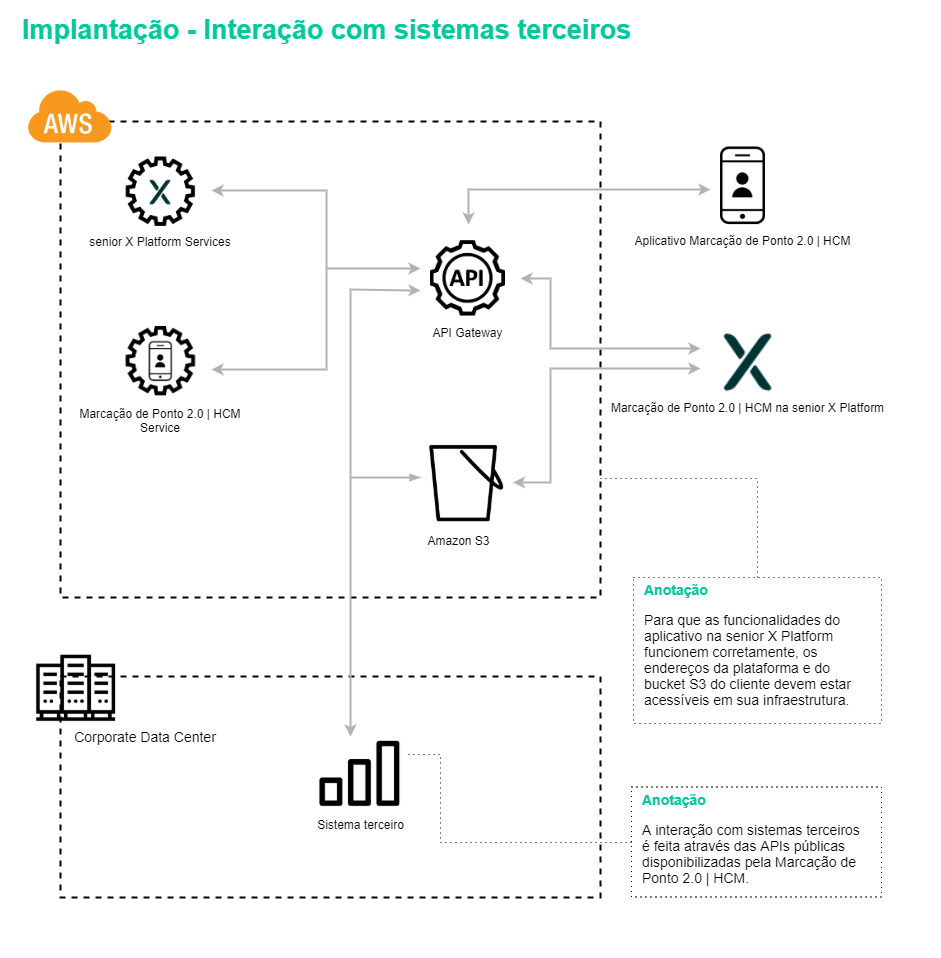
Interaction with third-party systems
If the client interacts with a specific third-party system that is not one of the Senior solutions, it will be necessary to exchange information through the APIs used by the app, which must be carried out by the client. If you prefer, this communication between the third-party system and the Clocking Event 2.0 | HCM can be carried out by Senior, however it is necessary to hire Senior's customization service.
The third-party system must provide the necessary input data for the app to function correctly and be able to consume the output data . In addition, the configuration of standard roles and validation of input and output data, as well as validation of behaviors according to the three app usage profiles (employee, manager and administrator) must be carried out to ensure the full functioning of the solution.
Interactions with the Personnel Management module or Ronda Senior system
Clients who have the Personnel Management module, from Human Capital Management | HCM, or the Ronda Senior system must have configured the sending of information between the system and the Clocking Event 2.0 | HCM. In this case, only the sending of employees will be configured, due to the module and the system not having routines for calculating clocking events, that is, the process of collecting clocking events is not available.
Senior Middleware configurations must be previously agreed with the client, in order not to impact existing operations within the current structure. And the configuration of the standard roles and the validation of input and output data, as well as the validation of behaviors according to the three application usage profiles (employee, manager and administrator) must be carried out to ensure the full functioning of the solution.
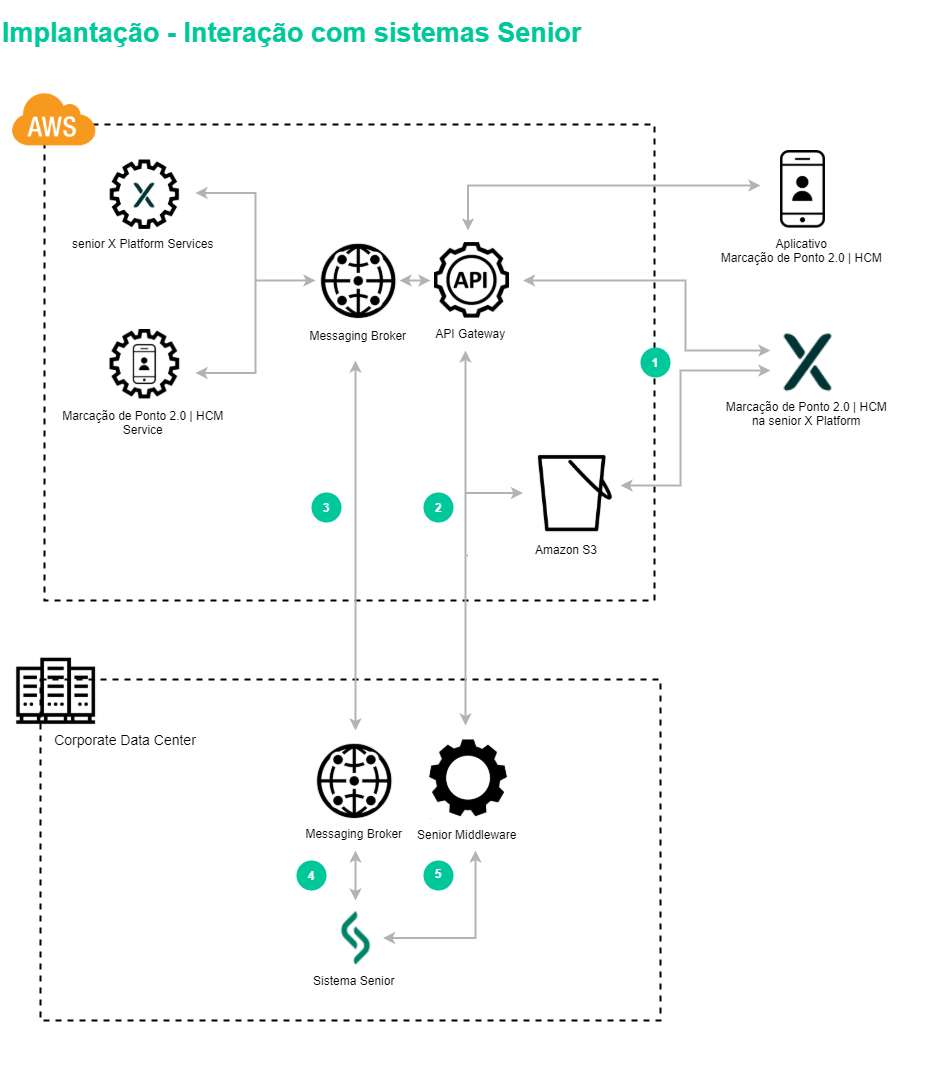
1. For application functionality on the senior X Platform to work properly, the client's platform and S3 bucket addresses must be accessible in your infrastructure.
2. The integration of the necessary information for the Clocking Event 2.0 is done through the public APIs and the Senior Middleware. In this way, the platform addresses must be accessible in the client's infrastructure.
3. If the users are integrated through the ETL Integrator, the communication between the two brokers must be accessible in the client's infrastructure.
4. If the users are integrated through the ETL Integrator, the communication between the two brokers must be accessible in the client's infrastructure.
5. Communication between the Senior Middleware and the Senior solution must be configured according to the documented deployment process.
Interactions with the Time and Cafeteria Control module
Clients who have the Time and Cafeteria Control module, from the Human Capital Management | HCM, need to have configured the sending and receiving of information between the system and Clocking Event 2.0 | HCM.
As this is a module that checks the clocking events made, two automatic processes will be set up, one for sending employees and the other for collecting clocking events. In addition, because the clocking events made in the app have particularities, the collector and clocking event separation settings are necessary.
Senior Middleware configurations must be previously agreed with the client, in order not to impact existing operations within the current structure. And the configuration of the standard roles and the validation of input and output data, as well as the validation of behaviors according to the three application usage profiles (employee, manager and administrator) must be carried out to ensure the full functioning of the solution.
 English
 Español


