Implementations
Cloud
CONNECT Cloud environments are maintained by the X Solutions Platform team. Systems external to Senior networks, involved in the integration processes, must have network configurations that allow them to receive requests from the integrator (more details in the Network Releases section), in addition to credentials for use by the integrator (for using databases, APIs, etc.).
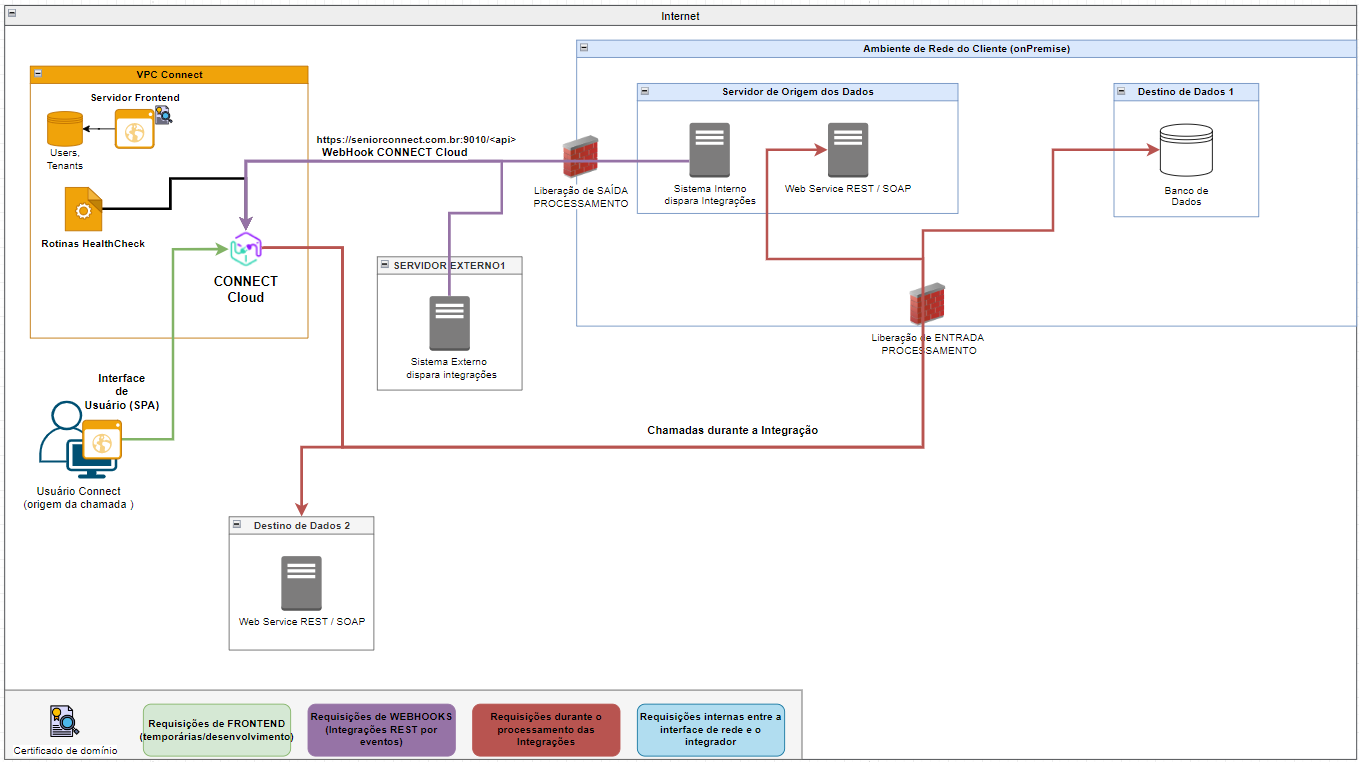
Image: Simplified diagram of the network infrastructure in a CONNECT Cloud deployment. Example illustrates, considering an integration between client onPremise systems and external systems.
On premise
In an onPremise implementation, the CONNECT backend is installed within the client's network environment, thus the health of the server that will host CONNECT, the network configurations that guarantee communication with the user interface (Frontend) and systems involved in the integration processes, are the responsibility of the network infrastructure. In addition to the points mentioned above, the credentials for use of the integrator (for using databases, APIs, etc.) and documentation of the systems involved are also the responsibility of the network infrastructure.
Minimum requirements for installation
- Operating System: Linux, Red Hat distribution (Suggestion: CentOS);
- Processor: 4 VCPU or equivalent;
- RAM: 8GB dedicated to the integrator;
- Disk space: 100GB dedicated for the integrator (Default path: usr/local/sconnect);
Note
The minimum requirements may not meet all scenarios for the scope and number of integrations planned for the onPremise instance. During development, the need for more resources may be identified.
If you have any questions, please contact our experts!
Server Requirements
Docker and Docker-Compose must be installed beforehand. The installation of these services must be carried out by the customer. For more information and detailed instructions, visitthis link .
We need the following information to install CONNECT:
- Server, Login and Password for remote connection (ssh). Necessary for the implementation team to perform the installation;
- External network domain to be pointed to the CONNECT onPremise instance (destination of requests to the integrator, as per diagrams below) and domain certificate (.crt + .key);
*Dedicated to the integrator (we recommend a dedicated server). It varies depending on the integration load. The application is not very processor intensive. Disk space required for exclusive use by the Integrator (generation of execution logs, with recycling and storage policy as defined by the customer).
** The application truststore is a .JKS file that contains the domain certificates for all the servers that CONNECT needs to send requests to. The truststore is required to perform SSL handshakes on HTTPS calls.
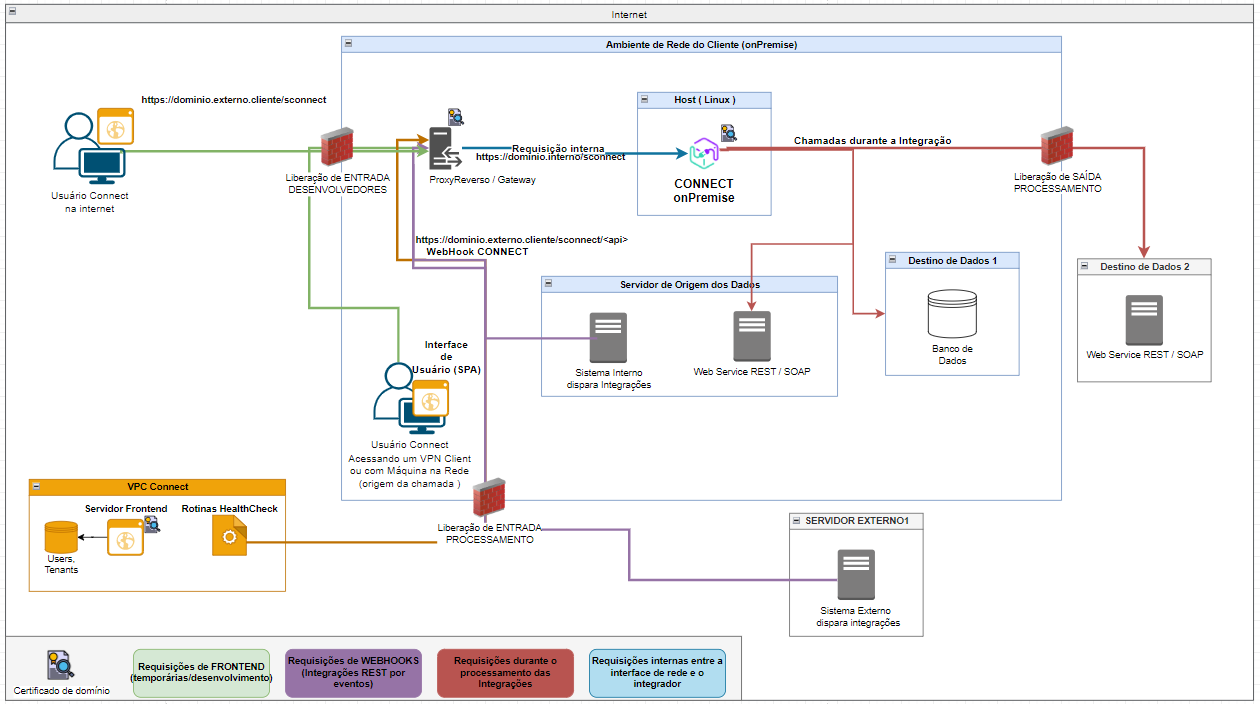
Image: Simplified diagram of the suggested network infrastructure (with request directions), in an onPremise implementation of CONNECT– with external access.
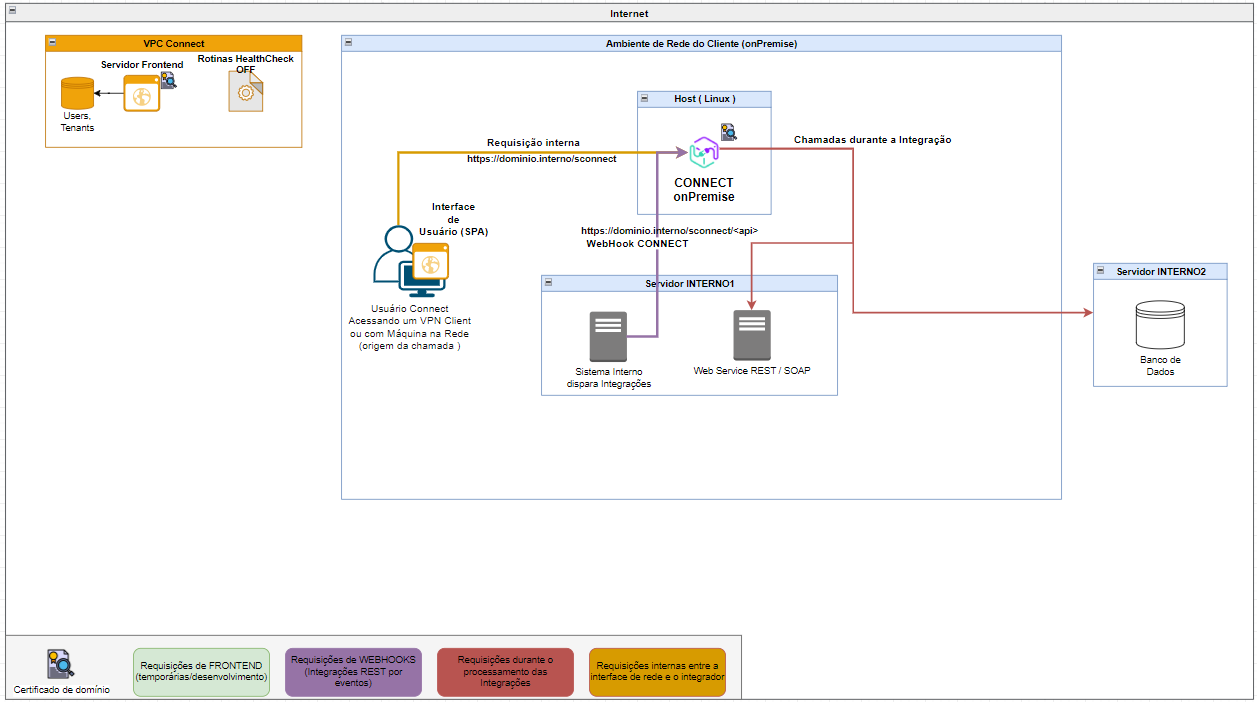
Image: Simplified diagram of the network infrastructure (with request directions) suggested in an onPremise implementation of Connect – without external access.
Integration Scenarios
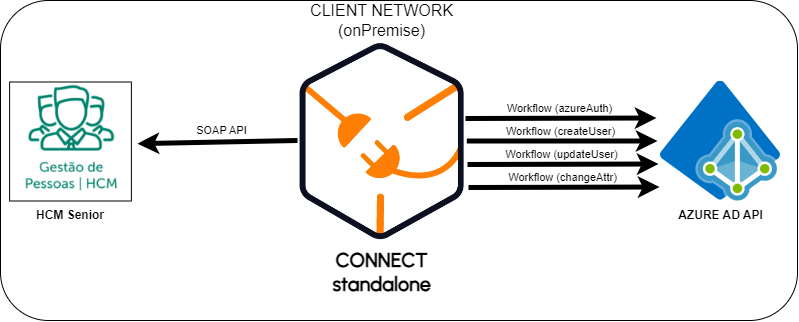
In this section, a collection of integration model diagrams is presented, successfully implemented in projects that used CONNECT tools. Each diagram illustrates proven and effective approaches that facilitate the interconnection between systems and processes, meeting specific requirements and providing high added value to end customers.
In addition to the tools for creating integrations, CONNECT offers additional benefits, such as the native implementation of monitoring tools and parameterization of the developed integration flows. These features enable rapid adjustments and continuous visibility into processes, optimizing operations and reducing response time for corrections and improvements.
Important
The models presented here are not mutually exclusive. In several projects, several of these strategies were applied simultaneously with CONNECT tools to achieve integration objectives in an optimized and effective way. This flexibility allows each project to take advantage of the best of each integration concept and implement it with our platform, resulting in solutions precisely adapted to the demands of each client.
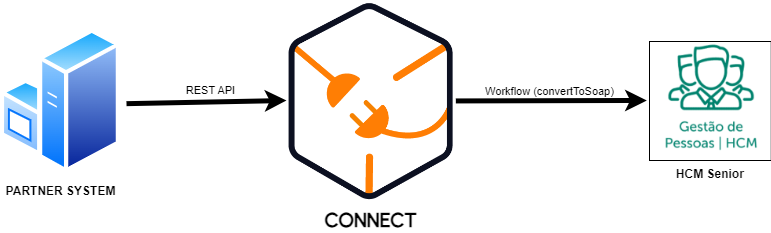
Integration Hub
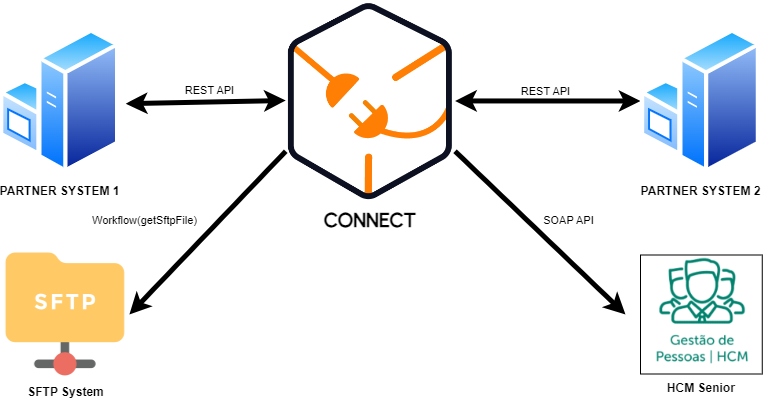
API bus to act as a gateway and translation of requests
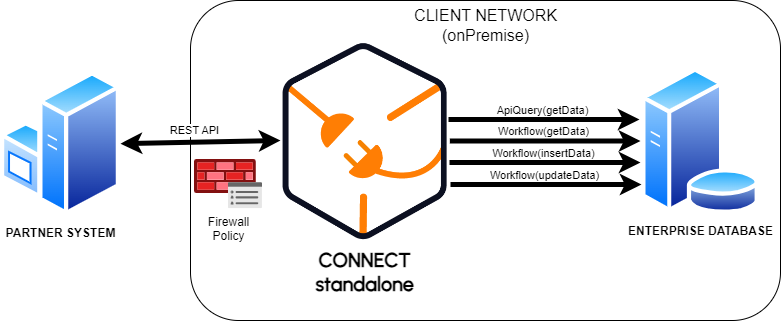
onPremise: API layer for enterprise systems
Updates
Integration platform updates bring new tools and features to CONNECT.
Communication of these updates is announced on the screen.News from the platform, you can also consult ourrelease notes.
For Cloud environments, as soon as a new version is published, it automatically goes live.
In cases of onPremise environments, it is necessary to request a new application image from the X Solutions Platform Integrations team.