Hikvision driver integration
Aiming to ensure a healthy work environment and the protection of employees, Ronda senior X integrates with the manufacturer Hikvision, which offers access control terminals with technologycontactless, that is, without the need for physical contact. These devices also provide technological differences such as:
- Facial recognition;
- Body temperature sensor;
- Protective mask use sensor;
- Native integration with Ronda senior X.
This integration and communication with Hikvision equipment is carried out through REST APIs, provided by the manufacturer itself. Through them, Ronda senior X synchronizes data, such as photos and people's registration.
To use access control through facial recognition, the manufacturer only uses facial models from the MinMoe line.
It is important to note that online access validation depends on a physical connection between the Hikvision device and another controller approved for online access validation. This physical connection must occur through a Wiegand port.
Wiegand is a communication interface that has a market standard protocol. This protocol transports information in binary format, breaking it into blocks of Parity + Facility Code + Card + Parity.
Hikvision allows you to use Wiegand 26 and Wiegand 34, which directly interferes with the maximum size of the physical number transmitted by the port.
For environments that use badges using technology other than Wiegand, it is suggested that the Access Controller interprets the information sent by Hikvision as an integer physical number, that is, that it considers the Facility Code + Card block as an integer. This will give the possibility of transmitting the physical number with a maximum value of 16,777,215 (3 bytes) on Wiegand 26 and the value 4,294,967,295 (4 bytes) on Wiegand 34.
If the integrator is unable to join the blocks as an integer, that is, only considers the card number, the maximum value for the physical number reduces to 65,535 (2 bytes) in Wiegand 26 and 16,777,215 (3 bytes) in Wiegand 34.
Therefore, in addition to configuring the Wiegand type on Hikvision, it is necessary to evaluate with the integrator responsible for the Access Controller which Wiegand the board has and whether it allows customization of the protocol to consider Facility Code + Badge as an integer.
Click on the thumbnail below to check a diagram representing integration with this manufacturer:
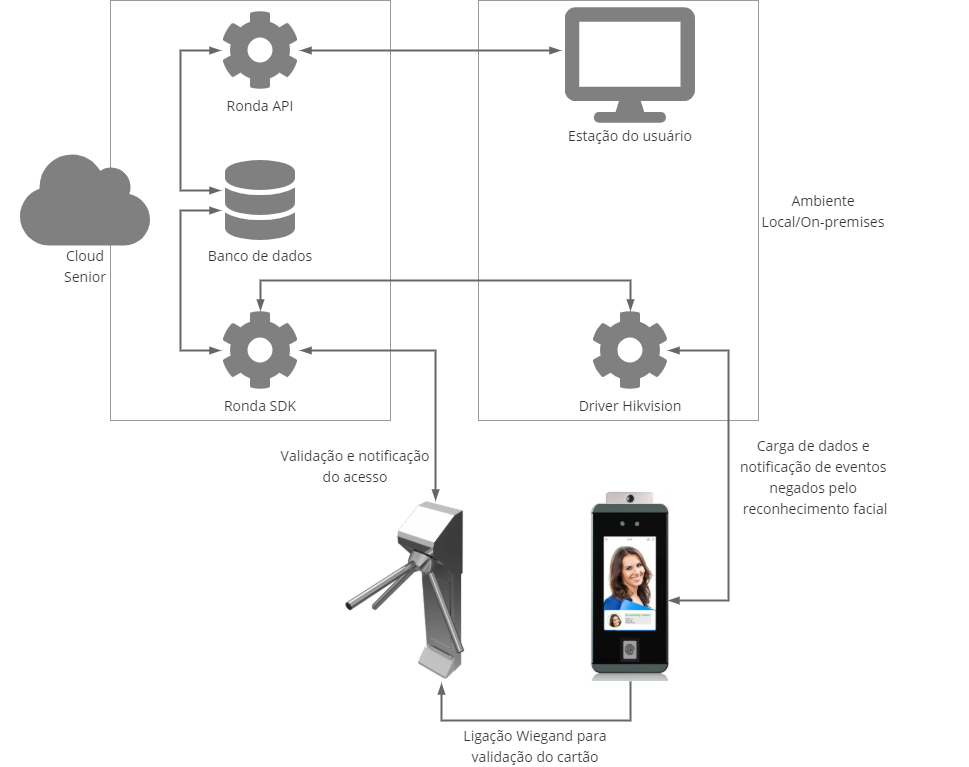
Hikvision driver working
Prerequisite
Have Java 8 installed.
Driver installation and configuration
The Hikvision driver must be installed on the client for integration with Hikivision devices to occur successfully. The driver monitors communication (online or offline) with all devices connected to it, sends them data and information, and carries out the necessary procedures for their integration with the system.
Note
Communication with Hikvision equipment is carried out through a REST API provided by the manufacturer. The Hikvision driver must be able to access the device via HTTP communication to consume this API. Therefore, if the Hikvision driver is in a Cloud environment and the device is in an on-premises environment or on different networks, there must be a VPN between the environments, so that the Hikvision driver can communicate with the device.
 Driver registration
- Register on the login screendrivers and select the "SDK" item in the fieldDriver type;
- Then, to download it, access the screenDownloads;
- After the driver is unzipped, the fileupdater.properties must be adjusted. In this file, configure the propertyupdater.java_home_env pointing to an environment variable that has the Java 8 path. Example: updater.java_home_env=JAVA_HOME;
- To install the Driver as a service, run the filecreate-service.bat as Administrator through the command prompt, then verify that the driver service was created in Windows Services.
- The driver can be started and stopped through Windows Services;
- Driver configuration is done in the fileconfig.properties, which is in the directory where the driver was unzipped.
Fields in the config.properties file
sdk.host
Access address to Ronda senior X followed by the port and other parameters.
sdk.api_key
Token generated for this driver on the driver registration screen.
sdk.connection.timeout
Maximum time, in milliseconds, for which the Hikvision driver will wait for a card's response before considering it offline.
sdk.request.timeout
Time interval, in milliseconds, in which the Hikvision driver will search for events on each board.
sdk.api_response.timeout
Minimum waiting time for the SDK API response (command response sent to the device).
These settings are sent to devices when the Hikivision driver is started and when the commandConfigure device is sent to the system.
Information about people, credentials, locations and access permissions is sent to the device whenever there is an addition, change or deletion to this data. Only people who have access allowed on the device and are not blocked are sent.
When sending this information and settings to devices, if communication is offline, this data will be sent when communication is reestablished.
Extensible property registration
- On the senior X Platform, go to Access and Security Management > Access control >Extensible Properties;
- Register a new group of extensible properties, to provide the device username and password;
- In this group, register two extensible properties:username, to inform the user of access to the device, andpassword, to enter the password.
Device registration
- On the senior X Platform, go to Access and Security Management > Access control >Devices;
- Register an Access Control type management device, informing the previously registered driver;
- Enter the device address and communication port. Typically, the default port for these devices is 80;
- In the fieldExtensible Properties, select the previously registered property;
- In the Monitored accesses section, indicate which types of access should generate occurrences, the types of occurrences and whether they should trigger emails;
- Fill in the other mandatory fields and clickTo save.
- Below the managing device (in the device hierarchy), register:
- a biometric reader, with facial biometrics;
- a credential reader, in accordance with the badge technology used in people's credential records, such as a Smart Card, for example.
Note
Although it is possible to configure the generation of events due to irregular temperature detection and absence of a mask, the access blocking configuration is carried out directly on the device's display.
Note
This device must belong to a Driver SDK.
Configuration performed on the device screen
Some settings must be made on the Hikvision device screen:
- Face conference degree: it must be adjusted to the environment in which the device is located and according to the customer's photo base;
- Normal temperature range: it is necessary to configure the minimum and maximum temperature that will be considered normal, because when the driver receives an event indicating an abnormal temperature from the device, it will generate an access denied due to abnormal temperature and send it to the system.
- Action after identifying person without a mask: you must configure the action that will be carried out after identifying that a person is not wearing a mask. If configured to not open the door ("tipsAndNotOpenDoor"), the driver will generate an unmasked access denied and send it to the system.
Important
The device firmware must be version 2.2.6 and build 20200902, or newer builds of the same version.
Registration of people
When delivering the credential, the person must have a registered photo to upload to the device. We recommend the following specifications:
- Size: 60 kB to 200 kB;
- Minimum Resolution: 640 x 480 pixels;
- Format: JPG or JPEG.
Important
The photo must feature face framing and be of good quality to facilitate facial recognition. To do this, the person's face must be close to the camera, but at a distance that keeps the image in focus. Otherwise, errors will occur when loading the list on the device.
For more details on how a photo should be registered, see thephoto registration guide for facial recognition.
Sending the Release List Load command
The commandRelease List Load it must be carried out after the driver is communicating with the devices, to initially load people with their credentials and photos that will be used in facial recognition.
On the senior X Platform, go to Access and Security Management > Access control >Devices.
So select the Hikvision manager and in the Send Command section click onSend command, select theRelease List Load and click Send command.
Event query
Querying access events for Hikvision devices displays information about the use of a mask and the person's temperature at the time of access. These details must be available and enabled in the device's screen setting.
To consult these events, access senior X Platform > Customization > Reports >Dynamic views, sam-event-person table.
Log generation
The procedures carried out by the Hikivision driver are recorded in log files, which can be accessed within the folder where the driver is installed. Each message in the log has a classification among the following:
- FATAL: messages that interrupt the operation of the application, forcing the service or executable to be restarted;
- ERROR: application malfunction messages, which must be analyzed by Senior's technical team, but the service or executable continues running;
- WARN: messages that indicate failure in registrations or system configurations. They must be analyzed by the system administrator;
- INFO: normal system operation messages (examples: event received, pending issue sent, etc.) for informational purposes;
- DEBUG: messages about the internal functioning of system components (examples: timer started, parameters read, etc.) for informational purposes to the Senior technical team. This log level should only be enabled in case of problems with the environment;
- TRACE: messages about the internal functioning of system components, with details of the data being processed.
Note
The Driver log level is configured in the filelog4j2.xml, in <root level=, example: <root level="INFO">.





