Incident management
Occurrences are considered to be any events that are not part of the company's standard operation and that cause, or may cause, an interruption or reduction in the quality of service, as well as offering risks to employees or the building structure.
The solution aims to assist in the identification and treatment of incidents, minimizing impacts on the day-to-day life of an organization. Occurrences can be signaled by devices (a fire alarm, for example), cameras or registered by a user (such as a broken window).
What you can do:
 Register occurrences
- In senior X Platform, access Access and Security Management > Occurrence Management > Occurrence registration;
- Click on the buttonTo add and select theType of occurrence and thePhysical location where it occurred;
- Report aDescription, The Date of occurrence, the time and then set yourPriority;
- If you wish, inform thePeople involved in the occurrence. To do this, enter at least three characters of the person's name in the fieldSearch and select the desired name(s), one at a time.
- click inTo save.
Log occurrences per API call
You can also register occurrences through the API. To learn more, see thecorresponding documentation.
Consult the occurrence panel
Access senior X Platform > Access and Security Management > Incident Management > Incident dashboard.
This panel displays pending incidents according to their priority ("Critical", "High", "Average", "Low" and "Planned") and Status ("Unhandled", "In progress", "Paused" and "Completed in the last 24 hours"). To facilitate visualization, each priority level is related to a color, and occurrences are shown starting from the most recent date.

Click on the name of the incident to view its details, procedures and deal with it, if applicable.
See more occurrences
This button allows you to consult occurrences using filters byStart date and time, End date and time, Identifier, Type, Physical location, Status, Priority It isOrigin. The results are presented in a table, divided into pages, which lists the details of each occurrence and allows them to be selected. If there is at least one item selected, the buttonsTreat occurrences It isComplete occurrences are shown so that these operations can be performed.
Note
The number of records that will appear in the Incident Panel is limited to 100 records per status. If you have more than 100 records, the priority and date of occurrence generation will define which ones will be displayed on the panel.
Treat occurrences
It is possible to access an occurrence to treat it in three ways:Incident panel, for theOccurrence query and through the screenMonitoring.

Once the Incident Details screen is open, you can:
- Change the priority level of the occurrence (as long as the occurrence is not with theStatus "Paused"): In the Details panel, change the value of the fieldPriority level;
- Register a new procedure in the incident: in the Procedures panel for this incident, it is possible to do this via text or attachment;
- Pause the occurrence (as long as the occurrence is not in theStatus "No treatment"): click on the buttonPause occurrence from the Procedures panel for this occurrence;
- Resume the occurrence (only enabled for paused occurrences): click the buttonResume occurrence from the Procedures panel for this occurrence;
- Complete the occurrence (as long as the occurrence is not with theStatus "No treatment"): on the panelProcedures for this occurrence, Click on the buttonComplete incident.
Export occurrence
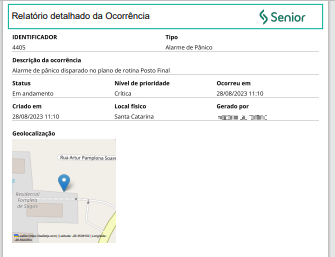
It is possible to export an incident in PDF format, including high-quality images, for investigation, auditing and validation with those involved. To this end, the process is similar to the previous item,Treat occurrence, using the buttonExport occurrence.
Consult registered occurrences and take some actions on them
On the senior X Platform, access Access and Security Management > Queries and fill out theInitial date, The Final date and clickFilter. The interval between dates can be changed as needed. It is possible to enter more filters to refine the results.
The list of occurrences that fit the filter entered will be displayed. From there, you can:
- Access the details of a specific occurrence: click on the occurrence and it will open in a new screen. From there, it can even be treated;
- Report progre
- ss on occurrences: this can be done for a single occurrence or for several at once, as long as their status is not "Completed":
- Select the check box preceding the desired occurrence(s);
- Click on the buttonTrea t occurrences
- ;In the fieldDescription, inform the procedure carried out; click inTo save.
- Complete events, as long as they have at least one registered process and are not "Paused" or "Completed". For that:
- Select the check box preceding the desired occurrence(s);click in C
- omplete incident(s)and read the confirmation message that is displayed, as it explains the impacts of this action;Once you are sure about the conclusion of the occurrence(s), clickComplete incident(s). Otherwise, clickCancel.
Analyze monthly indicators - Analytics
Analytics gathers information to analyze events that have occurred and, based on that, make decisions.
On the senior X Platform, go to Access and Security Management | Ronda X > Analytics Ronda > Occurrence Management to view the graphs:

You will find a graph with the Record of occurrences for the last year, comparing the open, closed and the accumulated balance for the year each month.
Additionally, there is information about the active month (which can be changed by clicking on the month in the graph or in the upper right part of the screen):
- Totalizers in hours of the selected month for average response times (time between the registration of the occurrence and the first procedure carried out on it) and resolution of occurrences (discounting pause times);
- Graphs of occurrences by priority, location and type.
Register types of occurrences
This option is only available forusers system administrators. To register an occurrence type:
- On the senior X Platform, access Access and Security Management > Occurrence Management > Occurrence types;
- Click on the buttonTo add;
- On the General data tab, configure the incident. If the optionMonitored is marked, whenever an occurrence of this type occurs, a notification is generated in the Monitoring. If the optionWarning sound is activated, whenever an occurrence of this type occurs, an audible notification is generated in Monitoring. Only occurrences with this option selected will be displayed in Monitoring;
- The value entered in the fieldDefault priority It is suggested in the record of occurrences that fall within this type of occurrence. When an occurrence is imported from the Ronda Senior solution without the priority informed, it is filled with the corresponding one for the type of occurrence;
- click inTo save;
- In the Notified Emails panel:
- click in
- Add emails to register the addresses that should receive notifications when an event of this type occurs;
- Enter the desired email address at Add email
- ;
- In the Emergency pane
- l:click in
- Add managers to define which devices will receive an emergency command when an incident of this type is registered;
- In the Triggers panel:
- click in
- Add triggers to define what output devices should do if such an event occurs;
- click in Add trigger, look for the
- desired Output and click on it;
- In the fieldStatus, inform what should happen to the device, according to its characteristics:"Deactivate" or "Activate": using one of these options, when the type of incident that triggers the device occurs, it is necessary to then activate or deactivate the device in the device registration.devices of Round senior X."Temporary": This option is checked for devices that are triggered for a predetermined duration, such as an alarm that must sound. In this case, the field is enabledDuration, in which the duration of this activation must be defined, in milliseconds.
- click inTo save.
Repeat the last two steps for as many actuations as necessary.
Consult, edit or delete the types of registered occurrences
This option is only available forusers system administrators.
On the senior X Platform, access Access and Security Management > Occurrence Management > Occurrence types and click on the desired type. You can then change or delete the occurrence.
Note
If there are any cases that have not yet been completed that are classified as the type of cases you want to delete, deletion will not be possible.





