Web Monitor
Monitor images, devices, events and occurrences in your company through Web Monitor.
On the senior X Platform, go to Access and Security Management | Ronda X > Security Hub > Monitoring. Use the addresshttps://psim.senior.com.br.
Important
What you can do:
 Monitor physical locations
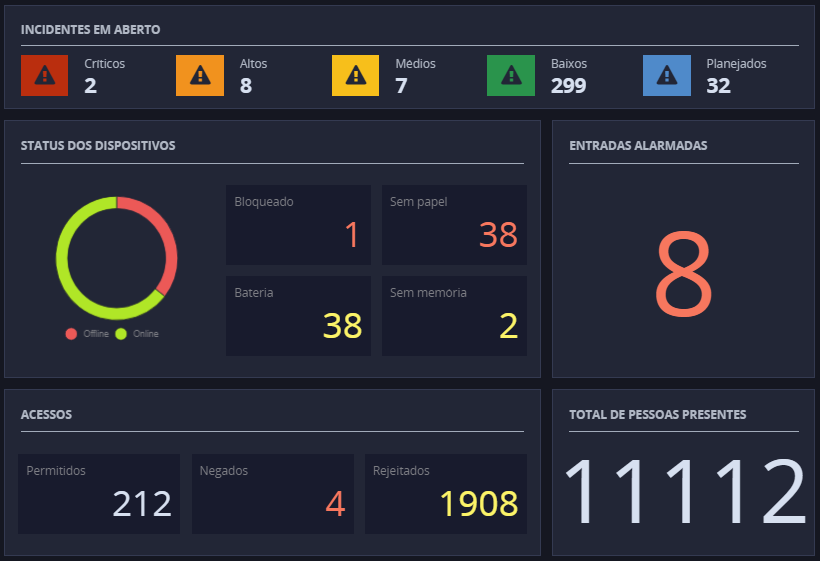
When accessing Monitoring, a panel is displayed with various information, in real time, related to all the company's physical locations. See an example:
Important
Some views may not be available as they depend on Paper Master permissions, inCoverage.
Understand what each panel represents
- Open incidents: shows all uncompleted occurrences, separated by priority. When clicking on the frame, theIncident panel, with complete details;
- Device Status
- : displa
- ys the number of devices (managers and modules), separated into:OfflineIt isOnline. When you hover the cursor over each bar in the graph, the number of devices in that status is displayed;
- Blocked,Without paper,(using)BatteryIt is Without memory, with their respective quantities.
- Alarmed inputs: displays the total for this type of entry and allows you to access the Device Query for details about such alarms;
- Event Monitoring
- s
- creen has three tabs :Access monitoring : shows the last fifty hits of the day, starting at midnight, separated intoAllowed,Denied It isRejected , with their respective quantities, and with details such as person, type of access, date, time, direction and device through which the person passed.
- Timekeeping monitoring: if the user does not use any filter in the search, this panel will display the last fifty clocks made on the day, with details about the device, date and time of access, physical location, PIS and NSR of the employee. If any filter is used in this search, all time stamps from the last hour will be returned, with all the details mentioned above.
- Vehicle access monitoring: displays the query of vehicle accesses to the location in the last hour, ordered with information about the person, direction, physical location, date and time, type of access, license plate and monitoring device. If search filters are not used, the tab will display the last fifty accesses of vehicles whose entry was classified asAccess Allowed or Access denied in the fi eld
- Total people present: number of people somewhere in the company.
Query information from a specific physical location
In the Physical Locations panel, click on the desired location and, at the top of the screen, click on the tabOperation. After that, you can:
Check the last accesses
Allowed entries and exits are identified with a green label, and those denied with a red label.
- Hover the cursor over the panelLast hits to enable scrolling and view the listing if necessary;
- Click on the access to see the camera image associated with it, if any.
View occurrences
Each occurrence is accompanied by a colored label that describes its priority and also a description of its status.
- Hover the cursor over the paneloccurrences to enable scrolling and view the listing if necessary;
- Click on the occurrence you want more details about. It is open to the solutionSecurity Hub.
Check events
Each event is accompanied by a colored label that describes its status and which device triggered it.
- Hover the cursor over the panelEvents to enable scrolling and view the listing if necessary;
- Click on the event to see the camera image associated with it, if any.
View the list of devices
The location's devices are shown in their entire hierarchy, with those that are associated with a location for which the person does not have coverage highlighted with a red icon.
When a device is on alert, it is signaled with a flashing yellow color. Hover the cursor over the panelDevices to enable scrolling and view the listing if necessary.
Consult child locations
- On the panelChildren Locations, which is on the right of the screen, click on the desired location and its information will be displayed on the screen;
- To return to the parent location, use the breadcrumbs below the location name description:
Hide or show any of the panels
Use this icon to hide a panel: ; and this o
 ne to show it again:.
Note
The flashing red light , both for physical locations and for their respective children, draws attention to the fact that there is an untreated incident at the location.
On the monitoring screen, both for physical locations and their respective children, when an occurrence with a sound notification is generated, it will be executed as long as the sound is active (icon ). To deactivate the beep, simply click on the icon
 .
.
Include and track the floor plan of the physical location
The resource makes it possible to have information about the floor plan of each physical location, mapping its devices, cameras and child locations.
At the top of the screen, click Floor Plan. These are your options:
Include the floor plan of the location
This option is possible when entering a location for the first time that does not yet have a floor plan and is only available to the administrator user or whose role has permission toTo edit OMonitoring.
- Click onSelect an image to start the map;
- On your computer, locate the floor plan image (accepted formats are JPG, .PEG and PNG).
- From there, you can:
- Inf
- orm a Manager:
 Click on the icon.
 - Drag it to the location on the plant where it should be and release it. At this moment, all managers registered for the location are shown - click on the desired one and then on the buttonSelect.
- orm a Manager:
 Report a Module:Click on the icon.
 - Drag it to the location on the plant where it should be and release it. At this moment, all modules registered for the location are shown - click on the desired one and then on the buttonSelect.
 Report an Entry:Click on the icon.
 - Drag it to the location on the plant where it should be and release it. At this moment, all entries registered for the location are shown - click on the desired one and then on the buttonSelect.
 Report a Camera:Click on the icon.
 - Drag it to the location on the plant where it should be and release it. At this moment, all cameras registered for the location are shown - click on the one you want and then on the buttonSelect.
 Enter a child location:Click on the icon.
 - Drag it to the location on the plant where it should be and release it. At this moment, all child locations registered for the location are shown - click on the desired one and then on the buttonSelect.
 You can also:Return to the floor plan view: click on the icon at the bottom right of the screen.
  Delete the floor plan: At the top left of the screen, click.
  Upload a new image: At the top left of the screen, click.
  Invert the colors: At the top left of the screen, click.
 - Remove an item from the floor plan. Simply click on the item and a list of items will be displayed, with the item in question selected. So, clickTo remove .
- Inf
View the site floor plan
When the location already has a registered floor plan, it is shown when entering the tab:
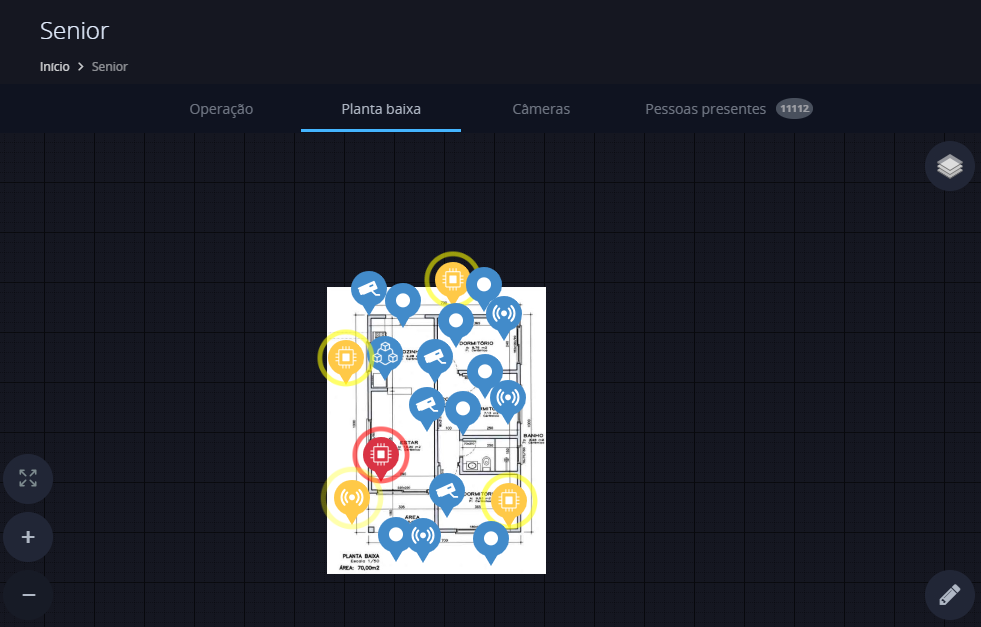
Each item is shown in a color that represents its status:
| If the item is in the color | It means that |
|---|---|
| red | the item is offline. |
| Yellow | the item is alarmed. |
| blue | the item is in correct working order. |
When clicking on:
- Any item, you can see its details;
- A camera, your image is shown live;
- A child location opens its floor plan.
You can also Edit the floor plan: click on the icon at the bottom right of the screen.
Both when adding and viewing a floor plan, you can:
Remove some items from the floor plan view
In the upper right part of the screen, click on the icon and deselect the items you do not want to view.
View floor plan in full screen
- At the bottom left of the mosaic, click on the icon
 .
. - To exit full screen mode, pressEsc or cli
 ck.
ck.
Zoom in or out
- At the bottom left of the mosaic, click on the icon
 to zoom in on the floor plan.
 - At the bottom left of the mosaic, click on the icon
 to zoom out of the floor plan.
View camera images
At the top of the screen, click the tabCameras.
From there you can:
View a camera in a separate window
Just click on the desired camera.
Rewind or fast forward camera images by 30 seconds
- Click on the desired camera.
- Use the respective icon:

 to go back 30 seconds. to advance 30 seconds.
Pause the camera image
- Click on the desired camera.
- Use the pause icon:
 .
. - click in
 to take it off pause.
Consult the camera image at another date and time
- Click on the desired camera.
- Click on the calendar area:

- Enter the date and time you want to consult.
Leave the camera mosaic in full screen mode
- At the bottom left of the mosaic, click on the icon.
- To exit full screen mode, pressEsc or click.
Change the number of cameras displayed at a time
- At the bottom right of the mosaic, click on the numbered icon -
 .
. - Click on the number of cameras you want to display at a time:

Navigate between the various pages with camera images
- Hover your cursor over the cameras mosaic.
- If there are other pages with cameras, the following buttons are available:
FunctionAdvance to next camera(s) pageReturn to previous camera(s) pageBu 
tton 
Consult the people present at the physical location
To check the people present at a location, select the desired place from the Physical Locations List and click the "People Present" tab. The number next to the name of the guide indicates the number of people who are in that physical location.
The display of this tab for the system user depends on the user having received the "Presence control" permission, which is given when registering the system.paper associated with the person.
In addition to the number of people present, this tab displays the recommended capacity for the location (valid for indoor locations). To see this information highlighted, click the maximize button:

Note
The information shown on this tab refers to the physical location that is selected and all its child physical locations. That is, if a person is in a child physical location, the parent physical location will also show them as present.
If you want to see the access date and time of a person present, click on their name and the details will be displayed on the right side of the screen.
Consult people with irregular presence on site
The "Irregular presences" tab displays all people who are outside your work schedule, but who remain in the location consulted.
Example
A person has a work schedule from 8am to 6pm, but at 7pm they are still at the company. This person will be displayed in the irregular presence tab, as they should have already left the location.
Another situation is, for example, a person who has a work schedule from 8am to 11am and from 1pm to 6pm is present on site at 12pm. In this case, it will also be displayed in the irregular presence tab.
For people with irregular presence to be shown on the monitor, the selected physical location must be scale controlled. To activate roster control, go to General registrations >Physical locations > Validations. In the "Control paper time range" option, clickConnected.
Furthermore, for this tab to be viewable by the user, it will have the same permission as "People Present". This permission is called "Presence control" and is located in the registration of thepaper that is associated with the person.
Note
The information shown on this tab refers to the physical location that is selected and all its child physical locations. That is, if a person is irregular in a child physical location, the parent physical location will also show them as irregular.
The time considered in irregular presence is based on the time zone configured in the location of the person's presence.
The data displayed on this tab updates every five minutes, and at the bottom of the screen you will find a counter that shows the time remaining until the next update. If necessary, you can update the data instantly by clicking onRecharge now.
Monitor devices
In Device Monitoring, devices linked to all physical locations are shown:
- In the menu bar on the left, click on the Device Monitoring icon;
- Devices are shown with signage in different colors:
Icon Status 
Offline 
Online, but with an alert 
Online and without problems - When clicking on the managing device, all devices (readers, inputs and outputs) connected to it will be displayed. Devices that are alarmed will have a flashing yellow triangle next to them:
- Click on connected devices for details;
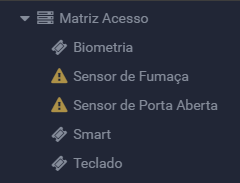
This screen also has the filter feature, which allows you to select the display of devices by physical location and device status.
Access monitoring
View the list of people who accessed or tried to access any physical location. In the menu bar, click on the Access monitoring icon.
Optionally, use the Filters panel to refine the accesses that are displayed by selecting a Role, Group, Person, Device, Physical location or Access Type. If desired, move the mouse pointer over the name of a person to view his or her picture.
Note
If there is any monitoring in the access filter, the search will return the events which occurred in the last hour, with a 50-register limit.
If no filter is selected, the search will display the latest 50 access registers, regardless of when they occurred.
Consult notifications
Consult notifications related to all physical locations.
In the menu bar, click on the Notification icon. Then click on the desired notification to be directed to the Monitoring dashboard of the corresponding physical location.
Access the virtual concierge
At the top of the menu bar, click on theVirtual concierge  -.
-.
Maximize the screen
- In the lower part of the menu bar, click on the icon.
- To exit the full screen mode, press Esc and click on again.
Exit Monitoring
- At the bottom of the menu bar, click on your photo.
- As a result, the icon for To go out is enabled - click on it.
Comments
Web Monitor is offeredfree to all customers who have a Ronda senior X environment, including several resources mentioned above. However, some of the panels require certain system usage licenses to be purchased:
- Open occurrences: to use this panel, the Occurrence Management license is required;
- Alarmed inputs: for this panel, the Sensor Monitoring license is required.
This free condition does not apply to public clients. We recommend that you request a value simulation from your Account Executive or through the Senior channel.





