
Performance Cards - My Analytics
Note
- All Analytics cards will be available as peruser permission settings and the card settings in Panels. The information presented considers the application of the filter, multiple contracts (except in the Compensation Management module) and, if applicable, scope.
- For the Remuneration Management module, it is mandatory to registersalary policy for the company and branch of the manager querying the analytics.
Assessment by competences
Competence evaluation
Shows the general concept reached in the competence evaluation after it is finished. Upon clicking on the View details button, the Competence Evaluation Consultation screen can be accessed, where results may be viewed by focus and by competence.
Compliance with the job/position profile
Displays the data of the last finished cycle of the competence evaluation. The chart compares the proficiency level of the competences required by the job, to the ones registered in the competence records. Each axis displays a competence with the concept required by the job and the concept obtained by the Worker in the cycle evaluation.
Observation
Occasionally, an outer gray line may be generated, as shown in the image below. This line is merely illustrative, aiming at the proper structuring of the graph.
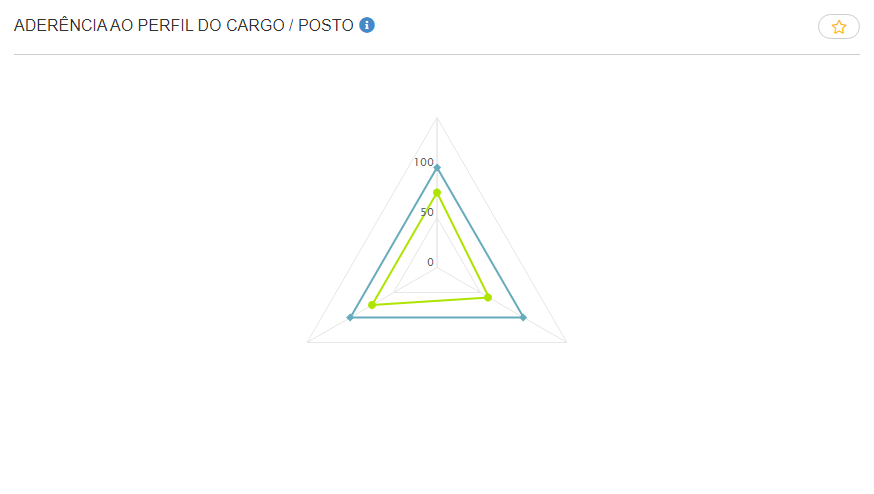
result evaluation
Results evaluation
Displays the results reached in the behavior evaluation after each monitoring register. Upon clicking on the View details button, the My Goals screen can be accessed, where the reached and achieved results may be viewed, as well as the deadline to finish the goal.
Feedbacks
Feedback received
Displays a summary with the number of feedback occurrences received during the last 15 days, the total number received and the date of the latest feedback. Upon clicking on the View details button, the Feedback Occurrences screen can be accessed to consult the details regarding sent and received feedback, and also request or send new feedback.
Individual development plan
Individual development plan
Displays the number of objectives that are open, that is, different from completed and/or cancelled. Upon clicking on the View details button, the My Development Plan screen can be accessed and the worker's objectives for the career and the current job, defined by the Worker or by the Manager/Mentor, and also the ones that have their approval pending.
 English
 Español


