Improvement Courses
This screen is displayed only when there is integration with the Training and Research or Recruitment and Selection modules.
In this item should be included the courses required for the improvement of the occupant of the position. We can also register the courses taught in the company and the courses that the employees bring in their curriculum. In each course we can inform the Subject to which it refers, allowing to register details as to the frequency requirement, minimum grade, duration, etc.
 Examples
Windows XP, Portuguese, Financial Mathematics, Human Relations, CIPA, etc.
Classes for training are formed only for training courses. In the registration of the course can be indicated a validity, which will be verified in relation to the collaborators who have already concluded it but who, because they are very old, must be re-performed to be valid in the requirement of their positions.
The information in these courses is necessary so that they can be linked as job requirements or even to update the employees' course history.
If the company wishes to work with prerequisites for the courses, the Prerequisites Training, knowledge and improvement folders can be filled. This information serves only for guidance and alert in the registration of training classes, where also the equivalence of training courses and training will be considered.
This register can be used to control the revisions of the courses used in ISO / Quality training management, where the revision folder will be informed of the dates that the revisions occurred.
In both the Salary and Training module, you can register the courses that are prerequisites of the improvement courses, through the folders:
Prerequisite Training Course, Prerequisite Course Improvement, Prerequisite Knowledge.
In the Training module it is also possible to inform the instructional resources, schedules, tests and grades for each improvement course.
In the Safety and Medicine module, only the Courses folder will be available in this register and if the database is integrated with the RS or TR module.
In the registration of the courses of improvement it is possible to use the following rules by process:
| 241 | Enter course |
| 242 | Change Course |
| 243 | Delete course |
In TLT Locations, the places belonging to the indicated course are presented.
Sequential number (code) of the course.
Full description of the course, such as Safety Technician, for example.
Courses
- Both course registration screens (Tables> Courses> Courses and Improvement and Training> TLT> Courses) present both standard courses and TLT courses, and it is not possible to change or delete a course of a different type from the menu.
- This grade will only be available if the course is TLT - Workplace Training.
In this item should be indicated if the course is modular or not. In the Disciplines folder, the courses that comprise the modular course will be informed.
Example: Modular course: Mechanics and as Disciplines: Drawing Interpretation, Basic Mathematics, Practices in Mechanics, etc.
Note
When it comes to TLT courses (accessed through the Training> TLT> Courses menu), this field is disabled because the TLT routine does not include the Modular Class functionality.
Inform the number of months of validity of the course, if there is none, leave it blank. It is based on this information compared to the date of the end of the course in the history of the employee or candidate that the course is considered valid or expired.
Inform, in number of days, how long before the expiration of the course history the requirement should be considered pending. This field remains enabled only when there are a number of valid months of validity.
If the course has a recycling, please inform it here. This field is only enabled when the registered course has a defined validity.
In the survey of training needs (FRLEVNEC), when the system finds a history of the course of the requirement, but it is overdue, it will verify if the course has a recycle informed in its register. If so, you will finally see if there is a history of the recycling course.
Flow of checks made by the system:
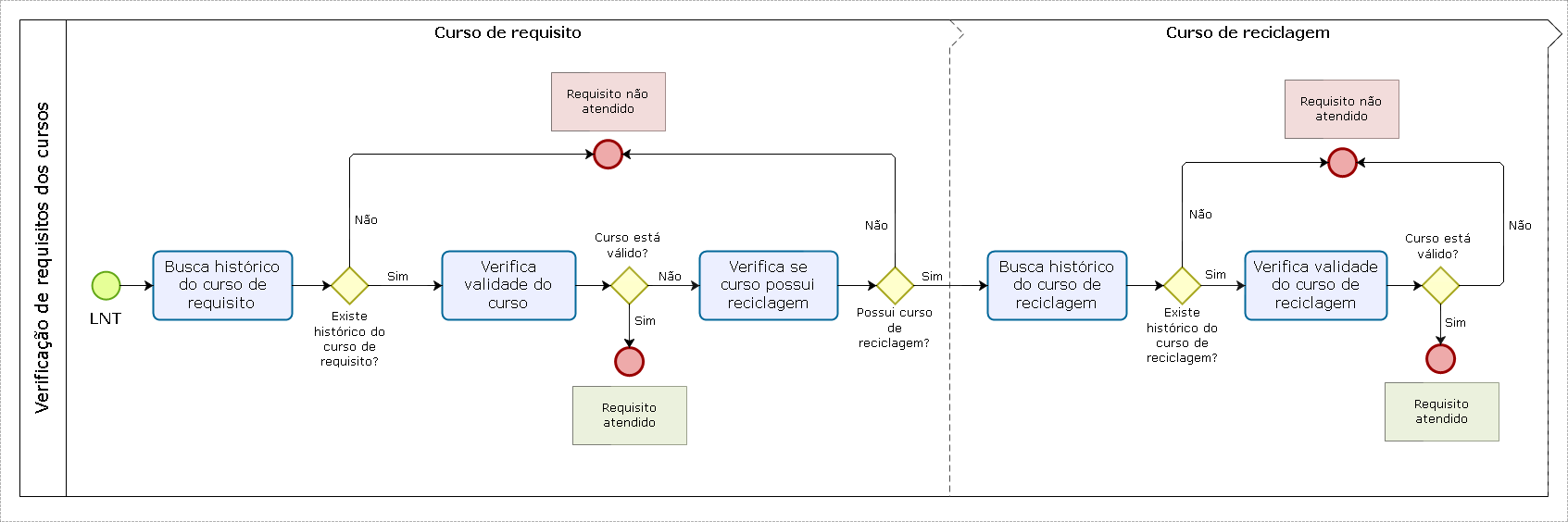
Example
Suppose you are registering the course 10 - CIPA and has a recycling course, which is registered as 20 - Recycling (CIPA). In this scenario:
- In course 10 you will be informed that your recycling course is 20.
- In course 20 you will be informed that course 10 is a prerequisite.
Inform the frequency control type that will be used in the menu > Training > Register Frequency Classes for course participants:
| 0 | Amount of classes-the control will be done considering the total number of classes attended |
| 1 | Load time-control is done by the total load time of attendance |
Indicate the type of course duration, as follows:
| 1 | Hours |
| 2 | Days |
| 3 | Months |
| 4 | Years |
| 5 | Semester |
When informed type of hours duration, it will not be necessary to record the duration because the hourly information will suffice.
Indicate the quantity of the type of duration that was reported in the previous data.
Example
If 3 = months were indicated in the previous data, and this course lasts for 06 months, indicate 6 in this field.
This field will only be available for the non-TLT training course.
Report the total hours of the course. This value will be suggested in the registration of a class, in the course history of the employee and in the general history of courses.
Report the percentage of frequency necessary for approval. This percentage will be considered in the evaluation of the participant.
This field will only be available for the non-TLT training course.
Inform the minimum average for passing the course.
This field will only be available for the non-TLT training course.
Identifies which type of certificate will be issued to the participants who took this course.
This field will only be available for the non-TLT training course.
| To | Utilization - a course history will be generated for the employee with type A |
| P | Participation - a course history will be generated for the employee with type P |
| N | None - no course history will be generated for the employee |
Inform the code of the questionnaire that will be used in evaluating the effectiveness of the training. This questionnaire should be previously registered in Training> Classes> Evaluation of Effectiveness> Questionnaire.
This field will only be available for the non-TLT training course.
Time to Start Evaluation Effectiveness
Inform the number of days that the evaluator has to start evaluating effectiveness after the end of the class.
This field will only be available for the non-TLT training course. It is not used by the following modules: Positions and Salaries, Recruitment and Selection.
Deadline Evaluation Effectiveness
Inform the number of days that the evaluator has to perform the evaluation of effectiveness. It will be used to count the deadline, which starts the day after the end of the training.
This field will only be available for the non-TLT training course.
Is a percentage of 0 to 100 that indicates what minimum percentage of the evaluators should assess how effective event for the event as a whole be considered effective. This field, from the training course registration screen, will only be used in the Events routine, that is, it will not be used by the old class routine.
Report the amount of days that evaluated has to perform the assessment of reaction. The deadline starts the day after the training end date.
This field will only be available for the non-TLT training course.
Inform the form of realization of the processing course.
- Internal
- Open External
- External Closed
- External Closed Multiplier Effect
- External Open Multiplier Effect
- Abroad-Open
- Abroad-Closed
- Synchronous E-Learning
- Asynchronous e-Learning
Inform the duration of the course, as follows:
- M - Morning
- V - Evening
- N - Night
- D - Daytime
Content
Inform the didactic content of the course of improvement done by the collaborator. This information will be used in the Note of the eSocial layout S-2200.
Inform the code of the rule to be used in each improvement course, for prerequisites not foreseen by the system.
This field will only be available for the non-TLT training course.
Inform the code rule that will be used in the inclusion of participants and/or members of the waiting list. This rule will be valid only for the WEB version.
This field will only be available for the non-TLT training course.
Should not be used the function message (error, text) or message (Returns, text) in this rule. These functions will cause an exception and will terminate the web instances. The alternative in this case is to assign a value to the MenLog system variable and then the Cancel (1) command;
Inform the code rule that will be used at the exclusion of participants and/or members of the waiting list. This rule will be valid only for the WEB version.
This field will only be available for the non-TLT training course.
Should not be used the function message (error, text) or message (Returns, text) in this rule. These functions will cause an exception and will terminate the web instances. The alternative in this case is to assign a value to the MenLog system variable and then the Cancel (1) command;
Inform the code rule that will be used in the transfer of participants in this class for the waiting list for another class. This rule will be valid only in the WEB version.
This field will only be available for the non-TLT training course.
Should not be used the function message (error, text) or message (Returns, text) in this rule. These functions will cause an exception and will terminate the web instances. The alternative in this case is to assign a value to the MenLog system variable and then the Cancel (1) command;
Inform the code rule that will be used in the replacement of end for this course/class. This rule will be valid only in the WEB version.
This field will only be available for the non-TLT training course.
The replacement will be referenced in the waiting list of the replaced and this will be deleted from your class back to the waiting list.
Should not be used the function message (error, text) or message (Returns, text) in this rule. These functions will cause an exception and will terminate the web instances. The alternative in this case is to assign a value to the MenLog system variable and then the Cancel (1) command;
Inform the code of the rule that will be used in the evaluation of the participants. When registering a new class for this course, this rule will be suggested.
This field will only be available for the non-TLT training course.
Inform who is allowed to make reservations for improvement courses.
| T | All |
| (C) | Course coordinator |
If you inform T = Everyone, anyone in the company can book in the course of improvement, if you inform C = Coordinator of the Course, only the coordinator indicated on the screen of the Course of Improvement can make this reservation.
Inform the code of the course coordinator, who will be allowed to include, change and delete the reservations of the training courses in Training> Reservations as well as the Training Needs Survey, IDP, Diagnostic, Budget and Evaluation routines by the which the reserves are generated.
There is an association between the user and code a registered contributor (employee, third party or partner) through the registration form.
Space for registering the programmatic content of each course.
This field is only available for training course other than TLT - Workplace Training.
Space to record the objectives of each course.
This field will only be available for the non-TLT training course.
Space to record the methodology used or required for the course.
This field will only be available for the non-TLT training course.
Space to inform the target audience of the course.
This field will only be available for the non-TLT training course.
Report a path to the file.
This field will only be available for the non-TLT training course.
This file can be a text document that describes the course; such as an English.txt file.
This field allows to identify the courses that will be available in the Web Curriculum.
For that the courses do not be available in the new Web Curriculum, just define the value as N for the field.
This field will only be available for the non-TLT training course.
Note
For existing courses in the database that should not appear in the Curriculum, it is necessary that in addition to the 'N' information in this field, be included in the curriculum rule cursor SQL (RSRG074.LSP) the complement "... AND CONWEB = 'S'.
Example
Cur_R128Cua.Sql "Select CodCua, NomCua from R128Cua where UPPER (NomCua) like: VTextoSearch and CONWEB = 'S' order by NomCua";
Consider PDI: Defines whether the course will be considered in the Individual Development Plan (IDP) routine.
This field will only be available for the non-TLT training course.
You can only enter 'S' when the subject matter related to the course of improvement is registered with the field Help Evaluation = 'S'.
Disapproval Criteria: This field allows you to define the type of history (disapproval) to be used in Training> Classes> Evaluate when evaluating a participant, if it does not reach the mean and frequency concomitantly. This information will be suggested when registering a class for this course.
This field will only be available for the non-TLT training course.
| 0 | Disapprove by average - history 5 |
| 1 | Disapprove by frequency - history 6 |
Inform the day, month and year in which this course is no longer used.
This field will only be available for the non-TLT training course.
In the Training module, you will not be allowed to report a date lower than the start and end dates of existing classes for the course. Ex .: If the course expiration date is = 10/31/2009 there should be no classes with a start or end date after this date, nor with the term equal to 00/00/0000. Validations were also implemented in the following situations:
- when informing the competence of the budget in the cost forecast screen, it will be verified if the course is valid on the last day of the informed competence;
- when informing the competence of the budget in the screen of budget, will be verified if the course is valid in the last day of the year informed;
- informing the course start and end date in the calendar;
- in the diagnosis record;
- when informing the competence of the reservation, it will be verified if the course is valid on the last day of the informed competence, as well as the expected start and end date;
- when informing the start date of the individual booking, it will be verified if the course is valid in the registration and collective generation screen;
- by informing the competence of the cost of further training courses;
- when informing the date of beginning and end of the course in the register of Applicant Aid and Assistance;
- on the screen of post, site and local / post enhancement requirements on the date of the requirement.
In the Recruitment and Selection module this field will be informative only.
social influence
Please inform us if the course registration for improvement will be taken to eSocial. If "S - Yes" is informed, the information will be taken to the Remarks block of the S-2200 and S-2206 layouts.
Specify the extent of locations that use the TLT.
This field is only available if the course is TLT - Workplace Training.
This field is for information only, it does not influence any screen or process. It will only be visible at the time of the viewing query.
Training Prerequisite
Inform the training courses that are prerequisites for the participants of each course of improvement.
Example: The participant of the total quality course must have at least a full secondary education.
Inform the equivalence group for this training course. This field will be enabled if in Miscellaneous> Assignments - Directory folder, the field Uses Routine Equivalency is with S.
To delete one or more items from the grid, type CTRL + DEL on the line to be deleted.
Prerequisite for Improvement
Inform the improvement courses that are prerequisites for the participants of each course.
Example: The participant of the course of Windows, needs to have realized a course of Initiation to Computing.
Inform the equivalence group for this course of improvement. This field will be enabled if in Miscellaneous> Assignments - Directory folder, the field Uses Routine Equivalency is with S.
To delete one or more items from the grid, type CTRL + DEL on the line to be deleted.
Prerequisite of Knowledge
Inform the knowledge and their families that are prerequisites for the participants of each course, such as the Windows course, which is a prerequisite knowledge of the DOS operating system of the computer family.
To delete one or more items from the grid, type CTRL + DEL on the line to be deleted.
Phases
To inform the codes of the phases of the course of improvement and its descriptions. The registration of this information will allow the identification of the phase in the history of improvement courses, such as First stage, final phase.
To delete one or more items from the grid, type CTRL + DEL on the line to be deleted.
Resources Intruc.
Inform the instructional resources used in each course, for example, in the course of Windows 10 computers will be used.
To delete one or more items from the grid, type CTRL + DEL on the line to be deleted.
Time
Inform the hours in which the course of study is normally taught. This information should also be informed in the definition of classes, and can be differentiated, as for example, the course of Introduction to Informatics is usually taught in the Night Schedule.
- Using the up and down arrow buttons allows you to sort the times chronologically.
- To delete one or more items from the grid, type CTRL + DEL on the line to be deleted.
Tests
Inform the tests applied in the improvement course.
To delete one or more items from the grid, type CTRL + DEL on the line to be deleted.
Notes
Inform the items of note that will be evaluated in the course of improvement, as for example, in the course of Safety in the Work will be evaluated Knowledge Acquired.
- To control the sum of the weights reported in the course evaluation items or participants, you can use a rule to be defined in Training> Settings - Classes folder, field Rule Weight.
- To delete one or more items from the grid, type CTRL + DEL on the line to be deleted.
Subjects
Inform the courses that make up the modular course, such as Modular Course: Mechanics and as Disciplines: Drawing Interpretation, Basic Mathematics, Practices in Mechanics, etc.
To delete one or more items from the grid, type CTRL + DEL on the line to be deleted.
Revisions
Allows you to control the revisions of the improvement courses (updates in the content) that will be verified in Training: Development> Queries> Requirements Needs as button Criteria, Course Improvement Review.
Date Revision: Inform the day, month, and year that the Review occurred.
Comments: Inform the reason for the review.
Knowledge Gained
This grade will only be available if the course is TLT - Workplace Training.
When in Assignments> Assignments tab, in the Asset Management field is set to 3-Activate without legacy, this tab is not displayed.
Inform the knowledge that will be acquired upon completion of the course of improvement.
Only the knowledge of the family defined in the Training> Settings> Classes option can be informed.
Tags
A tag is a relevant keyword that describes and allows you to rate improvement courses that are equivalent based on keywords.
Example
The Basic English, Intermediate English and Advanced English courses were tagged with ENGLISH. Whenever the user searches for the ENGLISH tag, the three improvement courses will be shown.
Contained Courses
When an improvement course is attended, the courses defined as contained in it will also be considered as attended by the following system routines:
- Training:ency in the classes, where it verifies if the employee is already in another class of an equivalent courseVerification of course prerequisites Consistency in events where, in the inclusion of a participant in an event, will also be verified if it already has an equivalent course history
- Recruitment and selection:
- Search for candidates
- Ranking of candidates
To enter the records in the grid, type or search the column Course the course codes covered by the training course. The system checks the courses contained in only one level.
Example:
Consider that you want to apply the concept of courses contained for English courses basic, intermediary and advanced.
To use the courses feature in this case, you need to put the basic English course within the intermediate, and the intermediate within the advanced. Thus, when the advanced English requirement is met, the baseline and intermediate levels will already be considered as met as well.
Prerequisite Examinations
When the Training module is integrated with Safety and Medicine, this guide allows you to indicate exams as prerequisites for the training course. This guide is only available for both modules.
To register exams as a prerequisite for the course, select them in the column Exam the grid and click Insert. The available records are obtained from the exams registered in the module Safety and Medicine. The columnDescription (Exam)will display the descriptive name of the selected exam. After registering them, the system will check:
- if there are records of the results of these examinations in the medical record of the employee;
- if these exams are still valid, based on the number of months of validity (informed in the exam file).
Verification occurs for classes and events on the Attendees tab of the Class Setting screen (FR134DTU), in the following situations:
- by including a participant directly in the grid;
- by moving the employee from the waiting list to the list of participants;
- when selecting employees from the Select Participants screen (FRPARRES), accessed by the button Contributors.
Veja também:
 English
 Español


