Analytics Studio
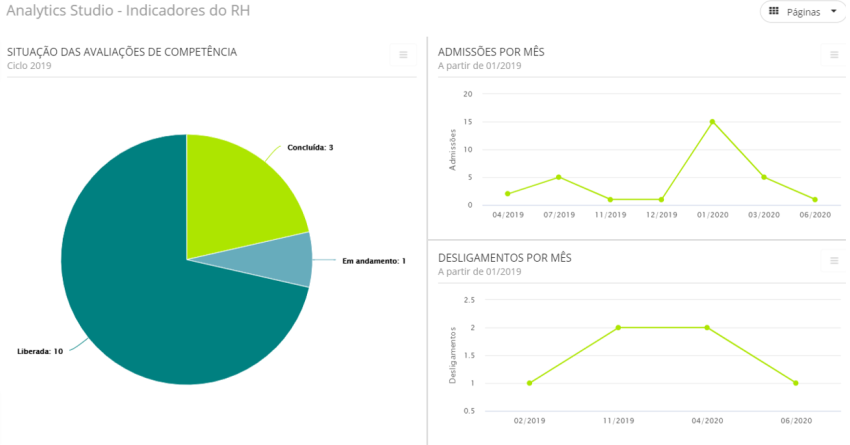
OAnalytics Studio is a feature of the senior X Platform that allows you to displaymanagement information from data that is extracted directly from the systems base.
The information is distributed inpages It islanding pages, forming a complete view of the extracted data:
Benefits ofAnalytics Studio
- Encourage collaboration through interactive reports.
- Increased productivity, as access to information is facilitated.
- Real-time data tracking.
- Data-driven decision making.
- Expanded view with different information accessed in a single location.
- Custom dashboards and analytics.
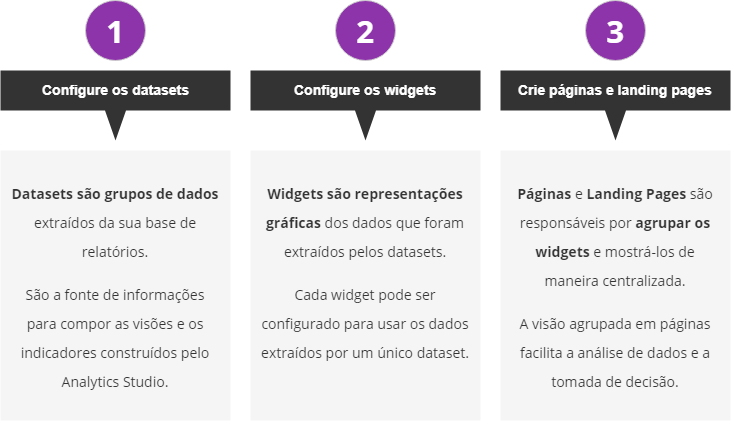
Three steps to create your management vision with Analytics Studio
Prerequisites
Before configuring the components used by Analytics Studio — datasets, widgets, pages and landing pages — you must meet the following requirements:
Create the reporting database
Oreporting database is the base that contains the data necessary to issue reports, execute dynamic views and data sources for datasets used in Analytics Studio.
- Make sure this bank has been created by accessing the menu:Technology > Administration > Reporting Database >Enable Report.
Release necessary permissions
The user who uses Analytics Studio resources must be associated with a role with all the necessary permissions.
- These permissions are assigned via the menu:Technology > Administration > Authorization >Paper Management.
 Resources that need to be released for paper
- For the role that only consults the information generated by Analytics Studio, assign only theTo view.
- For the role that will build, edit and manage information, assign all actions (To edit,Delete ,Personalize It isTo view).
| Permissions required for the role |
|---|
| Analytics (res://senior.com.br/platform/cms/analytics) |
| Pages (res://senior.com.br/platform/cms/page) |
| Widgets (res://senior.com.br/platform/cms/widget) |
| Dataset (res://senior.com.br/platform/dataset/dataset) |
| Dataset [dataset-description]
(res://<tenant-domain>/custom/dataset/<dataset-id>) This permission will be available only after a dataset has been created. There will be one occurrence of this permission for each dataset. |
| Metadata (res://<tenant-domain>/custom/report_database_metadata/<schema-desejado>) |
| Analytic [analytic-description]
(res://<tenant-domain>/custom/analytic/<analytic-id>) This permission will be available only after a widget has been created. There will be one instance of this permission for each widget. |
Tutorial: Create your first vision with Analytics Studio
We've prepared a sample tutorial to explain how to use Analytics Studio.
In this tutorial, the steps necessary to create thevisual representation of the distribution of people by gender in a company.
Did an error occur while configuring Analytics Studio?
See if there is already a solution registered on our troubleshooting page: