
Potential assessment
The potential assessment helps in recognizing the most suitable profiles for job promotion and in better retaining professionals who are critical to the organization.
The main objective of this process is to identify the strengths, areas for improvement and career expectations of employees.
This way, it is possible to identify the competences of each employee and the potential future capacity, so that the organization can reorganize its personnel structure through human mapping.
This assessment is also part of the talent identification, as the potential is assessed based on the talent groups identified in the company.
Process flow
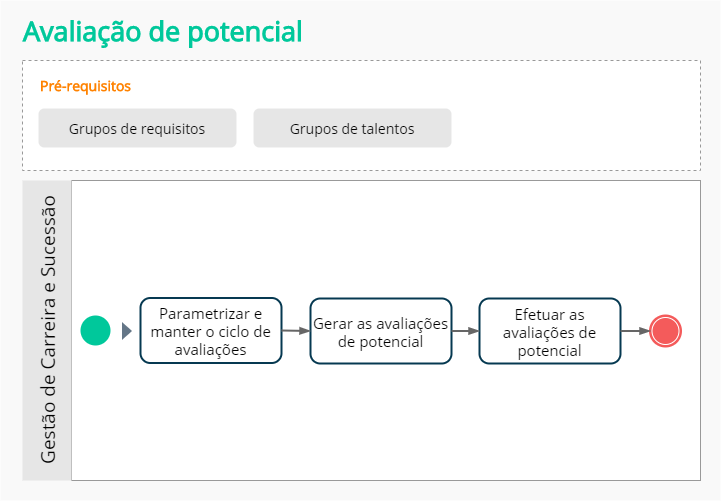
What you can do:
Check the prerequisites of the process
 Import or register group of job requirements
Before starting the process, it is necessary to register the group of job requirements
Alternatively, you canimport the data needed to generate the potential assessments.
These actions are typically performed by employees associated with the HR and Administrator roles.
Note
The system allows you to use the same set of requirements as a competency-based assessment to assess potential. However, if this group has evidence registered, it will not be displayed on the potential assessment screen. Evidence is only displayed in the competency assessment.
For this reason, it is recommended to register groups of requirements to be used exclusively in each type of assessment.
Create talent pools
The talent pool is made up of employees who have been classified as key positions and/or potential successors to a position.
This group will be used later in the generation of potential assessments step.
The creation of this group is a step in the talent identification process and identifies its purpose.
Start and perform the potential assessment
Parameterize and maintain the assessment cycle
The assessment cycle can be registered and maintained through the Maintenance of assessment cycles screen.
Maintenance of cycles is done at the following location:
- Performance management > Registers > Assessment cycle
On this screen, it is possible to define the main rules for the potential assessment process of a given cycle. Can also duplicate an existing cycle, facilitating the registration of the following cycles.
These are the main parameterizations that can be made in the cycle:
Informações do ciclo
Preencha as informações básicas sobre o ciclo:
- Forneça um nome que identifique o ciclo de forma clara.
- Informe se é um ciclo aberto (vigente) ou fechado (encerrado).
- Informe a data inicial e final para indicar o período de vigência do ciclo. Ciclos com data final expiradas serão encerrados automaticamente por um serviço agendado.
- Opcionalmente, preencha:
- uma data limite de admissão de colaboradores a serem considerados no ciclo.
- observações gerais sobre o ciclo, que ficarão disponíveis para consulta para outros usuários que tenham acesso ao cadastro do ciclo.
Configuration by assessment type — Potential assessment
- Scale used to classify the potential assessment result: allows you to indicate a proficiency scale that will be used during the assessment cycle.
- The proficiency scale serves to assess the potential of employees using the notes registered on the scale that was selected.
- Choosing a proficiency scale is optional. If none is selected, the system will use achievement percentages to assess the potential of employees.
- If you choose to use a proficiency scale, it needs to be previously imported or registered in the system.
- Group of requirements: allows indicating which group of requirements will be used to generate potential assessments. When entering a group of requirements, it will be suggested in the filter of the public assessed during the stage of generating the assessments, described below.
Delete an assessment cycle
O sistema permite excluir um ciclo de avaliação, caso necessário. A exclusão pode ser feita pela tela de Manutenção dos ciclos de avaliação, nos seguintes locais:
- Gestão de desempenho > Cadastros > Ciclo de avaliação > botão Ações > Excluir
- ou durante a edição de um ciclo de avaliação, pelo botão Excluir
Atenção
Ao excluir um ciclo, todos os registros relacionados a ele também serão excluídos permanentemente.
Registros como estes serão excluídos de maneira irreversível: avaliações por competências, avaliações de resultados, avaliações de potencial, mensagens e comentários das avaliações.
PDIs criados a partir uma avaliação por competências não são excluídos com o ciclo de avaliação, mas deixam de ser vinculados a uma avaliação.
Informações adicionais sobre a exclusão de ciclos:
- Não é possível excluir ciclos que estejam associados a um ou mais blocos de metas compartilhadas. Nesse caso, é preciso primeiro excluir essas metas vinculadas e depois excluir o ciclo.
- A exclusão de um ciclo de avaliação não é concluída de imediato. Ao confirmar que deseja excluir o ciclo, o sistema criará um agendamento automático para concluir o processo de exclusão. Não é possível selecionar o horário em que a exclusão será finalizada.
- O ciclo de avaliação ficará com o status Aguardando exclusão até que o processo agendado seja concluído. Não é possível editar o ciclo de avaliação com este status, tampouco cancelar a exclusão anteriormente confirmada.
- Caso ocorra alguma inconsistência que impeça a exclusão do ciclo do ciclo de avaliação, será apresentado o status Erro ao excluir. Nesta situação, entre em contato com seu canal de Suporte e solicite atendimento para avaliar o ocorrido.
- Um log (registro) é gerado, identificando o usuário que solicitou a exclusão, com data e horário. Este usuário ainda receberá um e-mail de confirmação da solicitação de exclusão, com um resumo da quantidade de registros relacionados que também serão excluídos. Quando o processo de exclusão for concluído, o log também será atualizado.
Generate potential assessments
The person assigned to the HR role needs to set the assessment type for potential. You also need to specify which competencies will be assessed and who the assessor is who has been set up for this group of people.
To generate potential assessments follow these steps:
- Access the menu Performance management > Maintenance > Generate assessments. In the assessment type, select Potential Assessment.
- In the field Cycle, select an assessment cycle to which potential assessments will be linked. Assessment cycles must be previously registered, as described in the cycle parameterization step.
- Indicate the rule that the system must follow to handle a possible assessment overlap for the target audience. These are the available options:
- Do not overlap, generate only for employees with no assessments: assessments are generated for employees who do not have any assessments, such as: employees returning from leave, employees with a minimum period of experience, employees on vacation, newly hired, among others.
- Do not overlap, always generate a new assessment: new ratings are generated. Previous assessments by selected employees, even if they do not yet have notes/comments posted on the form, will not be deleted. The assessment is only generated if it is different from the situation Completed.
- Overwrite existing assessments: if this option is selected, the assessments that have already been generated for the informed employees, who are in a situation Released or that have comments or that have already been started, with a status In progress, are deleted and a new assessment is generated. This operation excludes assessments that are not in the situations Completed or Canceled and generates a new one if it is not completed.
Note
If specific employees or registrations are not informed (in the filter), assessments will be generated for all employees of the company who do not have an assessment for the cycle.
- In the target audience settings, fill in the filters that define the audience that should receive potential reviews:
- Reference date: date that will serve as the basis for searching the group of requirements.
- Group of people: allows you to select one of the groups of talents that are registered.
- Assessor: suggests the person in charge defined in the talent group registration as an assessor suggestion, but you can change it using the field search.
- Group of requirements: suggests the group of requirements registered in the cycle.
Observation
The validation of the filters will only be done at the end of the generation of the assessments and the inconsistencies found will be presented in the log screen.
- After informing which audience will be assessed, click on Generate to start generating assessments. You will be notified when the process is complete.
When clicking on the process completion notification, you are directed to the potential assessment generation log screen.
If errors occur or assessments are not generated for any specific reason, they are displayed on the log screen.
- No competency has been defined for the requirements group.
- Assessed does not have a defined job position. Occurs when the assessed person does not have a division history on the generation reference date.
- Assessed does not have a defined job position. Occurs when the assessed person does not have a job position history on the generation reference date.
- Error generating assessment. Regarding a failure in processing, different from the previous reasons.
Attention
The generation of the potential assessment will make it impossible to later exclude the group of people linked to it.
Assess the potential of the indicated employees
The potential assessment is carried out based on an analysis of the skills of the employees who wereidentified as part of the talent pool from the company.
Competencies are usually defined and assessed by a performance committee, which designates a single assessor — usually the manager — as responsible.
Managers and employees record the final grades for the criteria evaluated by the validation committee and, for each analyzed criterion, inform the concept best suited for each competency. Concepts are levels that make up aproficiency scale defined by the organization.
Maintain potential assessments
A maintenance of potential assessments allows you to change some properties of assessments after they have been generated. This action can be done for a specific assessment or for multiple assessments.
To do this, access the menu:
- Career and succession > Maintenance of potential assessment
Use the filters to find employees (active and retired) who are assessed or assessors in the selected cycle.
During assessment maintenance you can:
- Change an employee's assessor or indicate an assessor for them (if they don't have one)
- Define a situation for the assessment
- Delete assessments that have already been generated. To ensure the best system performance, it is possible to delete 50,000 records (assessments) at once.
Note
Depending on the number of reviews selected for deletion, processing may take a few minutes to complete.
If a query is performed immediately after deleting a large volume of assessments, they may still appear for some time in some places, such as the assessment maintenance screen.
How the potential assessment is calculated
How the assessment of potential is calculated depends on whether a proficiency scale was selected in the cycle register.
Calculation with proficiency scale:
If a proficiency scale is selected in the cycle registration, the assessor can assign notes of this scale to the employe.
Then the system will use these grades to get the assessment result:

Calculation without a proficiency scale:
If a proficiency scale is not selected in the cycle registration, the assessor can assign achievement percentages to the employee.
Then, the system will use these percentages to obtain the assessment result:

 English
 Español


