
Personnel request sequence
The standard sequence is used to define the salary approval/definition steps of the personnel request process.
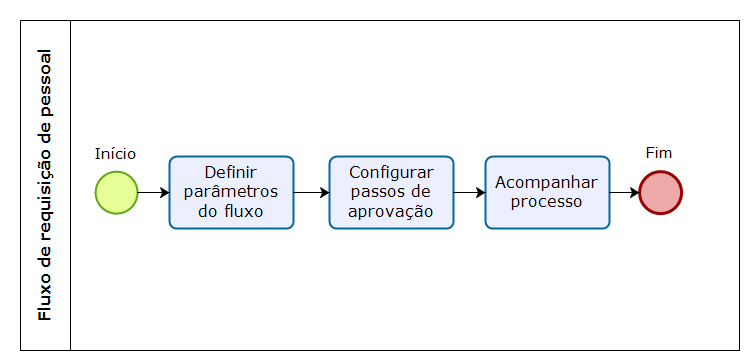
Approval sequence of the Personnel Request process
Configuration
The first step is initializing the approval sequence configuration for staff increases and substitutions in the tenant registration and then configuring the approval steps in: Human Capital Management | HCM > Recruitment Management > Personnel request sequence. In the Sequence Maintenance screen you can set the types of steps that will be used: hierarchy or fixed approval, which can be a person or an approval group;
- Hierarchy: the level corresponding to the last approval stage must be defined;
- Group of People: the members of the approving group must be defined.
- Steps of a sequence that has a process Awaiting approval cannot be modified or deleted;
- At least one sequence step must be configured;
- Up to three sequence steps can be registered;
- The salary fields (salary range) will be available according to the organization parameterizations.
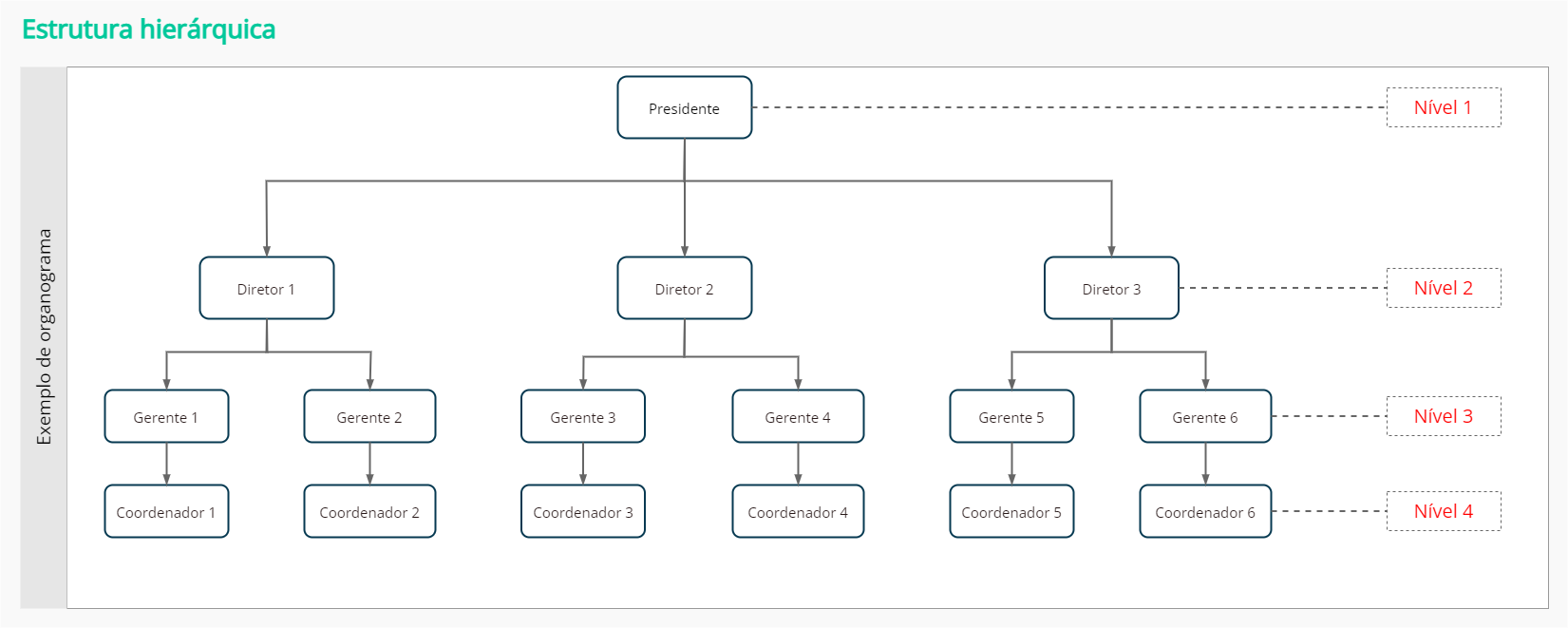
Approval level by hierarchy
The level corresponds to the last approval stage. It must be defined in descending order, considering 1 as the top level, as shown in the image below:
Process monitoring
Two roles are involved in the approval monitoring process:
HR department
This role monitors the processes in: Human Capital Management | HCM > Recruitment Management > Requests > Process monitoring, where you can monitor the Personnel Request openings which are pending in the organization. In this screen you can approve or reject a request, regardless of who requested it. Também é possível pesquisar pelo código, nome do processo, nome do responsável e/ou nome do solicitante nas guias Todos, Em andamento, Concluído e Cancelado e visualizar nos detalhes do processo, todas as informações da requisição de pessoal.
Approver
This is the user who can either be a worker in the organization hierarchy or a member of an approval group of the process, according to the progress of the steps defined for such process. This role monitors the processes in: Human Capital Management | HCM > Requests > My pendencies. This screen has the same functionalities of the process monitoring screen.
Approvers are notified when there is an analysis or approval pendency for processes in progress.
- A worker occupying a job position (for a step in an Hierarchy sequence) and the members of an approval group (for a step in a Group-of-People sequence) are the ones considered as the people responsible.
- A process starts in the In progress situation.
In the process approval, when the step of the current staff increase sequence is configured in the Approval steps which define the personnel request salary range (staff increase) parameter, or when the step of the current substitution processes sequence is configured in the Approval steps which define the personnel request salary range (substitution) parameter, both in the Tenant settings screen, the action to Define salary (salary range) in the Process Monitoring and My Pendencies screens will be mandatory before the process is approved. Quando o nível máximo de aprovação é solicitante, o aprovador seria o líder imediato, evitando que o solicitante seja auto aprovador. Só ir a aprovação para o RH quando o nível 1 for solicitante, porque não haverá mais ninguém acima dele na hierarquia, indo para o próximo passo da aprovação.
Also, when the step of the current staff increase sequence is configured in the Approval steps which edit personnel request information (staff increase) parameter, or when the step of the current substitution processes sequence is configured in the Approval steps which edit personnel request information (substitution) parameter, both in the Tenant settings screen, the action to Edit personnel request in the Process Monitoring and My Pendencies screens will be available.
Approval and rejection
When the process is approved:
- It is submitted for the analysis/approval of the next step in the sequence, if there is any. In this case, the approvers are notified;
- The situation of the process is set to Finished, if the process is in the final step of the sequence;
- The decision of the person responsible is saved (process approved);
- The date, time and person responsible for the decision are registered.
When the process is rejected:
- A justification must be provided;
- The situation of the process is set to Finished and the justification can be consulted;
- The decision of the person responsible is saved (process rejected);
- The date, time and person responsible for the decision are registered.
Approval process history
The personnel request approval history displays the name of the person responsible for each approval, the status (Approved, Rejected, Approval pending) and the approval or rejection date. If the process is rejected, a justification will be shown. The history is displayed in chronological approval order.
The history information can be accessed in: Recruitment Management > Personnel request. The history visualization is available in the All, Under approval, Approved, Rejected and Canceled tabs. Except in the Draft tab, which is restricted to the current stage of the job opening approval process.
 English
 Español


