
Personnel request
Ficou interessado nesse produto? Confira mais informações aqui:

This is the starting point for the Recruitment and Selection processes. It usually occurs with the need to increase the number of workers or to substitute someone. In these cases, the most common procedure is to start the process by filling out a specific form for these demands. This form shows standardized fields for the provision of information and can be called Personnel Request.
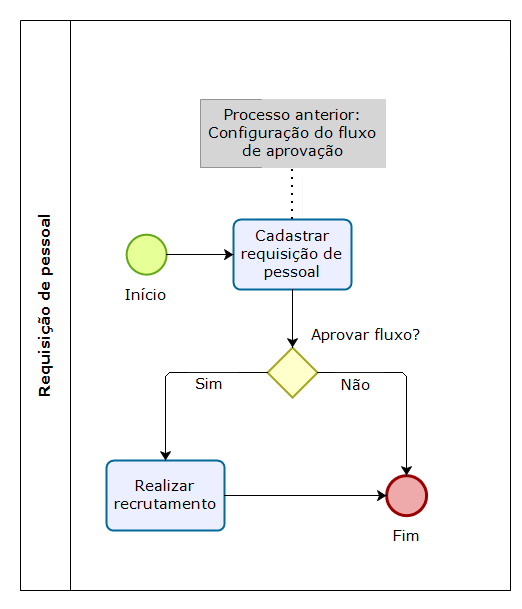
Macro flowchart of the Personnel Request process
Before starting the personnel request progress, the approval sequence must be registered and configured, in order to start the request by form. The Administrator of the module and the HR department are the ones responsible for this process.
Personnel request opening
The opening of the personnel request is made in: Human Capital Management | HCM > Recruitment management > Requests > Personnel request, by the HR and Manager roles. This window allows you to maintain (add/change/delete) the requisitions.
For the HR role, it is possible to consult all open personnel requests, regardless of who requested them (the HR department or the Manager). The Manager role, however, may consult the requests of which they are the requester. In the case of Managers who have led people who also have the Manager role, personnel requests requested by directly and indirectly-led people are also displayed in the consultation. The list considers laid-off Workers and Managers who have more than one work contract, returning the requests of led people in the many contracts.
Note
The requester is the person who opens the personnel request or the person whose name appears as requester, for the cases in which the form in filled out by the HR department.
Upon sending the personnel request for approval:
- The Approver is notified;
- The situation of the personnel request is changed to Awaiting approval;
- The requester is notified when the process is approved or rejected;
- If there is no approval sequence registered for the reason for opening the request: increase of staff or substitution, the requester is oriented by a message;
Notes
- You can only Edit or Delete requests in the Draft situation.
- You can Cancel only requests in the Awaiting approval situation. Requests in the Under Approval situation cannot be modified by the requester.
- Users with the HR role can cancel any personnel request, regardless of the requester.
- The My Pendencies screen also displays pendencies that were finished by another approver, in the Process Monitoring screen. These pendencies can be removed from the process list.
- The salary range and other data of requests in progress can be modified at the Process Monitoring and My Pendencies screens, as long as the approval stages during which the change will be available are configured.
Requester Field
The information in this field is displayed depending on the user permissions, as stated below:
- If the user has permission to view all requesters, all workers in the company will be shown for selection. Example: The HR department defines a worker from the company as the requester of the Personnel request.
- If the user does not have permission to view all requesters and has a selected employment contract, this contract is assigned to the Requester field and cannot be modified.
- If the user does not have permission to view all requesters and does not have a selected employment contract, the Requester field only allows the selection of active contracts of the signed-in user.
Job Field
This field displays the job required for the job opening. The field is only enabled when the Requester field is filled in.
Job Position field
This field displays the job positions under the worker who was defined as Requester in the job position hierarchy. It considers direct and indirect leaders of the active hierarchy in the current date. The field is only enabled when the Requester field is filled in.
Substituted Worker field
This field displays every directly and indirectly-led people, as well as the ones on leave and laid-off workers (with a lay off date), according to the job position hierarchy, considering the last job position occupied by the worker.
If the Consider the same job as the personnel/job opening request for the substituted worker parameter is set to true, the system shows only workers with the same job defined in the Personnel/Job Opening Request registration.
Cost Center Field
This field displays the cost center of the requested job opening. The field is only enabled when the Company field is filled in.
Note
- If the user has the All substituted permission for the request and job opening features, the Substituted worker field will display all workers, including laid-off ones, disregarding the Consider the same job as the personnel/job opening request for the substituted worker parameter. However, when the user does not have this permission, only workers who are led by the job opening requester will be considered, including laid-off workers.
- The Job, Company, Establishment, Cost center and Department fields will be filled out automatically when the data is in accordance with the characteristics of the selected Job Position, previously registered at the Job Position in the Personnel Management module.
Approved personnel request
After the approval of the last step of the sequence, the situations below are changed:
- The situation of the approval process is changed to Finished;
- The situation of the Personnel Request is changed to Approved;
- The Job opening is automatically created with the In progress situation and the following information defined in the personnel request:
- Job opening title (job name);
- Job opening location;
- Job opening description (job opening profile);
- Job;
- Job position: after the personnel request approval, the job opening registered in the request is taken to the job opening;
- Salary range;
- Expected admission/movement date;
- Contract type;
- Employment relationship;
- Start and end dates of the job opening publication: default value Null;
- Consider as a featured job opening: default value No;
- Indicate whether the job opening will be published: default value No.
- The stages of the selection process are created automatically, according to the stages model with the most recent date.
Rejected personnel request
When a staff increase or substitution Personnel Request is rejected:
- The Manager responsible for the request is notified;
- The Personnel Request situation is changed to Rejected and it can no longer be changed;
- The Manager responsible for the request may check the justification for the rejection that was provided by the Approver.
Canceled personnel request
When a staff increase or substitution Personnel Request is canceled:
- The Manager responsible for the request is notified;
- The Personnel Request situation is changed to Canceled and it can no longer be changed;
- The Manager responsible for the request may check the justification for the cancellation that was provided by the Approver.
What can I do in the Personnel Request process?
 Consult approval pendencies
In Recruitment Management > Requests > My pendencies you can consult the approval pendencies which are with the signed-in user or the processes that were approved by the HR department. The Manager is notified whenever there is a personnel request in their name and, upon accessing the My pendencies screen through the system notification or via email, they are directed to the pendency according to the situation: In Progress tab (for cases in which the Manager must approve or reject the request) and Finished tab (if the process has already been approved by another HR user of by the own Manager).
 English
 Español


