
Payment statements (Payslip)

|
This resource can be consulted with SARA, on WhatsApp! |
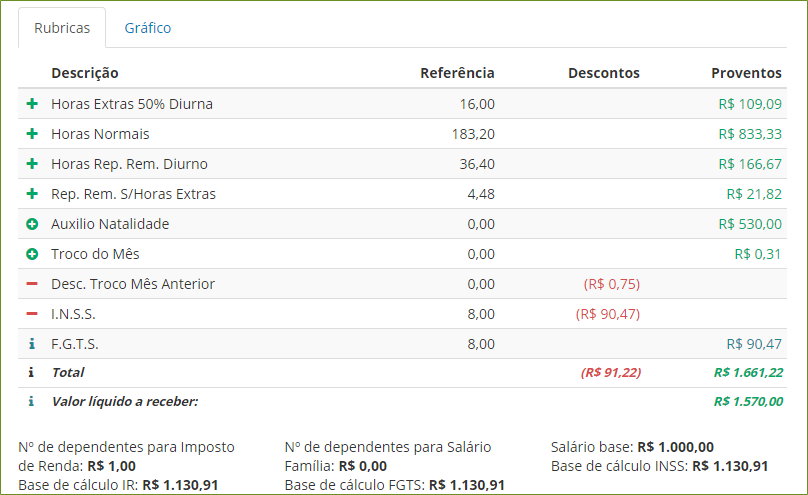
Check your payment statements for each calculation period, through the rubricas or in the chart per rubrica type.
Onde encontrar seu holerite (demonstrativo de pagamento)
Com um usuário associado ao papel de Colaborador, você pode acessar seus holerites pelo menu da plataforma: Painel de Gestão > Contrato de trabalho > Meus demonstrativos de pagamento.
Caso sua empresa possua o sistema integrado com a SARA no WhatsApp, também é possível consultar o demonstrativo diretamente no WhatsApp.
Quais informações são apresentadas
Data generated within the files contain the following information:
- Tipo de cálculo e período correspondentes
- Forma de pagamento (dinheiro, cheque, depósito bancário)
- Net value
- Detalhes das rubricas que foram consideradas no cálculo do valor líquido
 Examples:
Rubricas
Charts
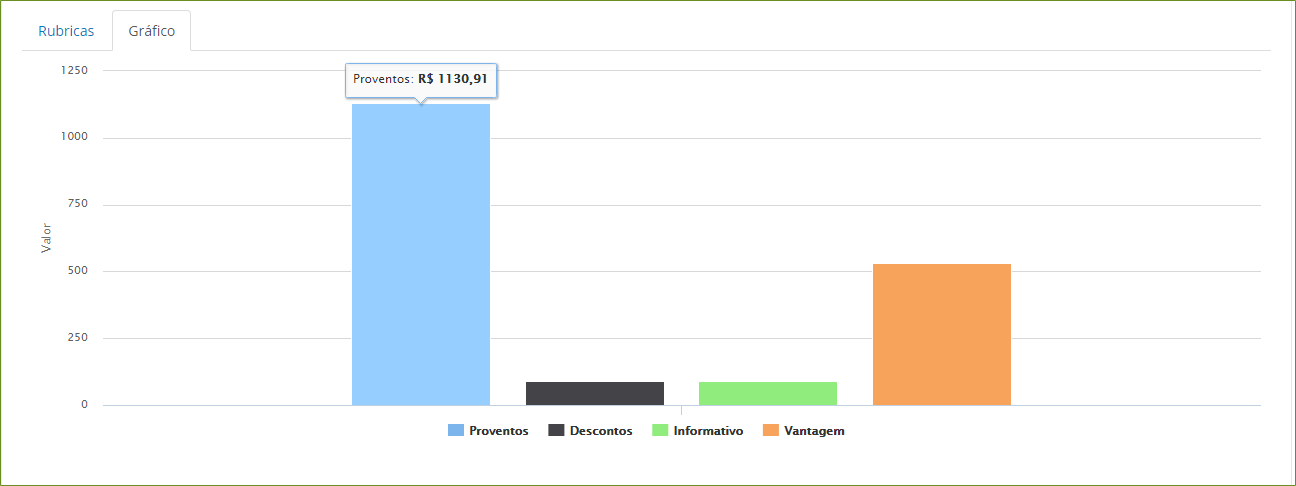
Rubrica types
- Earnings: rubricas payable to the worker, these are summed in the calculation that evaluates the net value. Examples: worked hours, overtime, paid weekly rest periods, benefits and refunds;
- Advantages: corresponds to a budget for payment, but without incurring charges. Example: birth allowance;
- Deductions: rubricas which are deducted from the worker. These are subtracted in the calculation that evaluates the net value. Examples: absence hours, charges (INSS, Income Tax) and plan deductions (health, loans).
- Informative: rubricas which do not influence the net value, but are important to help in its conference and repercussions. Examples: FGTS and benefit calculation bases.
In this screen you can consult the following information: bank account number, number of dependents, deductions and earnings, tax calculation bases and also print the receipt (if the company provides this option to the Worker).
Notes
- A exibição do demonstrativo de cada cálculo depende dos seguintes itens:
- Assinalamento Liberar Folha Portal, localizado na tela de definição de cálculo (FR044CAL) do módulo Administração de Pessoal.
- Geração do relatório FPEN006.ENV pelo Administração de Pessoal, conforme descrito na documentação de pré-requisitos do Painel de Gestão.
- The payment statements whose event is defined as "4 - Other" will not be displayed. Events of this type do not affect the values paid to the worker directly, and are usually used only as a calculation basis for other events.
Veja também:
 English
 Español


