
External recruitment
External recruitment is the search for professionals outside of the company, that is, in the labor market. The external recruitment sources can range from the organization's talent bank to headhunters or recruitment agencies. This model brings some advantages to the company: new ideas, renewal and development of the human resources of the organization, but some disadvantages may exist as well: the process is longer and requires a greater investment in the adaptation process of the new worker, it may have an impact on the satisfaction, motivation and perception of the internal team, as it already had a work routine which will probably be affected by the arrival of new workers.
Important
Se a sua empresa ainda está gerenciando vagas que foram criadas antes de migrar para a versão atualizada deste módulo:
A aplicação dos Termos de Uso e Privacidade não se aplica para as vagas criadas na versão original do módulo, intitulada de Gestão do Recrutamento.
Isso significa que os processos seletivos das vagas, cadastradas na versão original do módulo, não serão impactados quando o usuário não aceitar os Termos de Uso e Privacidade, apresentados no Portal do candidato. Assim, o RH poderá considerar também os candidatos externos que revogaram o aceite como participantes nos processos seletivos em andamento.
E um detalhe importante: ao verificar quais candidatos revogaram o aceite, na tela Banco de talentos, situada na versão atualizada do módulo Gestão de Recrutamento e Seleção, os candidatos que negaram os termos aparecerão como Revogados. Mas, mesmo assim, será possível movimentá-los na tela em que se encontra a Lista de candidatos pois, conforme já mencionado, os Termos de Uso e Privacidade não se aplicam à versão original módulo, e, conseqüentemente, as vagas criadas nela.
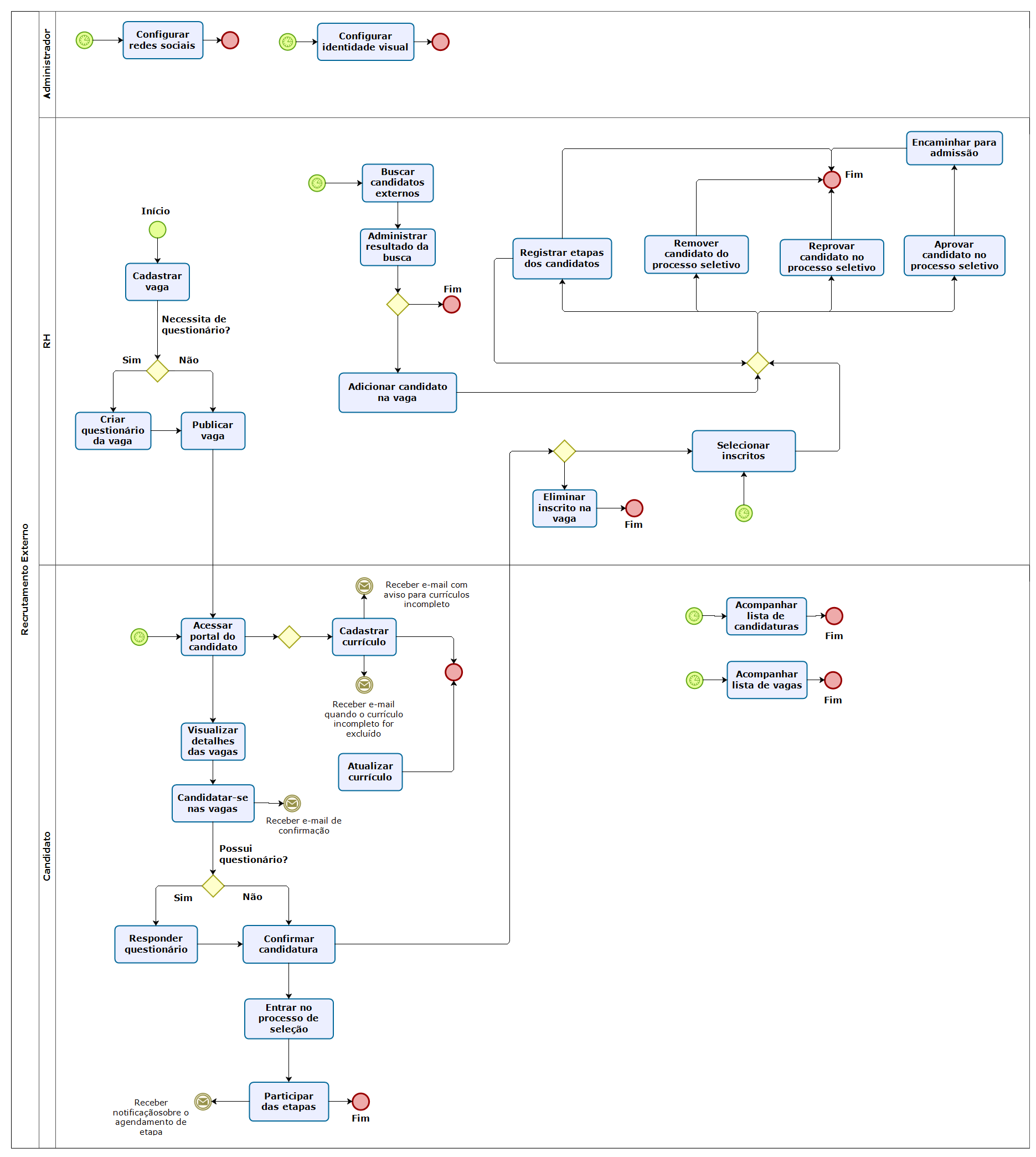
Macro flowchart of the external recruitment process
What can I do in the external recruitment process?
Important
The functionalities of this screen will be available according to the user's permission.
 Configure parameters for the process
Before starting the external recruitment process, the parameters must be configured in: Technology > Configuration > By tenant > HCM > Recruitment > System.
Publish job opening on the career website
In the job opening registration, you can define whether it will be published externally with the Publish job opening on the career website parameter, located in: Recruitment management > Job openings > Add job opening > Publication. You can also schedule the publication period with the Publication start and the Publication end fields.
Add external candidate to the job opening
The external candidate can be added to the job opening in the Candidate search screen or in the Selected tab of the job opening management. In the candidate search you can only filter external candidates.
Manage external candidates applying for the job opening
You can manage external candidates applying for the job opening in: Recruitment management > Job openings > Manage button. In the Applying tab you can view internal candidates (highlighted with the "internal" term) as well as external candidates. In this tab you can also select or remove the candidate.
Select an external candidate when finishing a job opening
When finishing the job opening in the Manage Job Opening screen in: Recruitment management > Job openings Manage button, the recruiter can select external candidates in the selection list for the approved candidate.
View the external candidates' curriculums
You can view the curriculum of external candidates in: Recruitment management > Candidate search and in Recruitment management > Job openings > Manage job openings > Applying tab, Selected tab and Details button of the candidates in the stages.
Carry out profile analysis for external candidates
To analyze the many personality models, the Recruitment Management module is enhanced by an IBM Watson cognitive API that supports the hiring process based on concepts and methods originated in psychology. This tool helps the Recruiter being more assertive in the hiring by searching for behavioral profiles, identifying the profile that is best-suited for a job opening, and comparing similar profiles.
Process
- The Recruiter/Manager define the behavioral profile for a job opening;
- The Recruiter published the job opening;
- Candidates who apply for the process get interviewed;
- The Recruiter and/or Manager view the result of the interview to evaluate the candidate's profile;
- The Recruiter and/or Manager evaluate the composition of all profiles in the candidate search.
Application of the profile analysis in the recruitment process
Administrator's View
The process begins with the configuration of the Minimum time to answer the profile evaluation parameter in the Tenant configurations at Technology > Configuration > By Tenant > HCM > Recruitment > System.

Recruiter View
After the parameterizations, the Recruiter must register the questionnaire to carry our the profile evaluation. The objective is to allow more assertiveness in the analysis of desired behavioral characteristics.
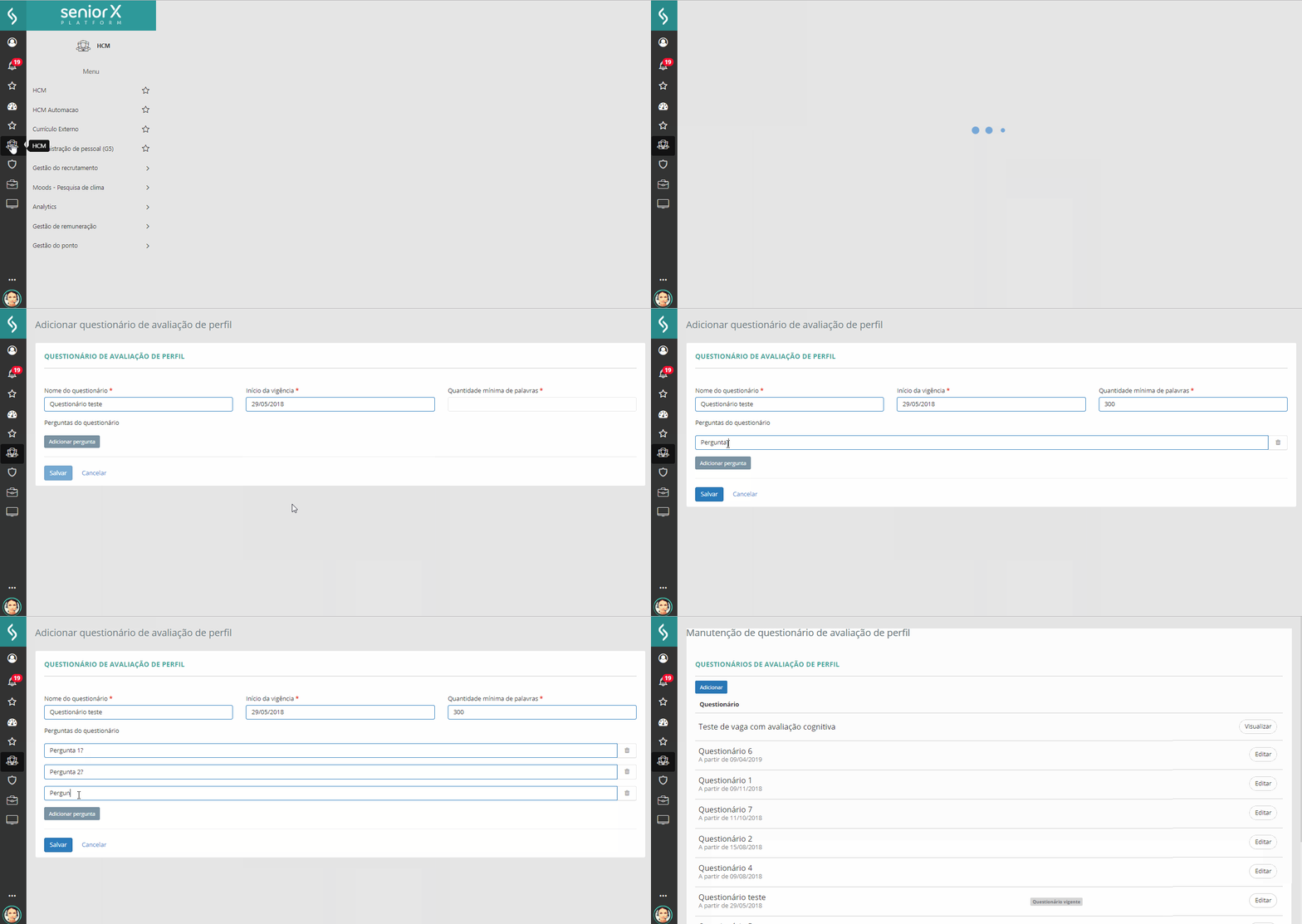
The profile evaluation will be available or blocked depending on the last evaluation carried out by the Candidate and the minimum time to answer the next evaluation. The profile evaluation will be available when:
- there is a default profile evaluation questionnaire;
- the candidate has not answered the questionnaire yet;
- the Minimum time to answer the profile evaluation parameter is not defined by the Administrator or the date on which the candidate carried out his or her last profile evaluation, summed to the value defined in the parameter, is greater than or equal to the current date.
For each job opening, the Recruiter defines the behavioral profile expected from the candidates. This is done via sliders for each dimension of the Profile analysis model in: Recruitment management > Job openings > Add/edit job opening > Profile summary.

Recruiter and Manager View
After the candidates attend the interview, the recruiter has the possibility of comparing the profile of different candidates in relation to the job opening and their compliance to it in: Recruitment management > Candidate search > Profile search. Candidates are ordered by the compliance calculation, which is a simple average of the obtained/expected percentage in each dimension. In this calculation, surpassing in a category does not generate a "bonus", as this surpassing must be analyzed by the recruiter. In some cases, this may be a positive thing and in others, a negative thing.
All profile analysis information is available in the Candidate Information screen.
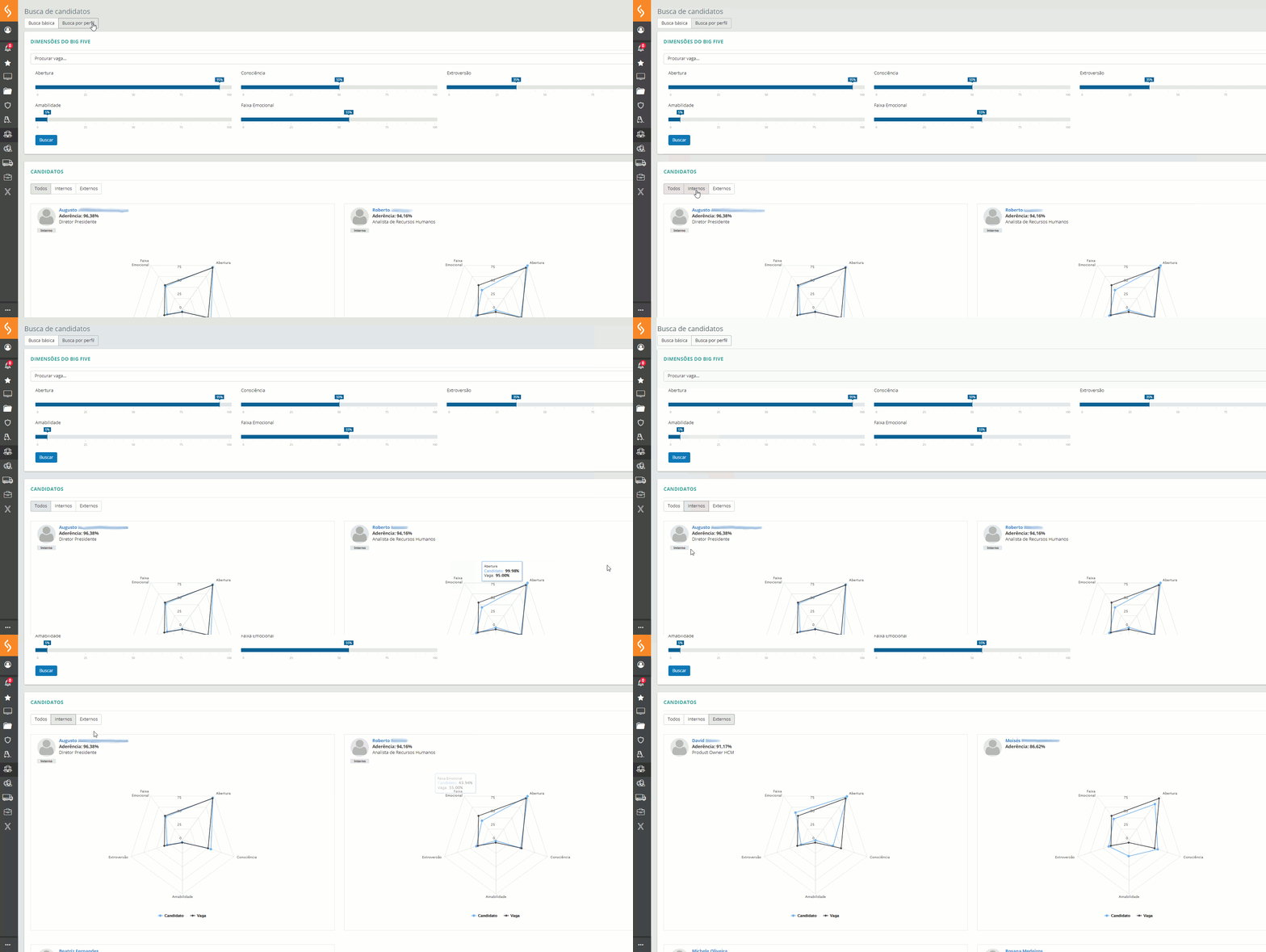
Another location where the personality analysis information is displayed is the Profile analysis tab, which shows the selected internal and external candidates in ascending job opening joining order. The Profile analysis can be accessed in Recruitment management > Job openings > Job opening maintenance > Actions/Manage button > Job opening information > Selected/Profile analysis tab.

Candidate View
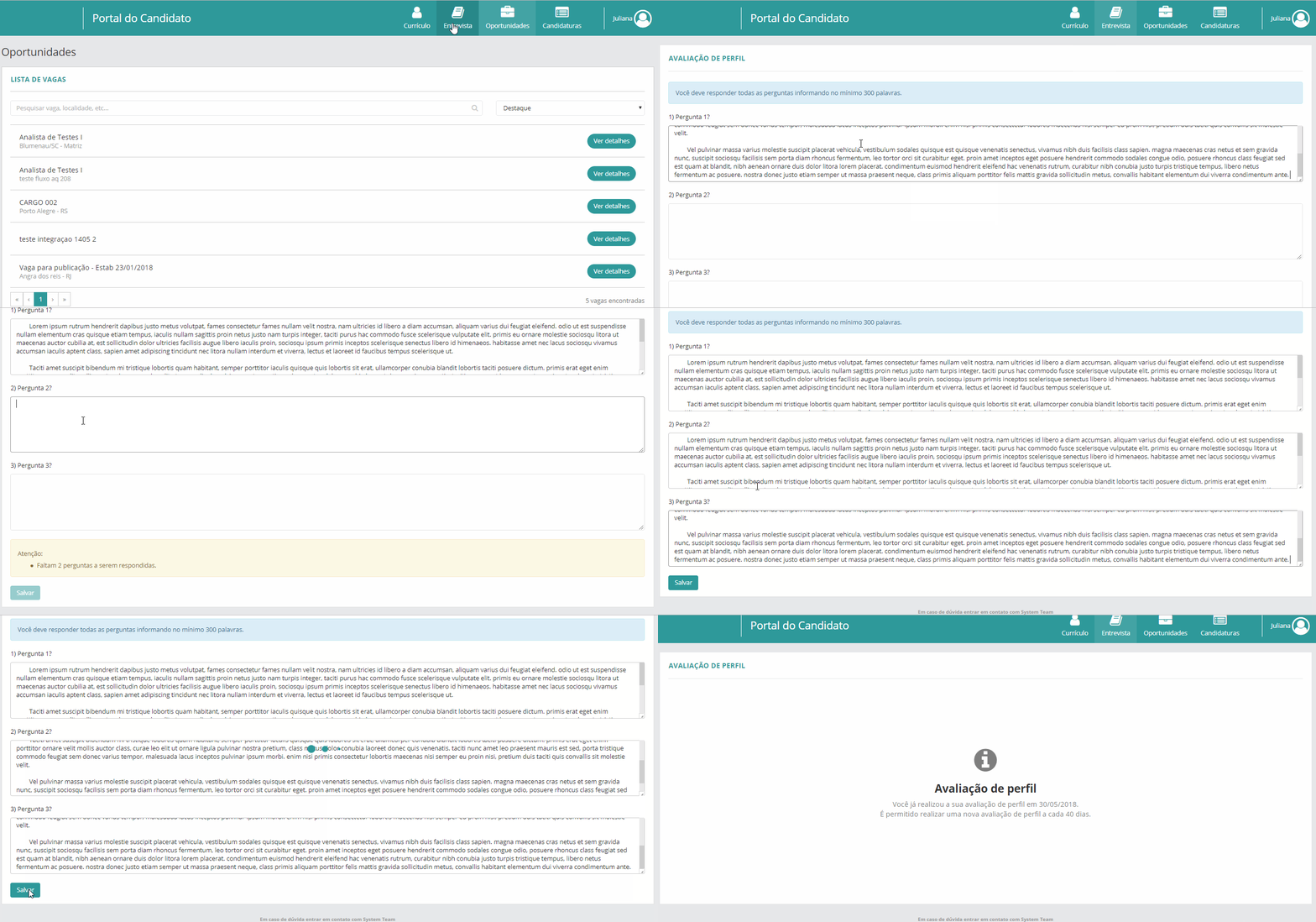
It is in the job opening application process that the cognitive analysis actually takes place. Through an online interview in the candidate portal, a series of questions associated with the behavioral and professional profile are answered. These answers are used for the cognitive processing and generation of the candidate's individual profile, which will be viewed by the recruiter.
 English
 Español


