
Internal Recruitment
The internal recruitment occurs when the organization has a job opening and decides to fill it with its current staff. It may occur by means of:
- Promotion - vertical movement;
- Transfer - horizontal movement;
- Transfer with promotion - diagonal movement.
Workers in the organization, who are the internal candidates, already have their data up to date in the Management Dashboard module in the My profile menu.
Data for the internal recruitment process
- Results of the selection stages;
- Results evaluation;
- Evaluation per competences;
- Trainings and improvements;
- Jobs descriptions;
- Career plans;
- Conditions for promotions and substitutions.

Macro flowchart of the internal recruitment process
What can I do in the internal recruitment process?
Important
The functionalities of this screen will be available according to the user's permission.
 Configure notification parameter for the Manager
In Technology > Configuration > Global you can set the Notify the leader about job applications made by his/her subordinates parameter. If it is enabled, the Manager will receive a notification when a led person applies for an internal job opening.
Access the internal job openings list
The list of internal job openings made available by the company can be viewed by all Workers while the internal publication period is valid. This list can be consulted in: Human Capital Management | HCM > Recruitment management > Internal opportunities > Internal job openings and it can be registered in Human Capital Management | HCM > Recruitment management > Job openings.
Add internal candidate to the job opening
The internal candidate can be added to the job opening in the Candidate search screen or in the Selected tab of the job opening management.
View details of the internal job openings, apply to one of them or recommend it to a coworker
Details of internal job openings can be consulted through the View details button in: Human Capital Management | HCM > Recruitment management > Internal job openings. In this screen you can apply for a job opening during the consultation and also recommend it to one of more coworkers. O botão Indicar para um colega permitir indicar a vaga somente para os colaboradores da mesma organização e é habilitado somente quando a vaga está na situação Em andamento e dentro do período de publicação de vaga interna.
Note
If the current user has more than one work contract, they will be displayed so only one of then is selected during the application for the job opening.
Monitor people applying for internal job openings
The monitoring of candidates applying for internal job openings is done via notifications. The recruiter in charge is notified, once a day, whenever there are new internal candidates applying.
Important
The notification is sent only for job openings with a responsible person assigned . Job openings without a person responsible will not receive notifications.
Monitor internal applications of your led people
For each application of a led person in an internal job opening, the Manager is notified, if the company allows this option. This notification is also sent by email.
Consult the job applications list
At Recruitment Management > Internal opportunities > My applications you can view all internal job openings for which the Worker has applied, regardless of the job opening situation. In this screen you can access the job opening details, if it is still available, and delete the application to the job opening.
Manage internal candidates applying for the job opening
You can manage internal candidates applying for the job opening in: Recruitment management >
Select an internal candidate when finishing a job opening
When finishing the job opening in the Manage Job Opening screen in: Recruitment management >
View the internal candidates' curriculums
You can view the curriculum of internal candidates in: Recruitment management > Candidate search and in Recruitment management > Job openings > Manage job openings > Applying tab, Selected tab and Details button of the candidates in the stages.
Carry out the profile analysis for internal candidates
To analyze the many personality models, the Recruitment Management module is enhanced by an IBM Watson cognitive API that supports the hiring process based on concepts and methods originated in psychology. This tool helps the Recruiter being more assertive in the hiring by searching for behavioral profiles, identifying the profile that is best-suited for a job opening, and comparing similar profiles.
Process
- The Recruiter/Manager define the behavioral profile for a job opening;
- The Recruiter published the job opening;
- Candidates who apply for the process get interviewed;
- The Recruiter and/or Manager view the result of the interview to evaluate the candidate's profile;
- The Recruiter and/or Manager evaluate the composition of all profiles in the candidate search.
Application of the profile analysis in the recruitment process
Administrator's View
The process begins with the configuration of the Minimum time to answer the profile evaluation parameter in the Tenant configurations at Technology > Configuration > By Tenant > HCM > Recruitment > System.
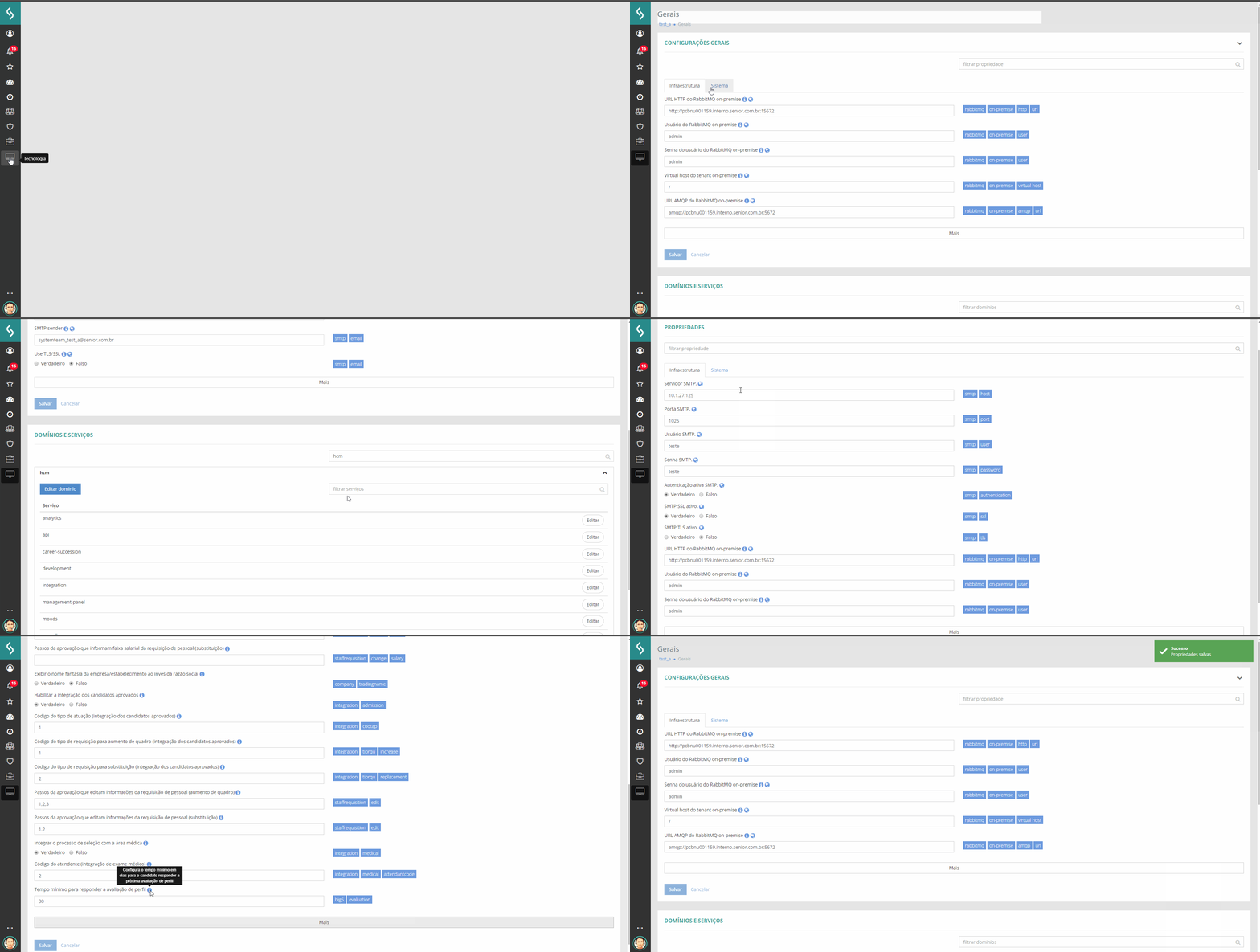
Recruiter View
After the parameterizations, the Recruiter must register the questionnaire to carry our the profile evaluation. The objective is to allow more assertiveness in the analysis of desired behavioral characteristics.
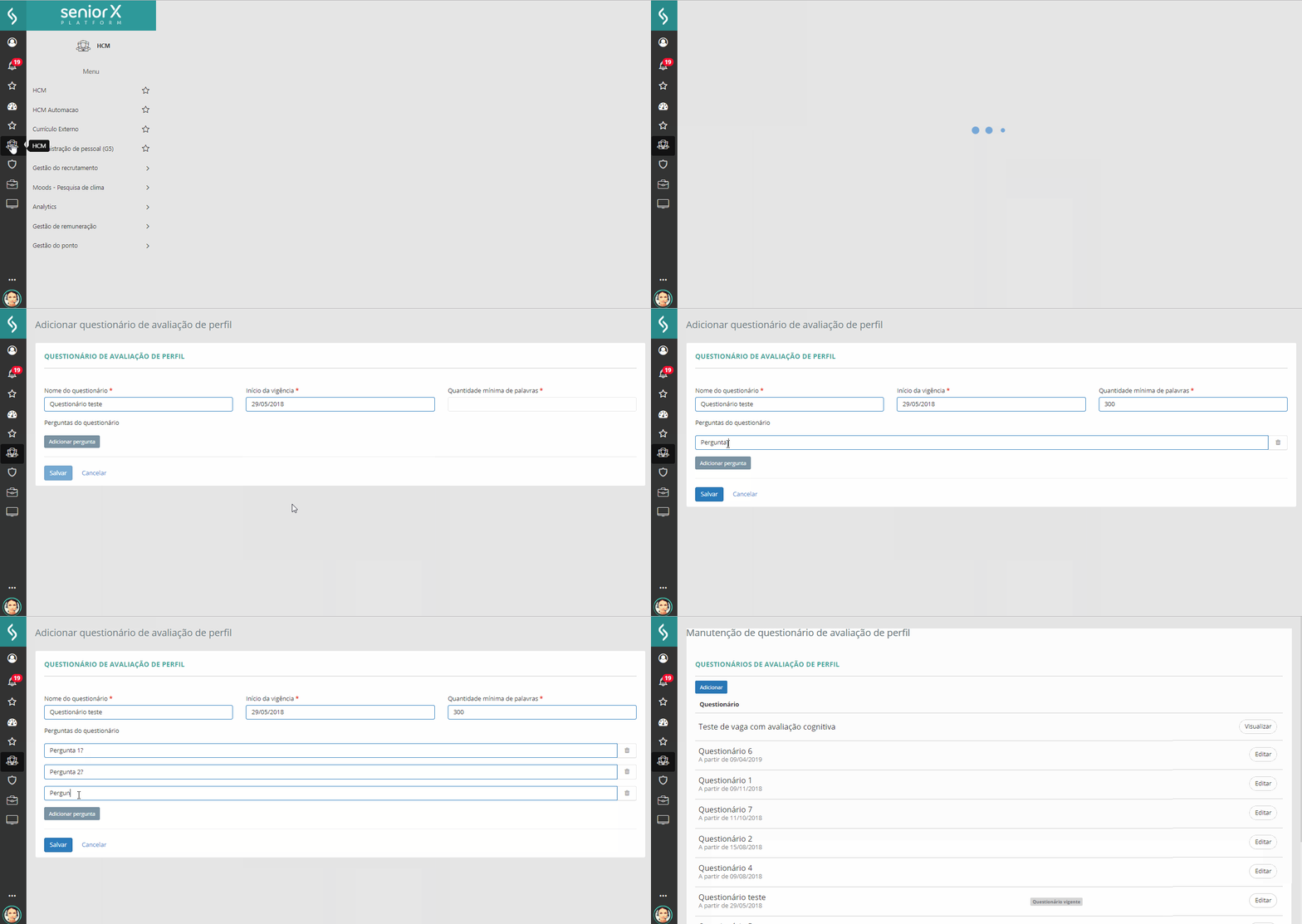
The profile evaluation will be available or blocked depending on the last evaluation carried out by the Candidate and the minimum time to answer the next evaluation. The profile evaluation will be available when:
- there is a default profile evaluation questionnaire;
- the candidate has not answered the questionnaire yet;
- the Minimum time to answer the profile evaluation parameter is not defined by the Administrator or the date on which the candidate carried out his or her last profile evaluation, summed to the value defined in the parameter, is greater than or equal to the current date.
For each job opening, the Recruiter defines the behavioral profile expected from the candidates. This is done via sliders for each dimension of the Profile analysis model in: Recruitment management > Job openings > Add/edit job opening > Profile summary.
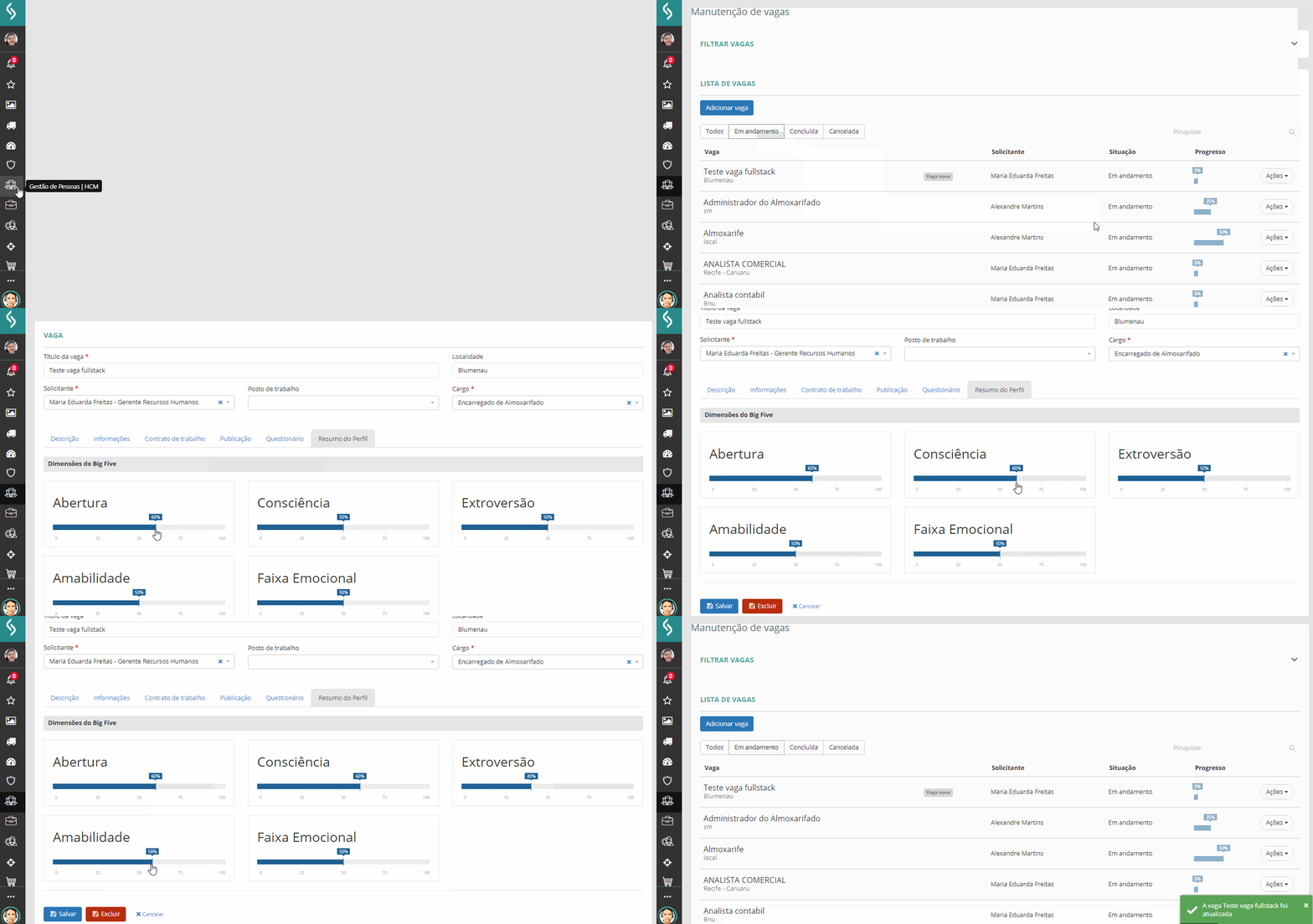
Recruiter and Manager View
Depois que os Candidatos internos respondem o questionário em: Gestão do recrutamento > Oportunidades internas > Avaliação de perfil, o Recrutador tem a possibilidade de comparar o perfil de diferentes candidatos em relação à vaga e a aderência deles na vaga em: Gestão de recrutamento > Busca de candidatos > Busca por perfil. Candidates are ordered by the compliance calculation, which is a simple average of the obtained/expected percentage in each dimension. In this calculation, surpassing in a category does not generate a "bonus", as this surpassing must be analyzed by the recruiter. In some cases, this may be a positive thing and in others, a negative thing.
All profile analysis information is available in the Candidate Information screen.
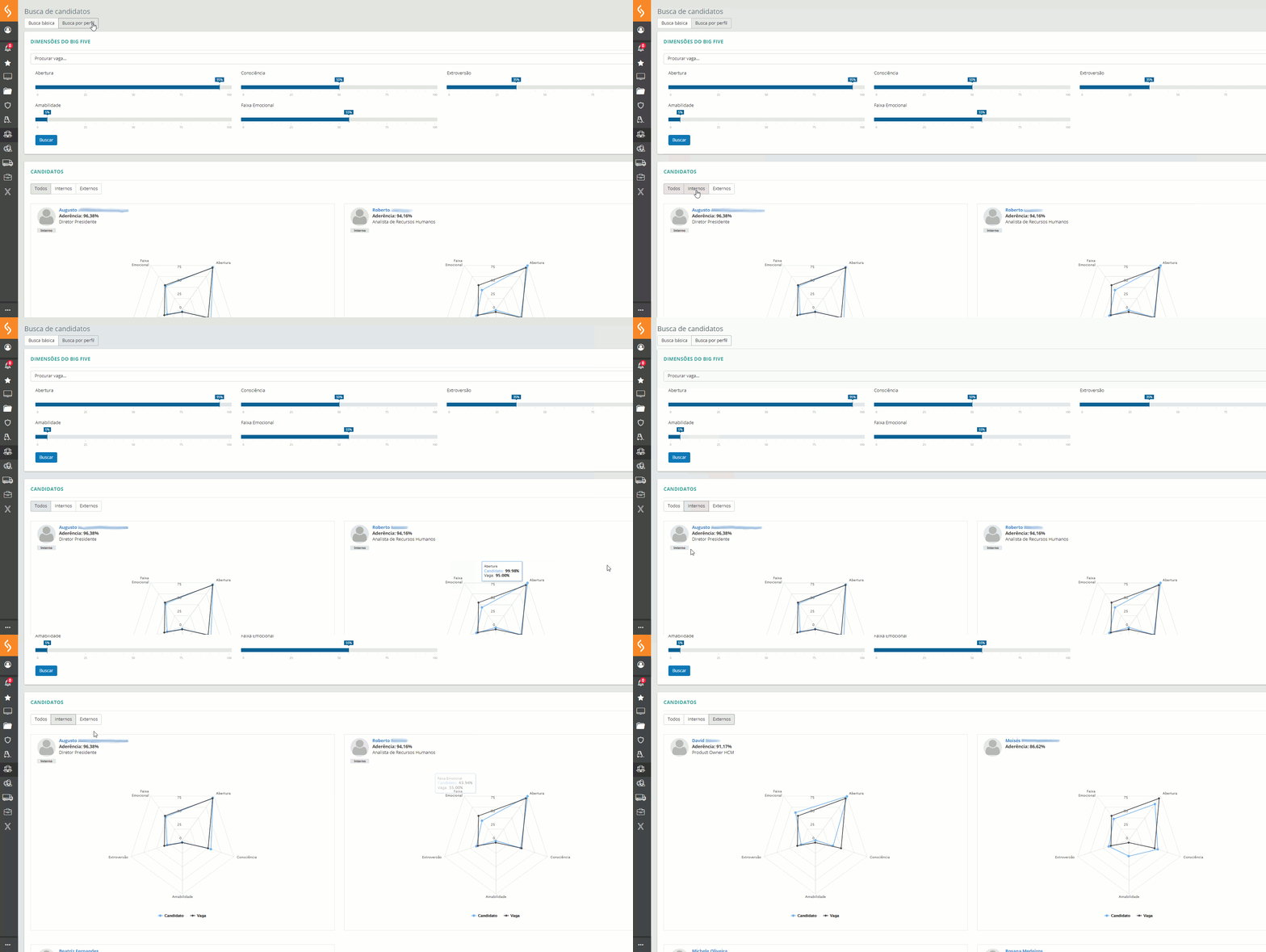
Another location where the personality analysis information is displayed is the Profile analysis tab, which shows the selected internal and external candidates in ascending job opening joining order. The Profile analysis can be accessed in Recruitment management > Job openings > Job opening maintenance > Actions/Manage button > Job opening information > Selected/Profile analysis tab.

Internal Candidate view
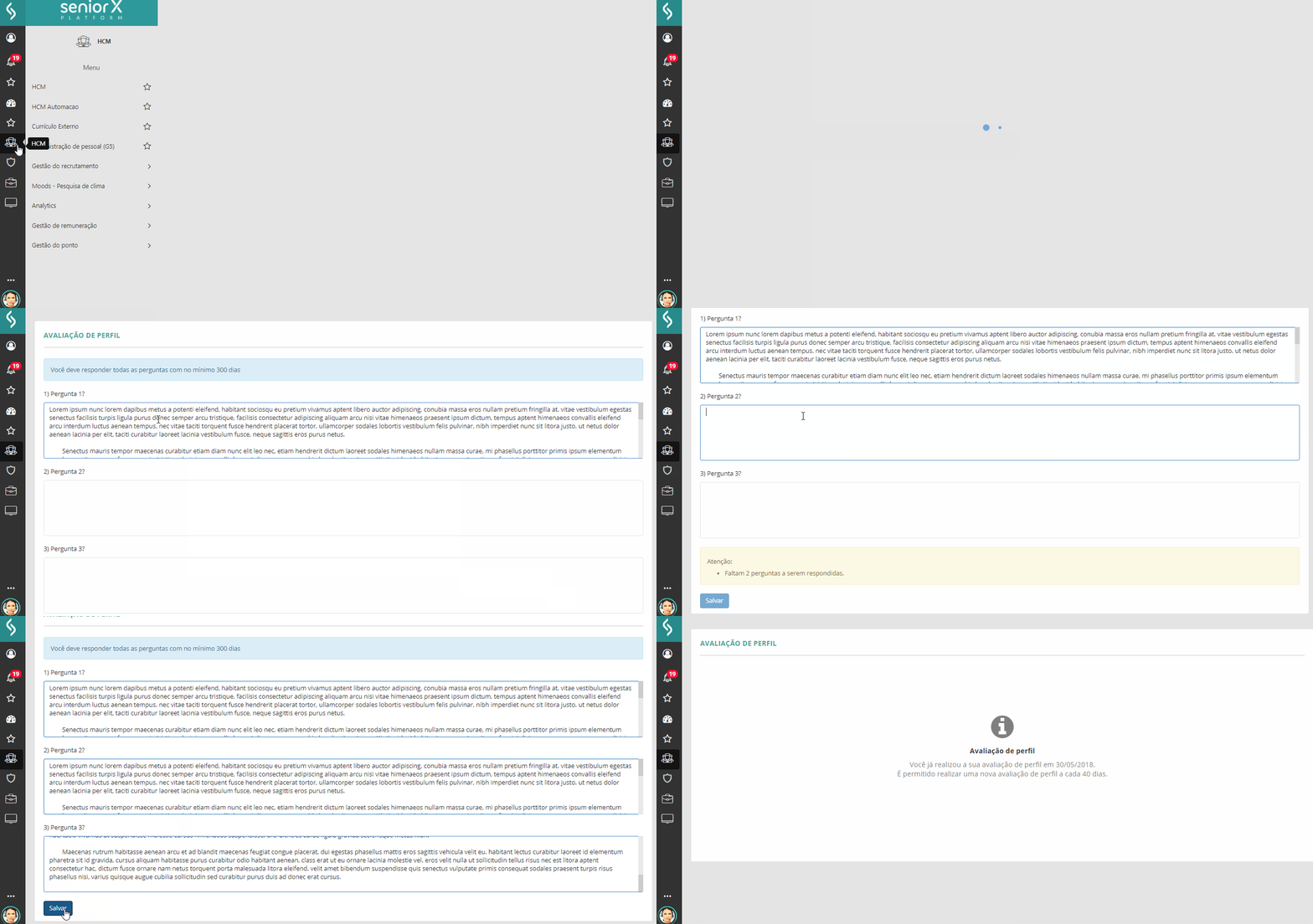
It is in the process carried out by the job opening candidate that the profile evaluation actually takes place. Through a questionnaire carried out in: Recruitment management > Internal opportunities > Profile evaluation, a series of questions associated with the behavioral and professional profile are answered. These answers are used for the cognitive processing and generation of the candidate's individual profile, which will be viewed by the recruiter.
 English
 Español


