Evaluate with comments (Continuous evaluation)
Upon enabling this setting, the competence evaluation form is changed so that each competence is evaluated via periodical comments, with a score or concept and finished with the cycle closure. The default value of this setting is disabled. Esse tipo de avaliação somente pode ser avaliada pelos gestores, não necessitando de informações adicionais de avaliadores.
Allow evaluators to delegate evaluations
Upon enabling this setting, the Delegate evaluations button becomes available for evaluators so that they may transfer the competence evaluation to another person. The default value of this setting is disabled. Evaluation focuses of the Subordinate, Consensus and Continuous Evaluation types may be delegated.
Allow the competence evaluation to be reopened during the cycle
Upon enabling this setting, the Reopen button becomes available in the competence evaluation forms for the self-evaluation, subordinate and consensus focuses. And shall be calculated in the following situations:
- it is being reopened by the evaluator (who is not the delegated evaluator).
- dentro do período vigente do ciclo
- quando a avaliação de consenso estiver liberada (diferente de "Em andamento" e "Concluída").
Upon reopening the evaluation, it returns to the In Progress status. The default value of this setting is disabled.
Note
Delegated competence evaluations cannot be reopened.
Apresentar resultados após concluir todas as avaliações por foco
Ao habilitar esta configuração, os resultados das avaliações serão apresentados ao avaliador somente depois que todas as avaliações estiverem concluídas, para todos os focos.
Ao desabilitar esta configuração, o avaliador pode ver os resultados parciais das avaliações a medida em que elas são concluídas.
The default value of this setting is disabled.
Scale used to rate the result of the competence evaluation
This selection field allows you to indicate the proficiency scale that will be used during the evaluation cycle.
Alterando uma escala de proficiência
Caso seja necessário alterar a escala de proficiência de um ciclo, recomenda-se seguir esses passos:
- Reabrir as avaliações que estão calculadas e finalizadas, no processo de avaliações por competências.
- Alterar a escala de proficiência, para a nova escala desejada.
- Concluir novamente as avaliações. Após isso o sistema irá recalcular as notas das avaliações usando a nova escala.
Note
Não é aconselhável alterar a escala de proficiência de um ciclo depois que já tiverem as avaliações por competências com focos já calculadas, visto que as notas dessas avaliações já foram apuradas usando outra escala. Com isso, pode ocorrer de as notas calculadas não sincronizarem com a nova escala que foi definida.
Visualizar resultados pelo nível de proficiência
Quando este assinalamento é ativado, o valor da média real é arredondado para coincidir com o percentual final cadastrado para o nível de proficiência correspondente. Por padrão, este assinalamento é iniciado como habilitado.
Se quiser saber como o sistema calcula a média real e as notas das avaliações por competências, acesse a documentação de formas de cálculo.
Nota
- Se o parâmetro Visualizar resultados pelo nível de proficiência for alterado no cadastro de um ciclo que já está fechado, as notas já calculadas nesse ciclo não serão alteradas. O cálculo fica gravado no fechamento do ciclo e não é mais modificado, mesmo que ele seja reaberto;
- Quando o parâmetro Visualizar resultados pelo nível de proficiência ffor desabilitado, o parâmetro Permite informar nota nas evidências da competência deve, obrigatoriamente, ser habilitado. Com isso, ao responder a avaliação, o campo para atribuição da nota na competência continuará bloqueado, porém, o campo para atribuição da nota na evidência ficará liberado. Consequentemente, ao atribuir uma nota para as evidências, o usuário deverá clicar em Aplicar resultado para a nota ser lançada para a competência. Esse comportamento é padrão do sistema, cujo propósito é deixar ambos os resultados (competência e evidência) equivalentes, possibilitando o não arredondamento.
Visualizar média real no resultado da avaliação de competência
Quando este assinalamento é ativado, alguns locais do sistema vão exibir o valor do atingimento das avaliações em forma de percentual (média real) (exemplo: 98.0%). Caso contrário, será exibido apenas o conceito do atingimento (exemplo: ótimo, bom, ruim, insuficiente).
Locais que mostram o percentual de atingimento quando o assinalamento está ativo
Gestor:
- Gestão de desempenho > Matriz de gestão da equipe:
- Detalhes dos quadrantes da Matriz de Gestão
- Consulta de avaliações por competências e detalhamento dos resultados
RH:
- Gestão de desempenho > Matriz de gestão da organização:
Colaborador:
- Gestão de desempenho > Competências > Minhas avaliações por competência
- Lista das avaliações por competências
- Fichas de avaliações e detalhamento dos resultados
Allows entering scores at the competence evidence
Upon enabling this setting, the score field of the evaluation evidence is displayed in the Competence Evaluations screen for the self-evaluation and subordinate focuses. The default value of this setting is enabled.
Require evaluation of competence evidence
Upon enabling this setting, grades will no longer be attributed to competences during an evaluation. Instead, they will be obligatorily be attributed to the evidence of each competence.
The default value of this setting is disabled. In this case, grades will be required for competences, and be optional for evidence. When there is no evidence, the grade will be attributed by the competence.
Note
This parameter does not apply for the consensus focus, only for the others. To make evidence notes mandatory in consensus evaluations, use the Allow evidence evaluation parameter in the Consensus tab of the cycle registration screen.
Cancel automatically the evaluation of laid-off workers
Nesse campo, é possível indicar se as avaliações por competências dos avaliados demitidos devem ou não ser canceladas automaticamente. Por padrão, este assinalamento é iniciado como habilitado.
Note
- O cancelamento das avaliações de demitidos ocorre em um processo agendado todas as noites;
- Somente são considerados no agendamento ciclos vigentes (data de início menor que o dia atual e data fim maior que o dia atual);
- Colaboradores demitidos após a vigência de um ciclo devem ser revisados, via tela de manutenção das avaliações.
Liberar a consulta do resultado da avaliação a partir de uma data
Ao habilitar esta opção, o campo Data de liberação dos resultados é habilitado. Com isso, pode-se definir uma data para que seja liberado o resultado das avaliações de competências. Ou seja, o sistema permite restringir os avaliados de verem seus resultados nas avaliações por competências de um determinado ciclo, e permite definir uma data em que os resultados ficarão disponíveis e os avaliados terão acesso.
Note
- Quando a opção Liberar a consulta do resultado da avaliação a partir de uma data estiver ativa e a data atual for inferior à data configurada na opção, os colaboradores avaliados nas avaliações por competências não terão mais acesso ao resultado da sua avaliação, mesmo que a avaliação de todos os focos já esteja sido concluída;
- Ao informar uma data para bloquear a consulta da avaliação de competências, o Avaliado/Colaborador não irá mais receber a notificação de quando sua avaliação for atualizada. Ou seja, todas as avaliações que forem encerradas com a data menor que a data informada no campo Data de liberação dos resultados não receberão a notificação.
As notificações das conclusões das avaliações de competências levam em consideração a Data de liberação dos resultados. Caso não haja data de liberação, o envio é feito normalmente. Caso o RH deseje comunicar os colaboradores que a avaliação está disponível para consulta, deve-se fazer o processo pela tela de Manutenção das avaliações por competências (como já ocorre atualmente), acessada pela menu Gestão de Pessoas | HCM > Gestão de desempenho > Manutenção > Manutenção das avaliações por competências.
Data inicial e Data final do período avaliado
Informe o período que o sistema deve considerar ao verificar a Quantidade mínima de dias trabalhados.
Situações desconsideradas na contagem de dias trabalhados
As situações preenchidas neste campo serão desconsideradas pelo sistema ao verificar a Quantidade mínima de dias trabalhados.
Quantidade mínima de dias trabalhados
Indique o número mínimo de dias que um colaborador precisa ter trabalhado para que ele seja incluído no ciclo de avaliação. Por exemplo: se este campo for preenchido com 90, neste ciclo não serão geradas avaliações para colaboradores que estiverem trabalhando na empresa há menos do que 90 dias.
Ao verificar o número de dias trabalhados, este campo leva em conta as informações preenchidas na data inicial e data final do período avaliado, e as situações que foram desconsideradas.
Situação de afastamento
Permite definir se devem ser considerados os avaliados que contém ou não determinadas situações de afastamento neste ciclo.
Com esse recurso é possível, por exemplo, impedir que sejam avaliados colaboradores que estão afastados por conta de um acidente de trabalho na data de referência.
Estas são as opções disponíveis:
- Contém: somente serão geradas as avaliações para os colaboradores que se encontram nas situações de afastamento escolhidas.
- Não contém: somente serão geradas as avaliações para os colaboradores que não se encontram nas situações de afastamento escolhidas.
Select the competences that will be evaluated
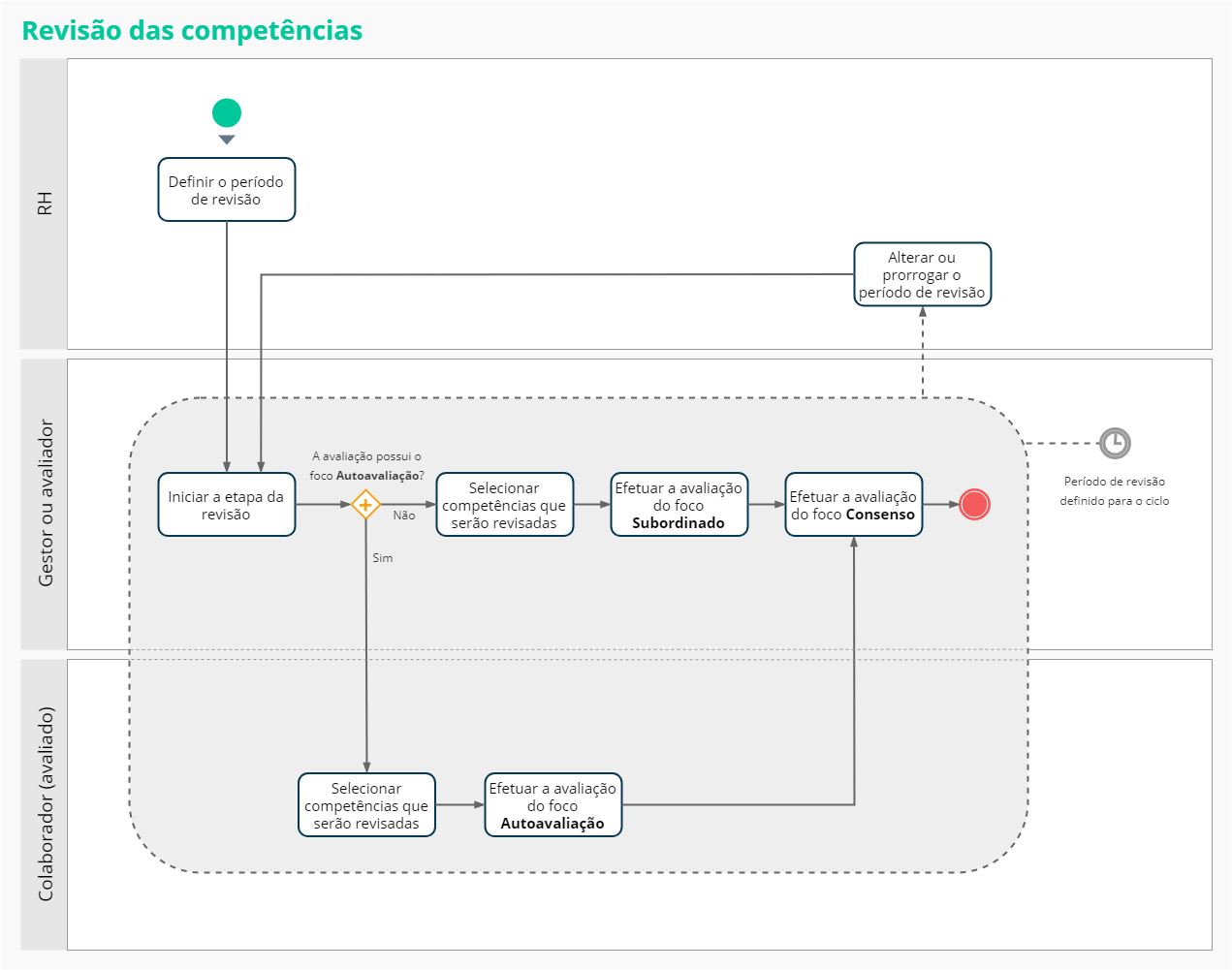
Ao habilitar esta configuração é possível definir a quantidade mínima e máxima de competências, indicar um ou mais grupos de requisitos que possuem as competências comportamentais desejáveis e necessárias e definir os tipos de competências comportamentais que serão apresentados na tela de seleção.
So, the In progress tab is made available for the Evaluator and the Evaluated Person to choose the behavioral competences that will be evaluated during the cycle for the Subordinate, Consensus and Self-evaluation focuses.
The selection of behavioral competences is done by the user (Evaluator or Evaluated Person) who access the functionality first, so that after the selection of competences, the Select competences button changes to View evaluation.
This configuration must be done before the competence evaluation generation process and it is disabled by default.
Note
The competences necessary for the evaluation (already defined by the HR department) will not be shown for the Worker and Manager's selection.
Allow selection of technical competences when accessing the evaluation
Upon enabling this setting, the In progress tab is made available to the Evaluator, so he/she can select the technical (non-tabulated) competences that will be evaluated based on the proficiency scale defined in the Rating used to classify technical competences field, regardless of whether the job/position is associated with a requirement group.
When the option is enabled, you can also set the minimum and maximum number of technical competences that must be selected.
The score/concept of these competences does not influence the end result of the evaluation. This configuration must be done before the competence evaluation generation process and it is disabled by default.
Rating used to classify technical competences
This selection field allows you to indicate the proficiency scale that will be used for the evaluation of technical (non-tabulated) competences.