General settings - Remuneration
The general settings allow you to control the functionalities that affect the process of some routines of the Management Dashboard and other modules.
These settings are available at: People Management | HCM > Management Panel > Settings >general settings.
What you can do with these settings:
general settings
r
egistration updates
ch
aracter standardization
P
erformance Managemen
t
Career and Succe
ssion
F
eedback
Lang
uages
VacationReportsStatement of responsibilityMovement of employeesstatement of payments Dependents Record sheet annotationsNotifications Insights
General settings
The functionality control has the objective of defining what will be available to the users in the following processes:
- consultation of birthdays(deprecated, see note below): defines if thebi
rthdays- It is
- co
mpany birthdays
will be displayed to all users on the dashboard
My Analytics
of each collaborator, according to the options:View birthdaysView company birthdaysObservationThe parametersView birthdays It is View company birthdays have been deprecated and will be removed from the system in a future release. This configuration must be done using the roles and permissions resources of the senior X platform.
To learn how to configure these and other system permissions, accessdocumentation of roles and permissions of the Management Panel.
- Career and Succession: this option controls the availability of the menu referring to the moduleCareer and Succession for users. Access to some screens and functionalities of Career and Succession depend on this indication. For the menus to be visible, enable this parameter.
- View job level: this
- option controls the visibility of thejob level of collaborators. To make the job level visible, enable this parameter. View job level
— if this option is checked, the following types of job levels will be displayed:
- Roman numerals from 1 to 12 (I,II , III , IV,V , SAW , VII , VIII , IX,X , XI , XII);
- Job level beingJunior (JR),Full (PL) andSenior (SR);
- Position status beingUnder Evaluation; It is
- CaseInsensitive It isWith/Without Accent.
|
The system validates this information as follows:
/**/"I",
/**/"II",
/**/"III",
/**/"IV",
/**/"V",
/**/"SAW",
/**/"VII",
/**/"VIII",
/**/"IX",
/**/"X",
/**/"XI",
/**/"XII",
/**/"[jJ][rR]",
/**/"[pP][lL]",
/**/"[sS][rR]",
/**/"[jJ]([uU]|[úÚ])[nN][iI][oO][rR]",
/**/"[pP][lL][eE][nN][oO]",
/**/"[sS][eE][nN][iI][oO][rR]",
/**/"\\([eE][mM]\\s[vV][aA][lL][iI][dD][aA][çÇcC][aAã][oO]\\)"
Note
The job level will always be visible on the screens below, regardless of this flag:
- View job description: configure whether the information from the job description of the collaborators will be displayed or not, according to the option:
- View job description — if this option is enabled, the job description will be displayed in the following places:
Note
The optionView job description only controls the display of thedescription of the charge. This is information provided by theregister of positions, from the Positions and Salaries module.
This description should not be confused with thename or thetitle of the charge. The name and title will always be displayed, regardless of the flag.
Examples:A job description is a breakdown of what the professionals holding the job are expected to do. For example:
- Job title and name: "HR Analyst"
- Job Description: "Acting with the routines of the personnel department, managing benefits and selecting candidates for the company."
- Allow user to approve his/her own request (enabled by default): this parameter prevents a user with the HR role from approving his or her own request in the Vacation and Register update processes.
This indication is valid for when the company has more than one person responsible for approving the worker's requests.
Example:
When an HR analyst requests a register update and the indication is set to "Disabled", only other analysts responsible for the process may assume and approve this request.
- Prevent managers and workers from viewing other companies' information (disabled by default): when this parameter is enabled, users won't be able to view information that doesn't belong to their own company. Information belonging to other companies will be restricted, which affects:
- Dashboard
- Feedback
- Performance Management
- Career and Succession
- Day-to-day management
- Hierarchy
Show additional wages in base salary information- (default setti
ng Disabled): when enabled, this parameter allows the values of each additional salary of the position, such as the percentages of dangerousness, unhealthy conditions and additional function to be displayed on the Management Panel screens that show the employees' base salary. These are the screens impacted by the parameter:Management Panel > Employment Contract > My annual compensationManagement Panel > Employment Contract > My salary evolution
Management Panel > Employment Contract > My professional history Management Panel > Employment Contract > My Employment Contract Management Dashboard > Day to day management > Compare team salaries- type of scope: select the type of scope to be applied to HR, that is, from which companies or branches employee information can be viewed by the HR role. Thus, HR will only be able to view information on employees from branches or companies that are part of the scope, which must be configured in theHR role management
. It is mandatory to select one of two options. By default, the scope is by Company.
Example:
A company has several branches and each of these has an independent HR sector. When selecting thetype of scope perBranch, in Role Management it is possible to select only the branch corresponding to each HR role. Thus, the HR sector at branch 1 will not be able to view the information of employees at branch 2, for example.
Note
When changing thetype of coverage, all Scope settings made in Role Management will be lost and HR will be able to view the information of all Companies and Branches while the setting is not done again.
Register updates
Register update: configure, according to the definitions of your company, which information in the Worker's profile can be edited, registered and deleted and which ones depend on an approval by the Human Resources department, in the following options:
Also define which of these functionalities depend on approval by the Human Resources sector.
- Allow to keep personal data;
- Allow to keep documents;
- Allow to keep addresses;
- Allow to keep personal contacts;
- Allow to keep professional email address;
- Allow to keep the family form;
- Allow to keep emergency contacts;
- Allow to keep professional experience;
|
- Allow to keep the academic education;
- Allow to keep trainings;
- Allow to keep languages;
- Allow to keep the professional certification;
- Allow to keep projects;
- Allow to keep the professional registration;
- Allow to keep Skills
|
The default value of these options is "enabled". An orientation can also be configured by the icon , that will be displayed in the workers' My Profile menu, for the following processes:
- Personal Data;
- Addresses;
- Family Form.
Note
When the Cadastral Update settings are changed, the changes may takeup to 30 minutes to take effect for system users.
Standardization of data characters sent to People Management | HCM on-premises
These parameters allowstandardize character formatting by integrating information from the Management Panel to People Management | HCM (version 6).
This is especially useful when more than one person is responsible for maintaining records in the system, in which case it is common for each person to enter data in a different way.
Convert to capital letters (standard:Disabled) — when this parameter is enabled, the information filled in the fields will have all its characters converted to uppercase.
Example:
Original text: Street: São Paulo, 825.
Standardized text: STREET: SÃO PAULO, 825.
remove special characters (standard:Disabled) — when this parameter is enabled, special characters will be removed from information filled in fields, except email addresses.
Examples of special characters:@*! %;:.
Example:
Original text: Street: São Paulo, 825.
Standardized text: Rua Sao Paulo 825
Comments
- The standardization takes effect on the data that is populated after enabling the parameters. That is, information that was filled in and integrated before enabling them will not be converted.
- The standardization is applied only to the information that is integrated for version 6 of People Management | HCM. Information existing only at the base of senior X systems is not affected by these parameters.
Menus that have fields affected by character conversion
- Employment contract > My family profile
- My profile > Contacts
- My profile > Personal data
- My Profile > Documents
- My profile > Address
- Academic profile > Academic training
- Academic Profile > Training
- Professional profile > Professional registration
Performance Management
- Results evaluation: configure, according to the definitions of your company, if the results evaluation will be available only for consultations or to carry out the results evaluation process through the Performance Management module in the following option:
- Allow changes in results evaluations.
- Management matrix: configure, according to the definitions of your company, if the HR department and the managers will be able to movement workers between quadrants in the Management matrix, in the following options:
- Allow the HR department to move a worker's quadrant in the management matrix
;
Allow Manager to move a worker's quadrant in the management matrix.
-
Individual Development Plan: configure, according to the definitions of your company, the permissions that will be available for the Manager and Worker roles.
- Allow worker to create development plan (disabled by default): upon enabling this configuration, the New objective
becomes available for the Worker, allowing him or her to define objectives and development actions. This option also allows the Employee to define a development objective during theself-evaluation, for this the functionalityAllows you to define objectives in the self-assessment from the screen ofmaintenance of the assessment cycle by the role of HR, must also be enabled;
- Allow changing development objectives approved by the manager: (Default setting Disabled): When you enable this option, the buttonTo edit on the screen My development plan of the Employee is available so that he can change and/or delete an objective approved by the Manager. This parameter must be enabled together along with the Manager must become aware of the development objective proposed by the led people parameter.
- Manager must be aware of the development objectives proposed by subordinates (Default setting Disabled): by enabling this option, the Manager receives a notification whenever an Employee proposes a development objective. At that moment, however, the Manager needs to approve or reject the objectives proposed by the subordinates.
This option is only available when if the Allow worker to create development plan configuration is also enabled.
- Allow worker to always create a development action (disabled by default): upon enabling this option, the New action button becomes enabled for the Worker and he or she will be able to register development actions for the objectives created by his or her Manager.
- Employees must be aware of their development objectives (default setting Disabled): by enabling this option, the Collaborator receives a notification when any development objective is defined or changed;
- Automatically cancel goals for terminated employees (Default setting Enabled): when this option is enabled, whenever an Employee is dismissed, the objectives are automatically canceled and HR is notified with this information.
- Allow selection of the development objective type (disabled by default): upon enabling this option, whenever a Manager/Evaluator or Worker registers a development objective:
- they will have the option of providing the origin of this objective, indicating if it is associated with the current job or the career plan;
their registered development objectives will be viewed divided by category (based on their origin).
- Allow manager to change/finish development objectives of the led person (enabled by default): upon disabling this option, the Edit and Finish buttons of the worker's Individual Development Plan screen will not be available and the Manager will not be able to edit or finish the objectives of the Workers in his or her team.
- Make development objective deadline mandatory (enabled by default): upon disabling this option, the Deadline fields referring to the Objective and the Development Actions, located in the Add Objective screen, do not have to be filled in by the Worker or Manager, allowing the objective and the development actions to be registered without a deadline defined.
- Allow manager to delegate responsibility for PDI (Default setting Disabled): by enabling this option, the manager will be able to delegate the mentoring of team collaborators through the buttonNew Mentor, individually or collectively.
Individual Development Plan: configure, according to the definitions of your company, the permissions that will be available for the Manager and Worker roles.
Career and Succession
- Show percentage of compliance to the job: upon enabling this option, the Worker and the Manager/Evaluator will be able to view the total percentage of compliance to the job, in their career plan screens.
- Show competences in the job requirements of the worker's career plan: upon enabling this option, the Worker and the Manager/Evaluator will be able to view the list of necessary competences, in the Job Requirements Compliance screen.
- Allow indication of successors to jobs that are not key-positions (default value: Disabled): upon enabling this parameter, the following options become available to the Manager:
- the Key-position column which enables the consultation of led people defined for this condition in the Team Succession Plan screen;
- the Add candidate to succession option is displayed in the Workers' options of the My Team screen.
- Questionnaire username and password (default values: blank): these fields are only used when the authentication is done at the https://hcm.senior.com.br address, with the person's business email address. In this case, enter a username and password that are already registered in senior X Platform so that the questionnaire service may be used. This user is used globally when granting access to the screens related to the questionnaire of the Career and Succession module.
If the Tenant already signs in through senior X Platform, these fields do not need to be filled out.
- Consider the employee's projects in the adherence calc
ulation- : by enabling this flag, the following features will be made available:register of requirements: HR will be able to define company projects as requirements for occupying certain positions.
- Professional Profile: the employee will be able to make the equivalence between the projects in which he worked and the projects that HR defined as requirements for the positions.
Dashboard Career Tracks: based on the projects that were defined as requirements, the system will evaluate the adherence between employees who have already worked on these projects and the positions.
- Situations of the courses to be considered in the calculation of adherence: in this checkbox, it is possible to indicate which situations of the courses will be considered to make an Employee (who has in his/her history) adhering to the position.
- All: when selecting this option, the system considers all employees in the adherence calculation. The optionAll, in turn, is the default value of the assignmentSituations of the courses to be considered in the calculation of adherence;
- only completed : when selecting this option, the system considers in the adherence calculation, only the collaborators whose situation of their course(s) is asConcluded;
- Completed and in progress: when selecting this option, the system considers in the adherence calculation, the collaborators whose situation of their course(s) is as Concluded It isIn progress.
Feedback
Feedback: configure the features available for Workers in this process, according to the definitions of your company:
- Allow to write feedback (enabled by default): upon disabling this option, all routines that allow the writing of a feedback occurrence will be disabled, as well as the menu screens and the feedback information in the Worker, Manager and HR Dashboards.
- Allow to request feedback (default value: enabled): upon disabling this option, all routines that allow the request of a feedback occurrence will be disabled, as well as the menu screens and the Request Feedback chart in the HR Analytics.
Important
- In senior X Platform, to configure the feedback permission for users, access the menu Technology > Administration > Authorization > Role Management and enable/disable the following permissions:
- write feedback:
res://senior.com.
br/hcm/performance_management/feedback/newFeedbacks
request feedback : res://senior.com.br/hcm/performance_management/feedback/requestFeedbacksThese permissions must be configured and used together with the permissions of the HCM cloud general settings mentioned above.
- Allow feedback occurrences to be made public (enabled by default): upon enabling this option, the Worker will view an indication to define if the received feedback occurrence will be public or private in his or her profile.
- The proficiency table can be imported by the data import process. The proficiency table can be imported by the process ofdata import. If the proficiency table is not informed, the classification available to the Employee will be the option using the star icons. In order to be able to use data import correctly, it is necessary to have the solutionPerformance Management.
- Sharing methods: upon enabling the options below, they will be available for the Worker when registering feedback:
- Share only with the Manager: the feedback occurrence is visible only to the Manager of the Worker who received it and only this worker will be notified with the information.
- Share only with the Worker: the feedback occurrence is visible only to the Worker who received it and only this worker will be notified with the information.
- Share with the Worker and his/her Manager: the feedback occurrence is visible to the Manager and to the Worker who received it, and both will be notified with the information. This is the default option of the process.
- Don't share (Private): the note/feedback occurrence is visible only to the Worker in the consultation of the public profile of the person who received it, i.e., it is not possible to submit it.
Languages
Define the language proficiency table
You can also define the default application profile that returns the competences of the language registered by the company.
You can also define the default application profile that returns the competences of the language registered by the company.
Note
Proficiency scales are registered in Human Capital Management | HCM and integrated to the Management Dashboard.
Vacation
Parameterizations affect the vacation request process functionalities, which will be either available or blocked for the Worker, Manager and HR roles.
Default reports for vacation receipts, bonuses and notices can also be defined; to do this the functionality must be enabled together with the Enable integrated authentication parameter, and the text that will aid the user in carrying out the request in the following options:
Note
- The Management Dashboard user must have permission to execute the same reports in the Personnel Management module, in Miscellaneous > Users > Permission of Generators.
- The vacation receipt is automatically integrated between Personnel Administration and the Management Panel. That is, after calculating the receipt in Personnel Administration, it will always be displayed on the Management Panel's Vacation screen. This behavior is default and not configurable.
Reports
Payment statement
In this field, the report of thestatement of payment (example: FPEN004.ENV). This information affects the statement print process by the Worker.
Attention
For the payment statement report, if a standard model is used, it is necessary to use the FPEN004.ENV model, as only this report is fully compatible with the Management Panel.
Time card
In this field, the time card report must be entered, for example:
Hour bank balance
In this field, the hour bank balance report must be entered, for example: HRBH009.GER.
Custom report model
If you use custom templates they can be used for all the above reports as long as they are created based on the default templates cited in the examples.
Available for the Modules: Personnel Management and Time and Cafeteria Control. When opening a standard template in Report Generator the input parameter attributes can be viewed and edited in Definition >Prohibited.
Parameter names must be exactly the same as in the default template (example:EiniPerCal).
Liability term
A term of responsibility can be configured for the workers to accept, listing the usage rules and conditions for the system screens.
HR must define the content (text) of the term and select the parameterRequest user agreement to this disclaimer. Thus, the term will be presented to all employees who access one of the screens that require it.
Whenever the contents of the disclaimer are changed, the checkbox in this disclaimer must be checked again, so that users are prompted for the updated agreement.
Screens that require acceptance of the term:
The term is required only to access the screens that are within the menus of the modules below:
- Management Panel
- Exception (does not display the term): vacation policy screen (Management Panel > Vacations > Vacation Policy)
- Performance Management
- Career and Succession
Screens that are outside the menus of the modules above do not require and do not present a disclaimer when accessed.
Note
Information about thedate,hour It isperson who viewed the term, and also theindicative of whether or not she accepted that term.
Worker movement
Control the worker's visibility of company movement
The information about the workers movement displayed in the Worker's dashboard can be configured and maintained according to the policy of the organization in: Settings > General settings > Movement of workers.
In this grid, it is possible to set:
- Projection period
- Worker information
- Movement
- Contract type
- Transference type
Note
The Transference reasons can be registered in the Personnel Management module in Tables > Reasons > Salary adjust.
Payment statement
Verify the latest payment statement available
- My profile > Employment contract > Payment statements
- Summary of annual compensation (Employee > Employment contract > My annual compensation)
The information will be presented as indicated, in three hypotheses:
- If the optionConsider grouping by event type in monthly and annual compensation summaries is enabled, the field will be consideredEvents (description) of the Events Register in Personnel Administration (path: Tables > Events > Events > Register).
- If the optionConsider event totalizers in monthly and annual compensation summaries is enabled, the event totalizers defined as groupers, registered in the Personnel Administration module, will be shown in the graph: Tables > Events >Totalizers. We emphasize that it is necessary to fill in the fieldHomologNet rubric (present in People Management | HCM on-premise version) for the correct operation of this view, as the system will group the totalizers.
- If both options are disabled, the field will be consideredHomologNet rubric of the Events Register in Personnel Administration (path: Tables > Events > Events >Register).
Note
- If an event is not mapped by any totalizer, its value will not appear in the Payment Statement chart and if it is mapped by more than one totalizer, the value will appear doubled.
- Salary advance and salary advance deduction values are not considered in the Current Remuneration Summary chart, as they do not correspond to the sum of values paid to the worker in the year.
Dependents
Allows you to perform two types of settings related to dependents:Inactive Dependents It isIs dependent on the IR.
Settings:
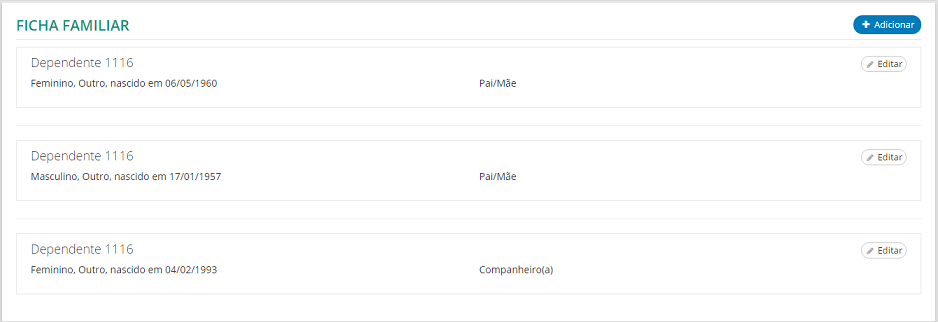
- inactive dependents: It is possible to configure the types of dependents that will not be available to employees in the consultation on the Family File screen in: role Employee > Employment contract > Family file.

Inactive dependents will no longer be displayed in the Worker consultation:
- Is dependent on t
he IR- : For this field to be available, it is necessary to check in Management Panel > Settings > General Settings if:in the
- option Allow to keep Family Card, the fieldRequires HR Approval is enabled;in the Dependents option, the fieldAllow the employee to inform whether the family member is dependent on the IR is also enabled.
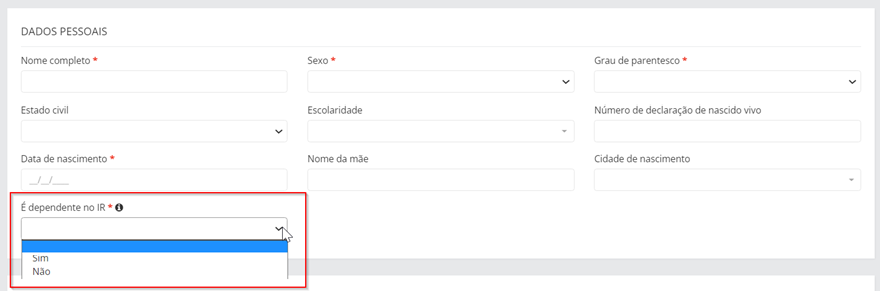
Both fields must be enabled for the functionality to be available to the collaborator:
Note
The family form data update will continue displaying the relationship degree types indicated as inactive, even with this configuration, so that the user can change his or her current dependents to any type.
Registry form annotations
In the Show annotations of the worker's register form indication, configure whether the annotations of the Worker's register form will be visible for the Manager in the Led Person's Profile in: Manager role > My team > Link in the name of the led person.
After enabling the indication, the annotation types that will be displayed can be defined in the Register form annotation field.
Notifications
To unify senior X Platform and Management Panel notifications, it is necessary to enter the following URL in the fieldEnter the URL for the notification links:
https://platform.senior.com.br/plataforma/menu/seniornew.html?category=frame&tenant=tenant_name&link=https%3A%2F%2Fhcm.senior.com.br
In the URL above, replacetenant_name by the customer tenant being deployed.
Example:
https://platform.senior.com.br/senior-x?tenant=senior.com.br//#/?category=frame&link=https:%2F%2Fhcm.senior.com.br
Inform if the X Platform senior page is used for authentication
After providing the URL that will be concatenated, you must Define whether senior X Platform is used for authentication.
Upon enabling this field, the senior X Platform page is used for authentications in noifications sent via email. The default value of this setting is disabled.
Insights
Configure for each Insight, according to your Company's policy, which notifications managers and employees will receive.
- Enable cadastral change notification insight: when this Insight is enabled, thecollaborators now receive a notification (via senior X Platform and by email) requesting the revision of their address and contact telephone information. Attention: usManagement Panel Roles and Permissions, it becomes necessary to activate the feature(res://senior.com.br/hcm/management_panel/profile/myProfile) for this Insight;
- Enable birthday notification insight: when this Insight is enabled, themanagers they start to receive (via senior X Platform and by e-mail) the list of direct subordinates who are going to have a birthday soon;
- Enable company anniversary notification insight: when this Insight is enabled, themanagers they start to receive (via senior X Platform and by e-mail) the list of direct subordinates who will celebrate their anniversary at the company;
- Enable upcoming vacation notification insight: when this Insight is enabled, themanagers start to receive a follow-up notification (via senior X Platform and e-mail) of team members (directly led) who are leaving or returning from vacation the following week. Attention: usManagement Panel Roles and Permissions, it becomes necessary to activate the feature(res://senior.com.br/hcm/management_panel/vacation/manager/calendar) for this Insight;
- Enable staff POI overdue notification insight: when this Insight is enabled, themanagers start to receive (via senior X Platform and by e-mail) a notification with the number of direct subordinates with Individual Development Plans (PDIs) that are expired or close to the expiration date;
- Enable employee POI overdue notification insight: when this Insight is enabled, thecollaborators start to receive (via senior X Platform and by e-mail) a notification about their Individual Development Plans (PDIs) that are expired;
- Enable contract expiration notification insight: when this Insight is enabled, themanagers start to receive a notification (via senior X Platform and by e-mail) warning about the contracts of team members (directly led) that are close to expiry.
By default, all Insights launch as enabled.
For more information about each Insight, see the documentationInsights.
Note
When Insights settings are changed, the changes can take up to 30 minutes to take effect for system users.