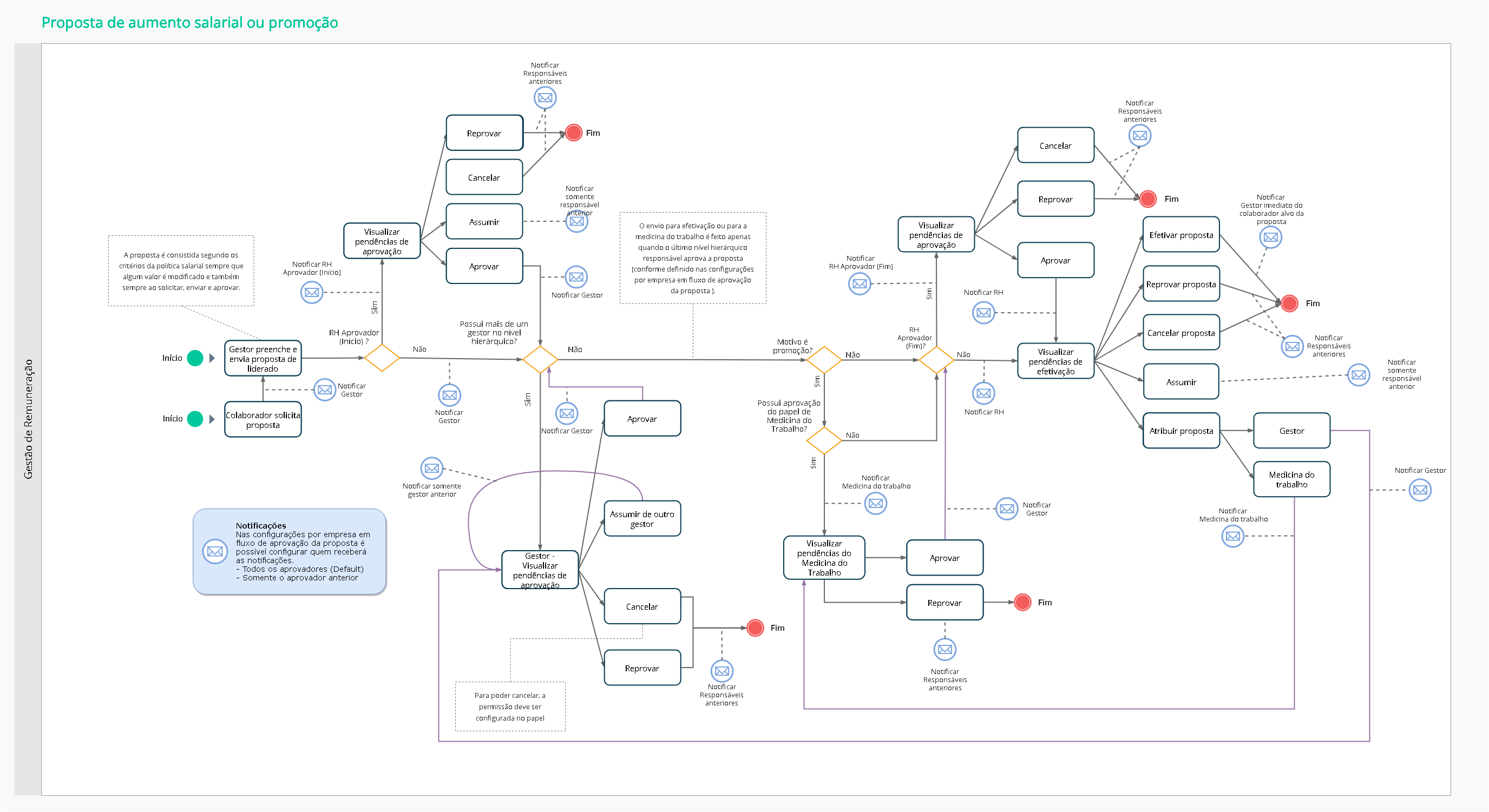
The proposal to change the position and salary is a spontaneous request process, which can be initiated by the employee, manager and/or the people management area - according to what was pre-defined by the company.
When available, the request goes through a native flow, which takes into account the hierarchy of jobs defined and respects the rules set forth in the current salary policy.
The image below shows this macro flow of the proposal process for job and salary changes. To view it, click on it. To close, just click on it again:
Important
The Manager may request a proposal to change the position and salary of direct and indirect subordinates, based on the integrated view of thecontributor information.
After the request, the person responsible for the next step in the approval sequence is notified with the pendency information and, as soon as the request is approved by the last level, the HR department receives a notification with the pendency for execution.
Important
The employee's admission salary is considered a spontaneous reason.
When submitting a proposal, if a valid salary policy exists
The salary raise or job promotion request for led people must be made in:
The reasons for the proposal used in the senior X Platform are the same registered in the versionon-premise, in the Positions and Salaries or Personnel Administration modules. We currently have three options:
To illustrate, the table below presents an example of career evolution:
| From | To |
|---|---|
| Human Resources Auxiliary | Human Resources Assistant |
| Human Resources Assistant | Human Resources Analyst I (or Junior) |
| Human Resources Analyst I (or Junior) | Human Resources Analyst II (or Full) |
| Human Resources Analyst II (or Full) | Human Resources Analyst III (or Senior) |
After choosing the reason for the proposal, it is necessary to fill in the fields related to the salary table.
Important
All calculations on the proposal screen are based on the employee's total remuneration (equivalent to the base salary and additional wages: unhealthy work, dangerous work, among others), not containing ICP (Short-Term Incentive) or ILP (Long-Term Incentive) and benefits .
The salary tables presented have a revision in effect on the current date.
The salary scaleincrease is equivalent to the registration made by thetable and also atstructures registered in the Positions and Salaries module.
Upon inserting information in the proposal table, class and range, the salary equivalent to this information is automatically filled in. In case of a Promotion, the salary suggested by the system is always equal to or greater than the Worker's current salary, that is, the table position considered is the one that has a salary equal to or greater than the current salary.
Another option for filling in the new salary is through the suggestions of salary range values. For this, in addition to choosing the salary class on the Proposals screen (when there is more than one), HR must configure the parameterWhen the salary range, corresponding to the new salary,should be indicated on the Proposals screen?
In addition to the salary table fields, the type of salary, the increase percentage and whether the proposal will be scaled to benefit other employees must be informed.
It is also possible to change the workload of a table, that is, the table will show the calculation proportional to the number of hours worked times what is registered in the table.
When editing an existing table, you can also update it by importing a spreadsheet inexcel.
If the employee's position requires the payment of legal fees and/or additional salary for the function, this data must also be completed in the versionon-premise.
In Senior X Platform Compensation Management, the system calculates the information entered in the versionon-premise to arrive at the final value of additional payments and display them on the screen.
For the Manager who wishes to promote an employee, it should be noted that: when the salary proposal is for a new position, and this position contains additional salaries, the calculation of the new base salary and the total additional salary will be calculated based on the new remuneration .
Important
To request a promotion proposal, a position other than the employee's current position must be informed. If the same position is informed, the buttonSubmit proposal will be blocked, making it impossible to register the proposal.
The information fromdangerousness It isadditional function are obtained from the moduleon-premisePersonnel Administration, at the locations below:
Aunhealthy will be calculated based on the regional minimum wage.
Finally, the Manager must inform the scheduled start date for carrying out the salary increase or promotion for the subordinate. This date can be individually defined for each Worker or as a batch execution. It is up to the HR department top accept or change the scheduling date suggestion.
If the proposal involves a job change, it will not be possible to send it on the same day the employee was hired. In cases where there is no change of position, the date of the proposal may be on the same day of hiring, but it cannot be made with dates prior to the date of hiring.
The available budget consistency may be added when submitting a request for a salary raise or a promotion that changes the Worker's salary.
Some registered data are verified to obtain the budgeted value and realized value of the worker's salaries. One of the verifications refers to the type of scenario for which the budget is controlled, according to the defined settings. The options are:
The realized value of the salaries is obtained by the following method:
The proposal reason is also considered in the available salary budget consistency:
Finally, the realized value is summed to the proposed value to identify if the total is compatible with the budgeted value. If the value exceeds the budget, the permission to submit the proposal will depend on the configuration defined by the HR department:
Important
The month considered for the budget consistency is always the one scheduled for the proposal execution, suggested by the Manager.
The Manager may submit salary raise or job promotion proposals and fractionate the payment of salary adjusts.
Proposals must be executed in Remuneration management > Approve and monitor proposals > Proposal information. All installments will be simultaneously evaluated and approved by the HR department.
The proposal staggering may be requested by the following reasons: framework, merit or promotion. Before enabling the Stagger proposals button, some fields must be filled out, according to the reason of each proposal. They are:
Some details must be observed for the adequate submission of the staggered proposal:
Important
For each change made in the installment values of the staggered proposal, the information will be verified to be consisted according to the salary policy.
If the raise percentage and the time interval between raises criteria are not defined, the data must be defined by the Manager, that is, the system will not suggest any values for the staggered proposal.
Escalation data will be included in the Salary History, located in the modulePersonnel Administration. For each installment of the staggered proposal, a new history will be generated.
Important
We emphasize that, due to the architecture of the system (designed using two decimal places for salaries of monthly workers and five decimal places for hourly workers), there are some cases in which it will not be possible to round off the proposal, especially when the employee has additional wages.
Note the example below:
The Manager, on the Proposals screen, types BRL 8,000.00. However, due to his position, this employee is entitled to a 40% additional function on his base salary. With this, the proposal screen will calculate base salary + additional ones. The calculation will be:
So x = 8000 ÷ 1.4 → x = 5714.2857, where 7 rounds 5 to 6, and 6 rounds 8 to 9.
It follows, then, that the employee's base salary to receive a salary of R$ 8,000.00 will become R$ 5,714.29.
In order to know how much the 40% of additional on your base salary represents, we must make the following calculation:
5714.29 * 40% = 2285.716 → where, by rounding, the value is R$ 2,285.72.
Still in the same example, when we add the base salary + the additional ones, we will have the employee's new salary:
Although the proposal was placed as BRL 8,000.00, the calculation that must be done to reach the salary amount is not rounded as requested. This can happen with cents - either up or down.
Important
Access the documentationRoles and Permissions - Compensation Management to enable the necessary permissions to use this feature.
To request a proposal group, follow the steps below:
At the end of this process, you can also click onInformation to access information about the respective contributor. click inTo save to archive the information.
To proceed with requesting group proposals, select which proposals you want to complete and clickValidate Proposals. It is also possible to exclude one or more proposals, by selecting them and clicking onDelete. If the proposals return without restrictions (signaled by an icongreen the Info button), clickForward Proposals to make the proposal.
If necessary, clickObservation to add information about the proposal, and clickTo save.
Note
It is possible that the proposal returns with some restriction (signaled by yellow icons and/or red on the Info button). This restriction may come from conflicts with theSalary Policy,Vacancy Board orBudget. If the proposal flags a yellow icon, it is possible to proceed with the proposal even with the conflict, that is, there is no impediment. If it flags a red icon, it will be necessary to resolve the impediment to continue the process.
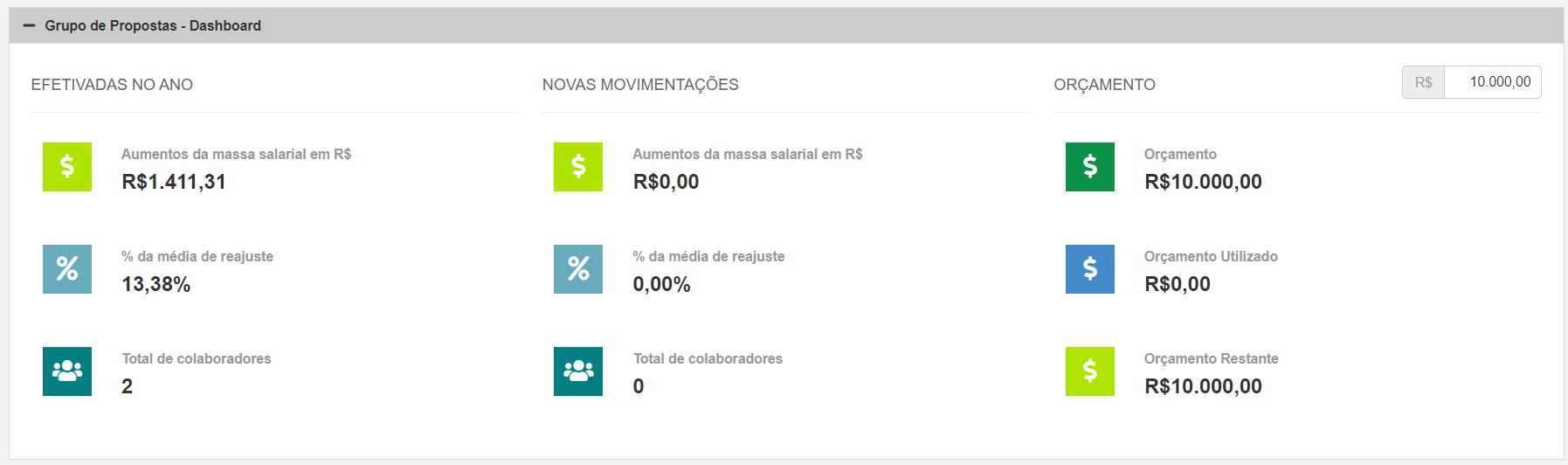
When selecting the registered proposals, a tab above the list of collaborators presents adashboard with information about the proposals made in the year, the new changes in the budget and how the current budget is, as shown in the image below:
To view the proposals generated in a group, you can access Compensation Management > Proposals > Approve and follow up proposals. In the proposal list, the columnProposal type will be displayed with the Group information.
In Compensation management > Proposals > Request increase or promotion, you can request a salary increase or job promotion and inform the justification. This justification will be registered in the proposal history.
After requesting a salary increase or a position promotion, the employee will not be able to make a new request until the process is finalized . The proposal standsIn progress until it is cancelled, disapproved or approved by the last hierarchical level foreseen in the approval process.
The cancellation of the salary raise request can only be made by the immediate Manager.
Proposals pending approval can be accompanied by the list of salary proposals at:
As soon as the Manager forwards the approval of proposals (individual or in batch), the pending approval of the proposals will be the responsibility of the HR sector or of the approvers of the proposal approval flow, if the company makes this option available.
It is important that the Manager suggest a date for the start of the requested actions. The person responsible for the approval sequence may accept or modify the schedule date defined by the Manager.
During the approval process, it will also be possible for the Manager to view a notification in the system that warns of any salary changes, additional or changes in the employee's position and position. When clicking the buttonTo update presented in the notification, the Manager can confirm that he is aware of the change, which will allow the approver to choose whether the proposal should remain at the same value or if the percentage should be applied to the employee's new base salary (if, for example, there has been any change via collective agreement or amendmenton-premise).
After acceptance and approval, the history will show who made the acceptance and which option was selected, including the percentage or value of the proposal.
Important
If user registration information has been registered in the moduleon-premise Personnel Administration,noassociate a collaborator to a user who already has a collaborator associated, in order to request assistance with tasks such as approving proposals, for example.
On the screen for approving and monitoring proposals, both HR and the Manager can check, in whatever situation the proposal is (Pending Approval, In Progress, Rejected, Canceled, Approved, Completed), the data below:
It is possible to approve more than one proposal at the same time. The logged in user who has the three configured permissions will see everything that is for approval with HR. If you only have one or two, you will only see those that are in their proper status.
Proposal data (reason, table, class, range, percentage and value) can be changed while they are pending execution. Thus, information that is outside the policy can be corrected without the need for the Manager to reopen a proposal and restart the flow.
on the buttonActions, option View details, you can check the information registered about the proposal, as well as the history of the request. The other option on the same button allows the user to assume the proposal.
Note
The Manager will see, in the situations In Progress, Disapproved, Approved, Canceled and Completed, only the proposals of Employees who are below him in the hierarchy. All directly- and indirectly-led people are displayed for all contracts of the user (if he or she has more than one contract).
HR can monitor the number of proposals pending effectiveness, pending approval and in progress through:
Whenever there is a pending proposal, the person responsible for executing it is notified.
In order for the proposal to be approved, it is necessary for the applicant to fill out the entire form - which is normally done by the immediate Manager of the employee targeted by the proposal. Effectiveness only happens after approval by the person responsible for the last hierarchical level, informed in the salary proposal settings.
When carrying out a promotion proposal, the characteristics of the job informed by the Manager are sent to the Personnel Administration and/or Positions and Salaries module, in the form of a newhistoric for the Collaborator. The records involved are: programming date and effective date, position, location, cost center, position and salary history, when informed.
The histories will be sent to the Positions and Salaries module when there is a change in the employee's movement, that is: if he changed his job and position, but the location and cost center remained the same. In this case, only rank and job history will be included.
If you wish, use thefilters to research:
In order for you to have access to this type of filtering, it is necessary to add the user role in thePanel-Filter. For more details, see the documentation forroles and permissions.
Proposals for change of position and/or salary in progress can be assumed and/or assigned according to the action of each role, through the proposal approval flow defined by the company.
A history will always be generated in the proposal regarding the action performed by the roles, and the requester (as well as the manager previously responsible for the proposal) will be notified.
This process can be performed by HR in:
The Manager may assume proposals in:
| Paper | When can you assume |
|---|---|
| HR - Employee (Compensation Analyst) | can always assume |
| HR - Approver (Start) | You can always take over, except when the proposal is with HR - Employee (you can even take over medicine) |
| HR - Approver (End) | You can always take over, except when the proposal is with HR - Effector |
| Manager | You can take over when the proposal comes from another manager |
| occupational medicine | will not be able to assume |
Note
If the company has only one person responsible for SESMET (Specialized Services in Safety Engineering and Occupational Medicine), it is recommended that another user be part of the Occupational Medicine role to perform the necessary processes related to SESMET in the approval flow of the proposal.
It is possible to follow the history of the actions taken in the proposals, through the Proposal History Inquiry screen.
By accessing Remuneration Management > Consult Proposal Actions, the history list is displayed, ordered by the action date. If an Employee receives more than one proposal for a future salary change, all future histories will be recorded.
If desired, use the filters to view records with specific actions, periods or workers. When defining the worker filter, workers will be considered regardless of their involvement with the proposal - they may be the person responsible for the request, execution or approval.
The Manager may change the Employee's salary when proposing a salary increase or promotion. This change is possible for employees registered as monthly or hourly workers - who will be paid monthly or hourly, according to the definition of the Manager's proposal.
This request is made at:
When converting the salary value from hourly to monthly salary, and vice versa, the system will consider the base of hours registered in the Employee's schedule.
Regarding the change in the type of salary of the Employee, we point out that: