 English
 Español

ADM0212 - Manual Item Valuation
This register will allow the user to manually insert the values of items registered in SimpleFarm. From the entries made on this screen and the processes executed through Work Orders on the Painel Gráfico de Ordem de Serviço (AGR0090) screen, it will be possible to perform the valuation of product movements by Operations, Locations and W.O. This will ensure essential information for the agricultural management and planning process.
Important
The use of this screen will be subject to the Allow manual item valuation parameter, configured on the ADM0088 screen, in the Administration module. This feature should be used exclusively in scenarios where the client does not have integration with ERP systems, so that it is possible to value Products and movements within the system.
What can you do?
Initial Register
- Access SimpleFarm > Administration Menu > Inventory > Manual Item Valuation (ADM0212);
- Click on Add ;
- To register the Manual Item Valuation it is necessary to fill in the following fields:
- Branch : field that should search for branch registers from the ADM0010 – Empresa screen;
- Stock location : field that should search for stock location registers from the ADM0050 – Local de Estoque screen and the associated branch;
- Item : field that should search for item registers from the ADM0034 – Item screen.Only items that have balance movement within the system will be displayed, that is, it is only possible to value items that have at least one inventory entry in Simplefarm.
- Date : manual entry field for the date this register was created;
- Currency : field that should search for currency registers from the ADM0008 – Moeda screen;
- Unit value : manual entry field to price the item.
- Click on Save ;
- All mentioned fields will be mandatory;
- When registering a new valuation, the system checks if there is already a record with the same data:
- Item ;
- Branch ;
- Stock location ;
- If found, it compares the dates and, if the new record has a more recent date, the system does the following:
- Automatically deactivates the old register (with earlier date);
- Keeps only the new valuation active.
- There are no buttons to delete or edit the registers.
If there is already a Work Order open before a new valuation is registered, when a new entry is made on this W.O., the system:
- Will automatically pull the new valuation;
- Updates the W.O. with the new value;
- On the Item (ADM0034) register screen, the Valuation tab will present the item’s valuation history, according to the movements recorded on this screen.On this tab the values of the respective product are recorded according to the Reference Dates and Branches.
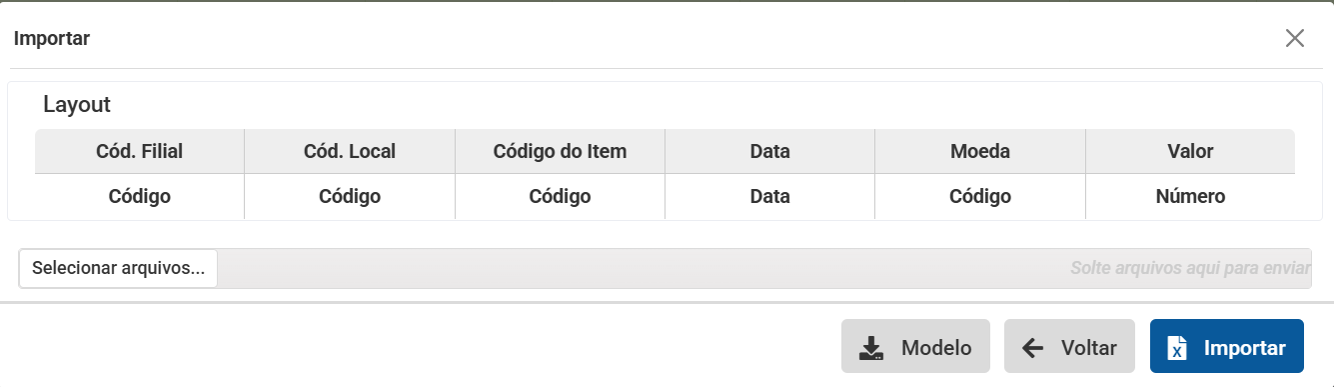
At the top of the register screen, by clicking on the button in the form of an icon that represents file import, the system will open an example, allowing you to download an Excel file that will serve as a template.

 English
 Español

