 English
 Español

AGR0630 - Irrigation Project Tree
The irrigation project represents the set of hydraulic structures and equipment in the irrigation infrastructure, capturing fresh or residual water from a source and transporting this water to storage structures and agricultural fields. The project registration is also structured as a tree; however, the registration is done from the project source to the upstream-downstream targets, modeling the water path from capture to irrigated areas. The project tree always starts at the Unidade Produtora, under which we register nodes to represent each project under its administration.
The basic structure of an irrigation project can be observed in the figure below:
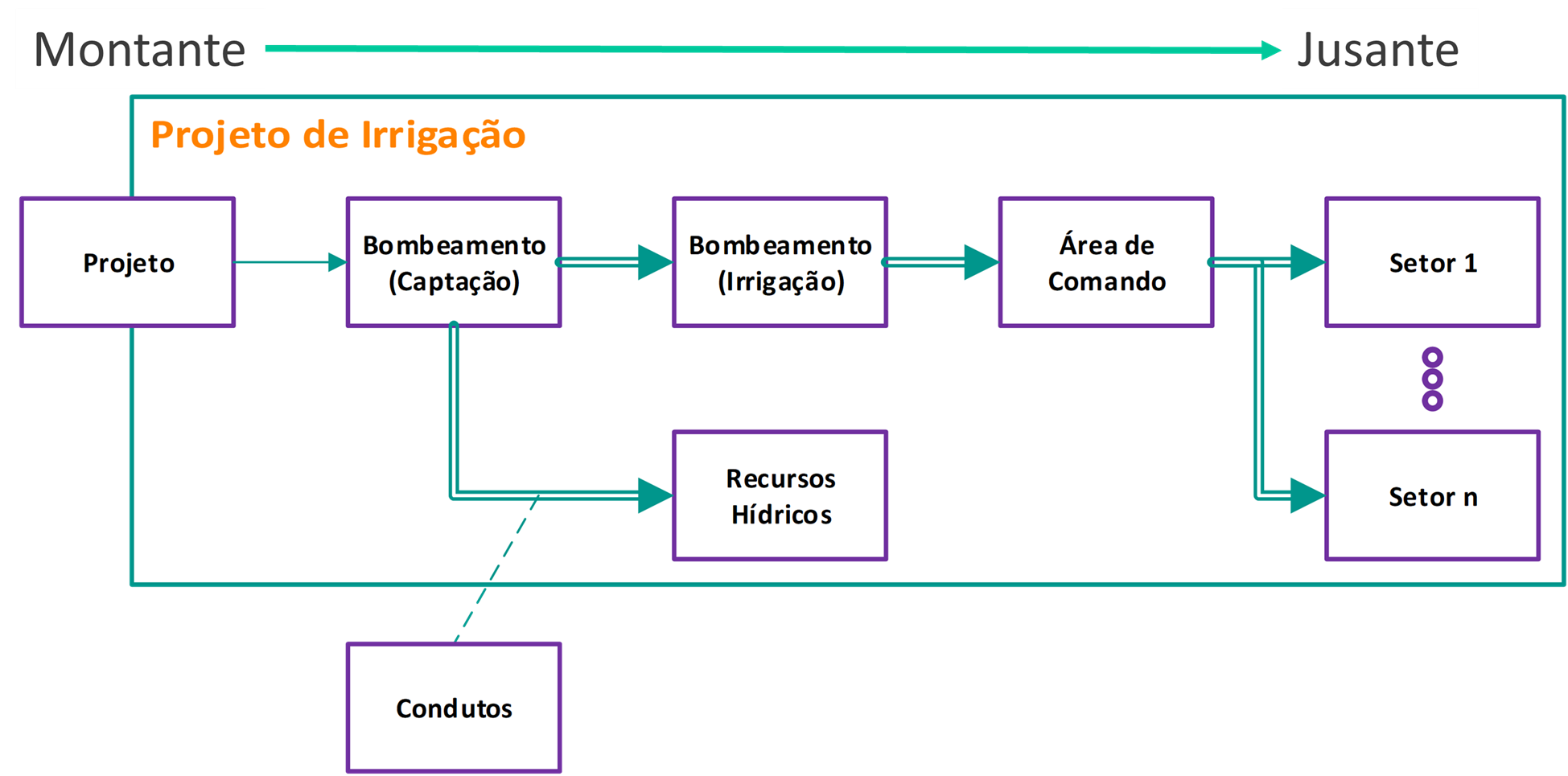
The irrigation project tree is structured using the following node types:
- Project;
- Pumping;
- Conduit;
- Command Area;
- Chemigation;
- Sector;
- Water Resource;
- General;
Each node type has a specific function, except for the General node made to accommodate structures that do not fit the other types. The irrigation project tree nodes do not depend on the Project (time structure of SimpleFarm), but their association with agricultural areas is based on it.
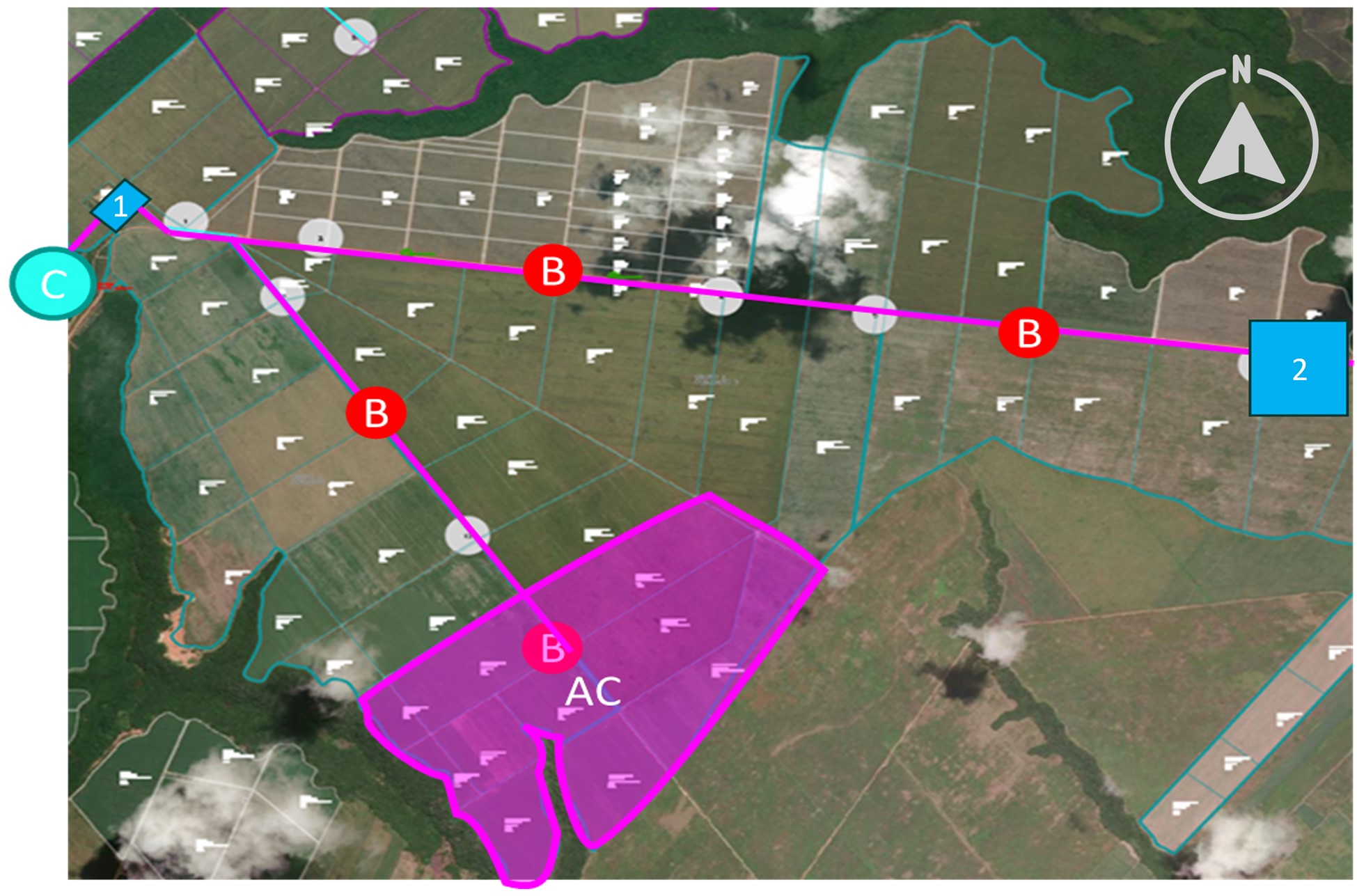
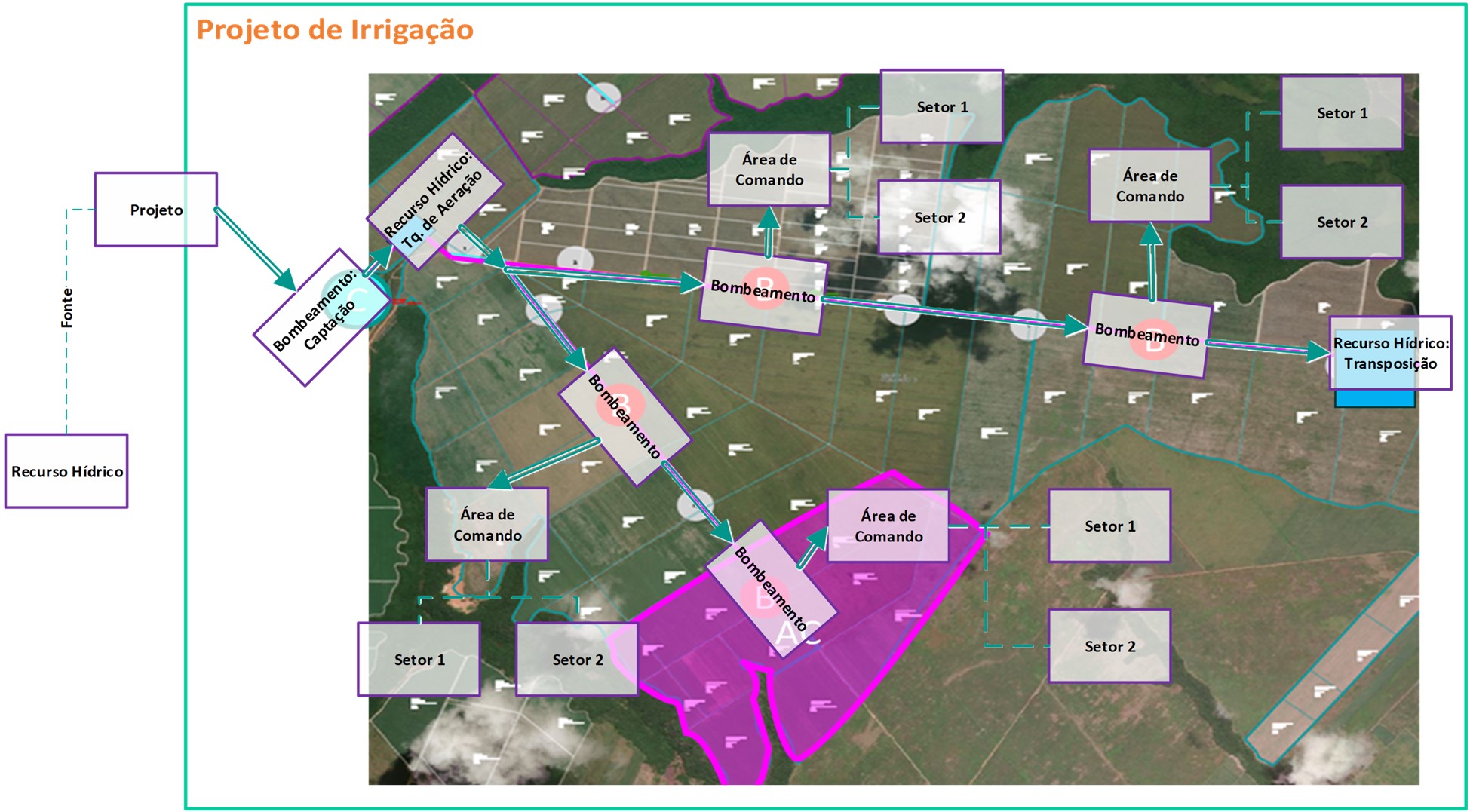
Below, a hypothetical irrigation infrastructure, followed by its tree representation, using the main node types present in irrigation project registration.
- The infrastructure captures water from a water resource at point C;
- It transports this water through a conduit to an aeration tank, point 1;
- It distributes this water by gravity using a network of canals, supplying four pumping points B;
- Each pumping point pressurizes the irrigation systems contained in a command area AC, only one is represented in the figure to facilitate visualization;
- The command areas are subdivided into two sectors, used to associate the plots;
- The northern bifurcation of the canal network is used to transport water from the source water resource to the water resource associated with point 2;
What can you do?
- Access the menu Agricultural > Irrigation > Irrigation Project Tree (AGR0630);
- In the upper right corner click on Select the Project ;
- Fill in the field Production Unit ;
- Search for a Production Unit in the field and select a project as unidade de tempo;
- Click on Select ;
- After selection, the Irrigation Project Tree will appear;
- To add a new node, we click on the addition sign next to the Production Unit.
- To add subsequent levels, the procedure is repeated.
- All nodes have as basic information:
- Code ;
- Abbreviation : is displayed in the tree structure;
- Order : controlling its display order at the level where it was registered;
- Description ;
- Cost Center : allowing its association from infrastructure to a cost structure;
- Classification : for selection of the aforementioned types;
- Marker Accepts Maintenance Order : to allow opening maintenance orders for the location;
- Save ;
- In the project node, in addition to the informações básicas, shared by all nodes in the project tree, we have a field to specify the implementation year of the irrigation project;
- By default, the first node addition in the classification field will be Project (non-editable field).
In the Project Sources tab we associate water resource locations. The water resources associated in this tab will provide the necessary items for executing irrigation operations and will be available for association in work orders and withdrawal reports indicating the origin of the volumes used.
- To associate water resources to the project node, you need to click Add ;
- When clicking the Add button, a list is presented with the water resources available for association;
- Save ;
Nodes with pumping classification allow the association of equipment from the irrigation class motor pump sets, enabling the description of the location’s infrastructure.
- In the informações básicas tab, pumping nodes can be marked as Withdrawal , allowing the logging of their motor pump operations without opening a work order through the daily withdrawal report.
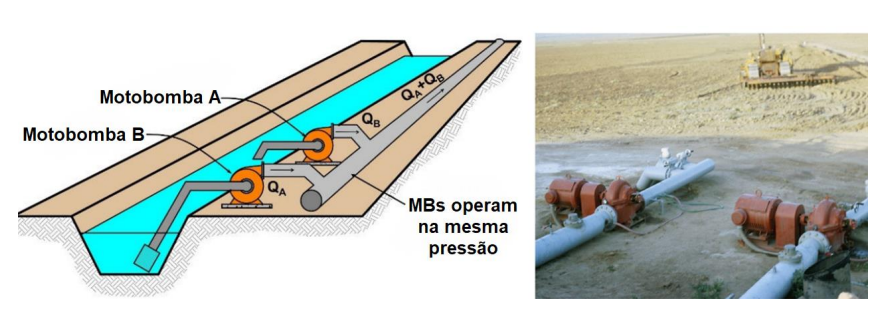
- Motor pumps associated with the same parallel location accumulate the volumes produced in the node. Pumped volumes accumulated in consecutive nodes, associated in series, can be validated by the law of conservation of mass and used to estimate project efficiency.
- In the equipment tab, the association of equipment to a pumping node is performed;
- The Add button associates new equipment to the node.
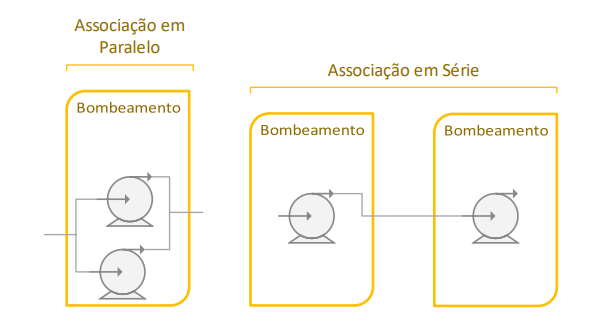
- To represent associations in series, motor pumps must be associated with consecutive pumping nodes in the irrigation project tree. The diagram below shows the two types of association:
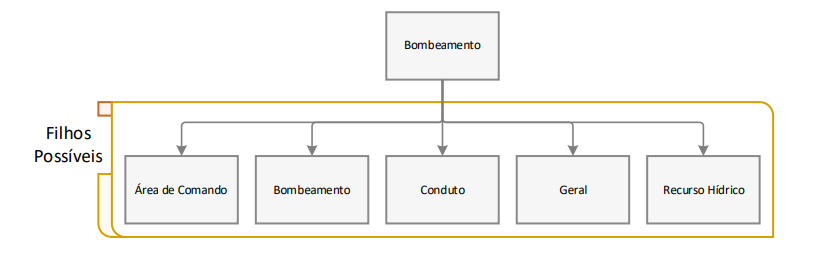
The conduit nodes are optional and can be used to describe sections of free or pressurized conduit, such as channels and pipelines, connecting the irrigation infrastructure. In the future, we can add geometry and roughness parameters to describe the flow in these conduits. This location can be created at any level of the project structure, except for the internal levels of the command area.
The command area node groups the agricultural locations served by the infrastructure of a branch of the irrigation project tree. In this location, the irrigation systems that will distribute the captured volume over the surface of the agricultural locations are associated.
- In the informações básicas tab the Typification field will be registered as: Command Area
- In the Irrigation Type field the filling will be according to the irrigation type of the Command Area:
- Mobile:
- Conventional Sprinkler : Mobile
- Mechanized Sprinkler: Self-Propelled Gun
- Mechanized Sprinkler : Linear System
- Fixed:
- Localized: Drip
- Localized: Micro-sprinkler
- Mechanized Sprinkler: Center Pivot
- Conventional Sprinkler: Fixed Grid
- Mobile:
Example: Mechanized Sprinkler: Center Pivot that can only house equipment from the irrigation class Irrigation Systems - Mechanized Sprinkler and irrigation subclass Radial Movement.
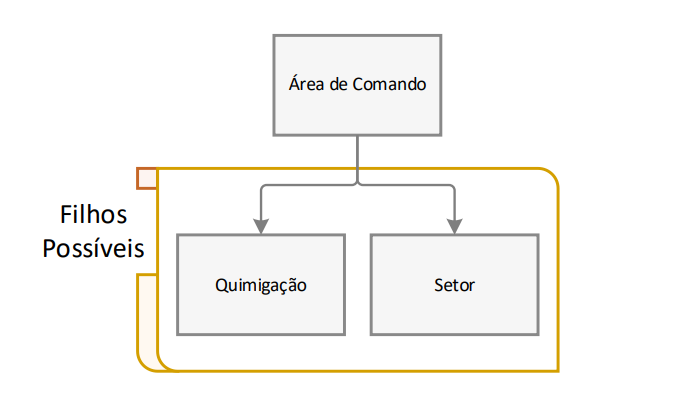
The chemigation node will represent an input injection point in the irrigation system, and may occur at various levels of the irrigation project. The chemigation node and the sector node are the only ones that can occur after the command area node. This is because injection systems for chemigation do not always serve the entire command area, being able to inject the mixture at specific points, directing it only to a fraction of the sectors.
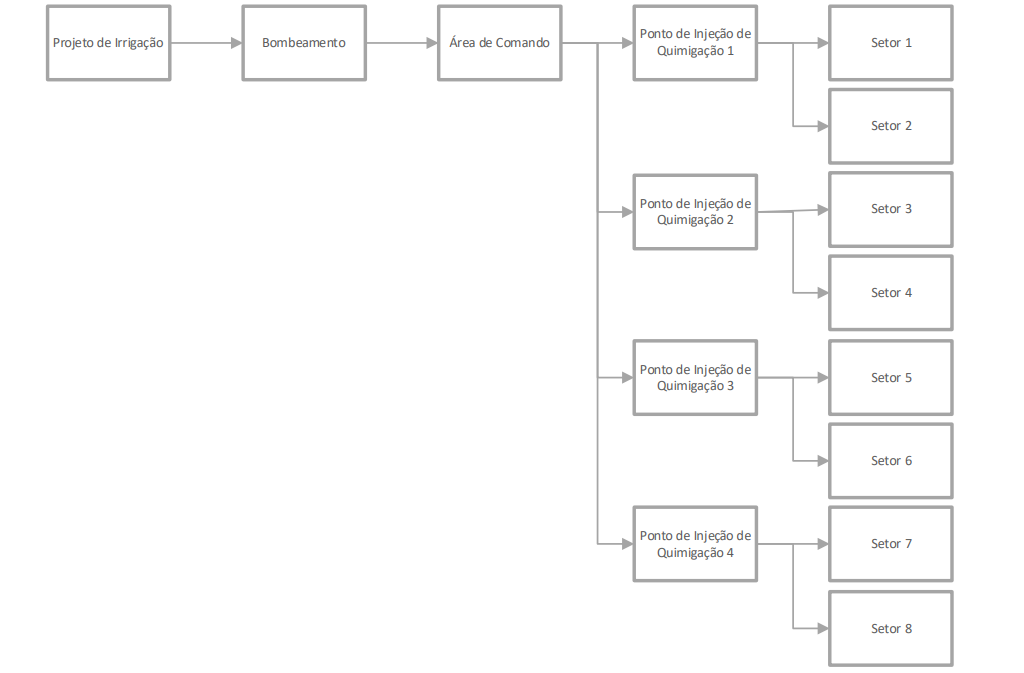
In this node, only equipment from the “chemigation systems” class can be associated. The equipment association follows the same process already exemplified for pumping nodes and command areas.
The sector node is a subdivision of the command area, used to associate agricultural locations targeted for irrigation operations to the project structure. Only command area and chemigation nodes can originate a sector node; creating new locations from this is not allowed.
-
In the informações básicas tab, the Typification field will be registered as: Sector;
-
After saving, the locations tab will be displayed; the grid fields show the total area of the location, irrigated percentage, and irrigated area. The rules for associating locations to the sector node depend on the irrigation type selected in área de comando.
-
Mobile: when the irrigation type represents a mobile irrigation system, the association of locations to sectors is flexible and the system does not validate the sum of irrigated area for a given location (DIV4) in the irrigation project tree, allowing it to exceed the area registered in Estrutura de Locais (AGR0023), with distinct sectors serving up to the totality of a location’s area. This rule reflects the flexibility of these systems’ operation in the field, where the same location can be irrigated from distinct pumping points, depending on the network setup.
-
Fixed: when the irrigation type represents a fixed irrigation system, the association of locations to sectors is validated by the system and the sum of irrigated area for a given location (DIV4) in the irrigation project tree must be less than or equal to the area registered in Estrutura de Locais (AGR0023); only the location’s area balance (Total Area - Sum of Irrigated Area) will be available for registration in a sector.
Example: association of the “Plot A” location, with 20 ha, to the sectors of an irrigation project.
- Command Area 1, Located: Drip (Fixed),
- Sector 1, 20 ha available for registration, you registered 10 ha,
- Sector 2, 10 ha available for registration, you registered the balance, plus 10 ha;
- Command Area 2, Mechanized Sprinkler: Center Pivot (Fixed),
- Sector 1, there is no balance for the association of “Plot A”, which will be hidden in the locations structure;
- Command Area 3, Mechanized Sprinkler: Self-Propelled Gun (Mobile),
- Sector 1, 20 ha available for registration, you registered 20 ha,
- Sector 2, 20 ha available for registration, you registered 20 ha.
-
-
To add a new node, you will need to click on Add ;
-
A window will be presented to choose the agricultural locations for association with the sector; multiple areas will be allowed for addition;
-
There is the possibility to edit (through the grid’s pencil icon) the area or percentage of this location served by the sector;
-
Save ;
This node describes water resources interspersed in the project structure, for example: extraction wells, aeration tanks, reservoirs.
- In the informações básicas tab, the Typification field will be registered as: Water resource;
- To perform the association of water resources, you will need to click on Add ;
- In the Add Water Resource screen, the association to the node will be performed;
- Click on Save ;
To associate new equipment to the irrigation project tree nodes, it is necessary to:
- Click on the Add button in the Equipment tab. The Equipment tab is only available for node types that allow this association (Pumping, command area, and chemigation).
- When clicking on the three dots to the right of the Equipment field, the equipment search is opened, restricted to irrigation equipment belonging to the classes and subclasses compatible with the registered location type;
- To define the validity period of the association, the end date is not mandatory and is automatically assigned when the equipment is associated with another location date. The end date assumes the value of the start date of the subsequent association of this equipment;
- To transfer equipment to a new location, simply associate it with the destination node; it is not necessary to end the validity period at the origin location;
- It will be necessary to inform the equipment code, the association start date; the end date is not mandatory;
- Click on Save ;
- If the equipment has a current association in another location, the user will receive a message with the branch of the current association, requesting confirmation. If confirmed, the previous association is finalized;
The irrigation infrastructure is independent of the Project (PET, estrutura de tempo do Simple Farm), however, the area of agricultural sites may vary between PETs and even within a PET. Therefore, rules were created to protect this association and a tool to maintain the area associations to the infrastructure, transferring them between PETs.
- Command areas with fixed irrigation types: the areas irrigated by the sectors persist when there are changes in the site registration (AGR0023) and the area of a plot cannot assume values lower than the sum of its irrigated areas;
- Command areas with mobile irrigation types: the percentages irrigated by the sectors persist and are used to adjust the irrigated area according to changes in the site registration (AGR0023), changes in the plot areas are not validated;
The crop turnover tool is accessed through the irrigation projects tree. In it, it will be necessary to inform the source PET and the destination PET. The plots associated with the irrigation projects tree in the source PET, which have areas registered in the AGR0023 for the destination PET, will have the associations transferred according to the rules described above.
 English
 Español

