 English
 Español

AGR0226 - Execute routines
The Routine Execution (AGR0226) screen is where the module’s calculations and routines will be processed to consolidate information that will later be used in composing the Payroll for Agricultural Employees.
The calculations presented and processed on this screen vary according to the client’s scenario. The module has some standard calculations, registered and parameterized through the Cálculos (AGR0220) screen.
What can you do?
-
Access the menu Agricultural > Labor > Execute Routines (AGR0226);
-
When in this registration the Routine Group is defined as Labor and the selection field Execute Calculation is active, the respective calculations will be presented on the AGR0226 screen and will be available for execution.
-
To perform the registration it is necessary to fill in the fields:
- Calculations: in this expandable field, the parameterized calculations will be presented, through the Cálculos (AGR0220) screen, for display and execution on this screen. The user will be able to select more than one calculation for execution, according to filters defined in the next fields. The execution order of these calculations will follow the ascending order as defined on the Cálculos (AGR0220) screen;
- Production Unit : mandatory field, used as a filter in the execution of the selected routines. Retrieves information from the registrations on the unidade produtora (ADM0012) screen;
- Project : mandatory field, used as a filter in the execution of the selected routines. Retrieves information from the registrations on the Projeto (AGR0013) screen, only projects linked to the previously selected production unit will be displayed;
- Harvest : mandatory field, used as a filter in the execution of the selected routines. Retrieves information from the registrations on the Safra - (AGR0014) screen, only registrations linked to the previously selected project will be displayed;
- Period : mandatory field, used as a filter in the execution of the selected routines. Retrieves information from the registrations on the competência (AGR0084) screen, only periods from the labor module will be displayed in this field. Defines the period that information will be retrieved and generated in the executions, commonly called closing period;
- Start Date : field automatically filled with the start date informed in the previously selected period registration;
- End Date : field automatically filled with the end date informed in the previously selected period registration;
- Reference Date : field automatically filled with the end date informed in the previously selected period registration. This date can be changed, however without effects on the execution of calculations;
- Team : optional field, when informed, will be used as a filter in the execution of routines. The user can select more than one team to be filtered, however when an item is selected in this field, the field for employee filter selection is blocked;
- Employee : optional field, when informed, will be used as a filter in the execution of routines. The user can select more than one employee to be filtered, however when an item is selected in this field, the field for team filter selection is blocked;
- Button Execute : after selecting the calculations to be executed and selecting the filters, the user must click this button for the system to start processing the routines;
From the moment a routine execution starts, the system generates a processing history in the grid displayed at the bottom of the screen. In this history, during the execution of processing, it is possible to follow the status of each process being executed within the calculation.
-
When processing is finished, if errors occurred in the process, the system does not generate an execution batch, and presents the description of the errors that occurred in this history.
-
If processing has finished successfully, the system generates a processing batch, in which the consolidated information is recorded. The generated batch is displayed in this grid through a link provided by the system. From this link, it is possible to access the Manutenção de Cálculos (AGR0225) screen, where the values and information generated in the processing can be checked.
The production routine is a fundamental step in the system’s labor module. Its objective is to gather and organize all the information that was recorded in the Apontamentos de Produção (AGR0087). This consolidation is important because it serves as a basis for several other essential day-to-day routines, such as:
- Control of employee Absences
- Calculation of Holidays
- Calculation of DSR (Weekly Paid Rest)
- Calculation of Extra Production
- Inclusion of Daily Supplement
In generating this routine, the system retrieves the production logs made during the period and according to the filters informed on the screen. In executing the process, the system will consider the information of quantity and hours logged, as well as the total value generated for the log in question, recording this information in Eventos (AGR0231), which can be checked on the Manutenção de Cálculos (AGR0225) screen.
For each log record for the employee per day and operation, a record will be generated in the execution of this routine. In this case, after executing the processing, all production logs considered in the period will be consolidated, from this moment on, it will not be possible to edit the respective logs on the Apontamento de Produção (AGR0087) screen.
After executing the production routine, these logs, considered in the processing, will be made available for viewing in reports of the Labor module.
The time off generation routine is a standard feature of the labor module. It is responsible for automatically generating time off for agricultural employees, based on the escala de trabalho (AGR0232) linked to the registration of each funcionário (ADM0025). This routine ensures that employees have their time off correctly recorded in the system, according to the defined schedule.
The information generated here, together with the data from the production routine, is used to feed other important routines, such as:
- Absences ;
- DSR (Weekly Paid Rest);
This routine aims to automatically generate employees’ days off based on the registered work schedule. The system does this by retrieving productive days and days off from the most recent effective start date informed in each employee’s registration. From this date, the system starts counting work days and rest days, according to the schedule, and generates the corresponding time off within the period.
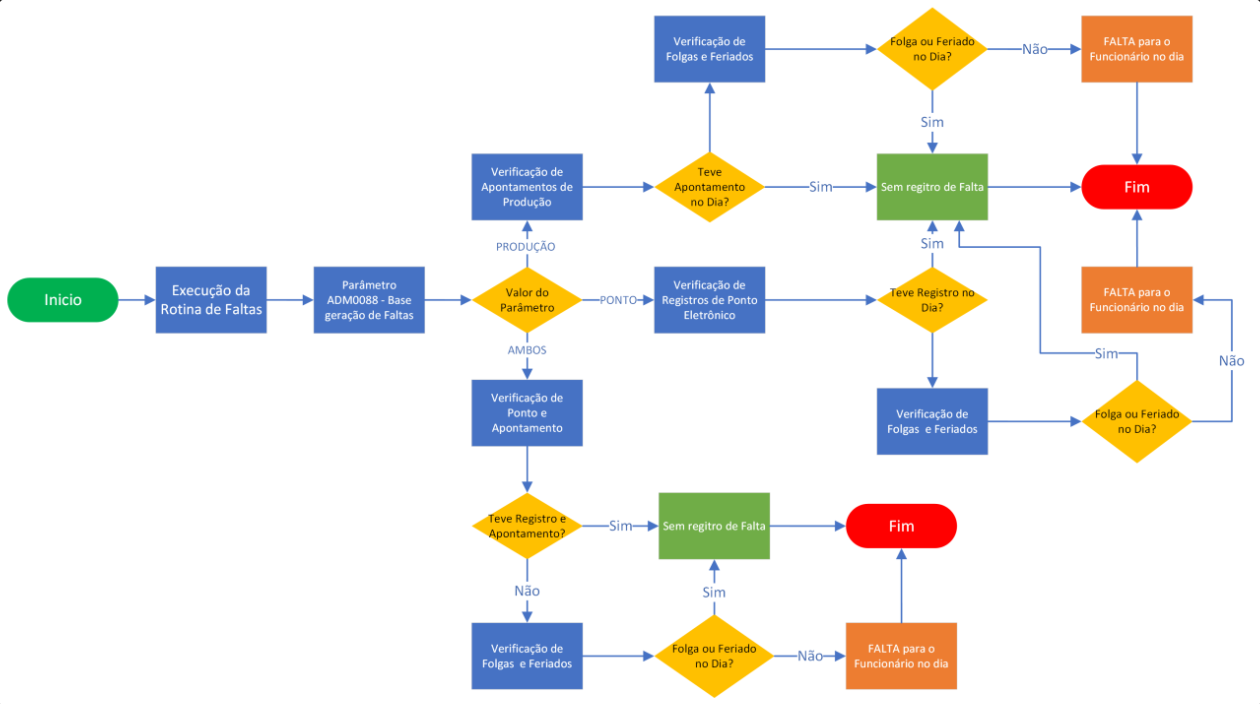
The absence routine is a standard feature of the workforce module and is responsible for verifying the absences that the employee had during the informed period. The generation of absences is parameterized according to the company’s rules. For this, from the PayGenerateAbscenceBase | Base for absence generation parameter, present on the Parâmetros (ADM0088) screen, it is defined which information should be considered in the processing execution.
In the parameter in question, we define whether only production work logs will be considered (generated through the Apontamento de Produção (AGR0087) screen), only electronic clocking event records (specific integration with ERP required), or both. In this case, according to this parameterization, in the processing of the routine in question, the information generated in the production routine and/or the information recorded on the Ponto Eletrônico (AGR0229) screen will be considered, in addition to the information generated in the time off routine and the Grupo de Feriado (ADM0082) link in the employee registration.
During the routine processing, the system follows the flow presented below for the generation of Absences:
The holiday routine is a standard feature of the workforce module and has the function of calculating the value of holiday days for employees, based on the average of the values generated on productive days of the work week. For this, the system considers both the data from the production routine and the information from the Absence routine.
The system uses a standard rule to calculate the value of holiday days. It considers the presence or absence of absences in the week in which the holiday occurs. See how it works:
When the employee is entitled to the holiday value:
- If the employee has not been absent during the holiday week;
- And has no production recorded on the holiday;
- Then the system calculates a value to be paid for that day.
When the employee is not entitled:
- If there is any absence recorded during the productive week of the holiday;
- The system does not calculate value for that holiday;
- A record will be created with zero value.
When the employee is entitled to the holiday value, the system performs the following calculation:
- Adds up all values from work logs recorded in the production routine of the holiday week;
- Divides this sum by the number of productive days, according to the escala de trabalho (AGR0232) of the employee;
- The result is the value that will be assigned to the holiday.
The WRD (Weekly Rest Day) routine is standard in the labor module and is responsible for valuing the employee’s WRD day, taking into account the standard rule of averaging the values generated on productive days of the employee’s work week. To execute this routine, the system considers, in addition to the values generated in the production routine, the information generated in the absence routine and the escala de trabalho (AGR0232) linked to the funcionário (ADM0025) register.
The system calculates the WRD value based on the employee’s attendance during the productive week. The rule works as follows:
When the employee is entitled to the WRD value:
- If the employee has not been absent during the productive week;
- They will receive a value on the day off identified as weekly rest day, as registered in the escala de Trabalho (AGR0232).
When the employee is not entitled to the WRD value:
- If there is any absence recorded in the productive week;
- The system does not generate the WRD value;
- A record will be created with zero value in the routine.
When the employee is entitled to the WRD, the system does the following:
- Adds up all values from work logs recorded in the Production routine of the productive week;
- Divides this sum by the number of productive days of the week, according to the escala de trabalho (AGR0232) of the employee;
- The result is the value assigned to the weekly rest day.
The extra production routine is standard in the labor module, it is responsible for recording in the evento (AGR0231) of extra production, values from employee work logs that had production on holidays, in this case, used for specific payments in the ERP system. To execute this process, the information recorded in the production routine and the Grupo de Feriado (ADM0082) link in the Funcionário (ADM0025) register are considered.
The extra production routine is standard in the labor module, and is used in scenarios where, through the parameter SalarySupplementRoutineFixedValue | Rotina de Complemento Salarial - Valor base para complemento (valor fixo), present in the Parâmetros (ADM0088) screen, the minimum value to be paid on the employee’s productive workday is defined, when they have no absence record on the day in question.
In this case, when a value is defined in this parameter, during the routine generation, the system will verify the total value of the production logs for the employee on the day and, if they have not reached this minimum parameterized value, the system will generate a supplement in the daily value until it reaches the minimum value, in the sum of the production and the supplement.
- Parameters used in standard Routines of the labor module:
- PayGenerateAbscenceBase | Base for absence generation
- CltOperationSaturdayPlywood | Operation for Compensated Saturday
- SalarySupplementRoutineCalculationMode | Wage Supplement Routine - Calculation Mode
- SalarySupplementRoutineOriginValue| Wage Supplement Routine - Source of value for supplement
- SalarySupplementRoutineFixedValue | Wage Supplement Routine - Base value for supplement (fixed value)
- AllowFiltersAndExceptionsComp | Allow use of Filters and Exceptions in Period registration: When active, the fields for defining the standard Team and Employee Filters on the screen are removed, in this case, these become informative fields, with automatic filling according to the information from the Period entered on the screen.
 English
 Español

