 English
 Español

AGR0750 - Seed Category
A seed is one that carries all the genetic potential of a cultivar. Their production begins with the development by the breeder, the selection of the best cultivars by rigorous quality standards (genetic, physical, physiological and sanitary) that guarantee greater productivity, more efficient use of fertilizers and pesticides, lower incidence of weeds, pests and soil diseases (Peske et al., 2019).
Important
To use Seed Category information on other screens, it is necessary to activate the parameter on the ADM0012 screen > Parameters and basic information tab, select the Control seed category marker. In addition, it is necessary to activate the parameter on the AGR0035 - Cultura screen - Use seed category.
What can you do?
Within the seed production process, they are identified by:
- Classes: Certified and not certified;
- Genetic seed: It is the first generation seed that results from the selection of plants with high quality control to maintain genetic identity and purity;
- Basic seed: It is the second generation seed that results from the multiplication of genetic seed, produced in a way that guarantees its genetic identity and varietal purity;
- First generation certified seed (C1):Resulting from the multiplication of basic seed or genetic seed;
- Second generation certified seed (C2):Resulting from the multiplication of C1, basic seed or genetic seed;
- First generation non-certified seed (S1): Material produced outside the certification system. Resulting from the multiplication of C2, C1, basic seed or genetic seed;
- Second generation non-certified seed (S2):Material produced outside the certification system. Resulting from the multiplication of S1, C2, C1, basic seed or genetic seed;
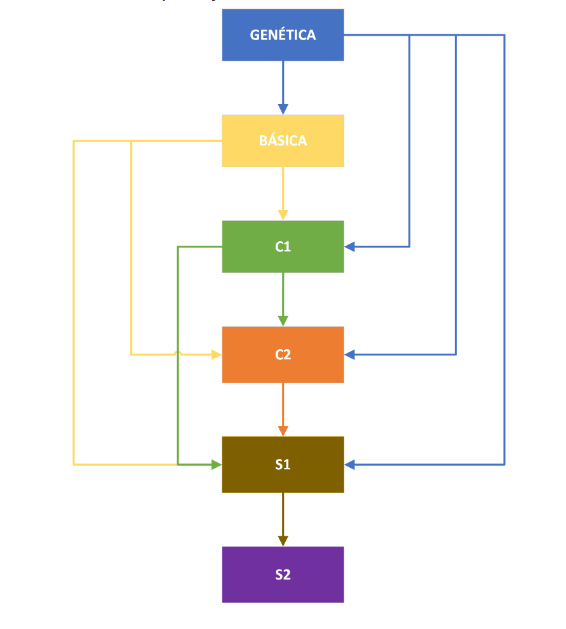
In this stage, it is possible to register these Seed Categories and insert a transition to them. To do this:
- Access the menu Agricultural > Crops > Seed Category (AGR0750);
- To register the seed category, it is necessary to fill in the fields:
- Code : a unique code must be provided for each seed category;
- Description : a unique name must be provided for each seed category;
- Abbreviation: an abbreviation must be provided for each seed category;
- Seed Category : insert the future category of the seed in question. Choose a category previously registered on this screen;
- In Category Transition, we have the seed category field to fill in.
As an example, we are planting an area with a C1 category seed (informed in the planting service order), so when logging work on the harvest service order for this area, the category to be harvested will be C2 (parameterized on the AGR0750 screen as the future category) .
- The Active parameter must be activated so that the registration can be used on other system screens. In addition, to use Seed Category information, it is necessary to activate a parameter on the (ADM0012) screen;
- Click the Save button to register the registration.
 English
 Español

