 English
 Español

AGR0093 - Product Withdrawal
The product withdrawal screen is where we can record the withdrawals and returns of resources that are used in the service order, so we have as a premise that the Service order AGR0090 has been created so that the withdrawal/return can be done.
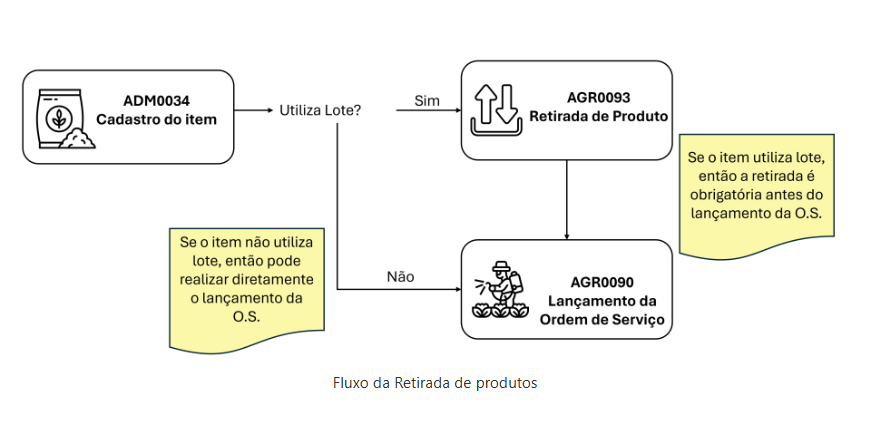
The execution of the product withdrawal screen stage is necessary when the item registration on the Item (ADM0034) screen and the Uses Batch checkbox is active. When active, on this same registration screen the lote do item tab becomes mandatory to fill.
After the item registration is complete and the service order is open, before executing it, it is necessary to withdraw the item/batch on the AGR0093 screen.
Important
When the product inventory control process is done manually, and not controlled by the ERP, it will be necessary to withdraw the product on the AGR0093 screen, and the product entry on the Entrada de produto (ADM0092) screen.
What can you do?
- Access the menu Agricultural > Service Order > Product Withdrawal (AGR0093);
- To execute the registration it is necessary to fill in the fields on the basic information and items tabs;
- To execute the registration it is necessary to fill in the fields:
- Date : date when the product withdrawal will be executed (mandatory);
- Employee :choose an employee, registered on the Funcionário (ADM0025) screen (mandatory);
- Observation :field to fill in an observation (optional);
- After clicking save the record, the second Items tab will be visible for filling.
- Click Add ;
- To execute the registration it will be necessary to fill in the fields:
- Service order : mandatory filling, from the registration displayed on the screen. Painel Gráfico de Ordem de Serviço (AGR0090). The service orders that can be selected in this field will be those that had resources planned in the service order.
- Item : mandatory filling, comes from the registration on the Item (ADM0034) screen;
- Depot : mandatory filling, this registration is on the Local de Estoque (ADM0050) screen but the options to be chosen are from the depot already associated in the service order for the item;
- Batch : searches for batches that had product entry on the Entrada de produto (ADM0092) screen for this depot and item;
- Requested quantity : will pull the value from the Resources tab of the service order;
- Withdrawn quantity : manual filling. Can be any value equal to or less than the requested quantity;
- When selecting a service order, in the item field only the items already associated in that service order will come;
- Click Save .
- Verify how the registration of the item to be used is, if it has the Uses Batch checkbox checked. This verification will be done on the Item (ADM0034) screen;
- Execute the opening of a service order on the Painel Gráfico de Ordem de Serviço (AGR0090) screen;
- After opening, associate the item on the Resources tab;
- It is necessary to execute the product entry through the Entrada de produto (ADM0092) screen;
- Execute the product withdrawal on the Retirada de Produto (AGR0093) screen. This step is mandatory if the item has the Uses Batch checked, otherwise it becomes optional;
- It is necessary to execute the service order. If the withdrawal has not yet occurred on the Retirada de Produto (AGR0093) screen, no quantity will be added to the execution;
 English
 Español

