 English
 Español

AGR0779 - Area Validation Parameters
Before starting the Validação de Área process, it is essential to perform the necessary parameterizations. These parameterizations ensure that the calculation of the area balance routine is accurate and correctly reflects the changes that occurred in previous periods or in specific areas of projects and cultures.
Important
-
For the work order area balance validation routine, it will be necessary to enable the Parâmetro - ADM0088 - Informa operação na abertura da ordem de serviço.
-
For the set of information that the area cannot be repeated, we will call it KEY = production unit | project | period | process | subprocess | group | operation | culture | DIV1 | DIV2 | DIV3 |DIV4. In this key, DIV1 | DIV2 | DIV3 |DIV4 are understood as the levels of the customer’s location tree. These levels can be less than 4 or more than 4, the key will always consider the last level for validation.
What can you do?
- Access the menu Agricultural > Work Order > Area Validation Parameters (AGR0779);
- Click on Add ;
- Fill in the following fields:
- Production Unit ;
- Project ;
- Period ;
- Make sure the parameters are correctly configured:
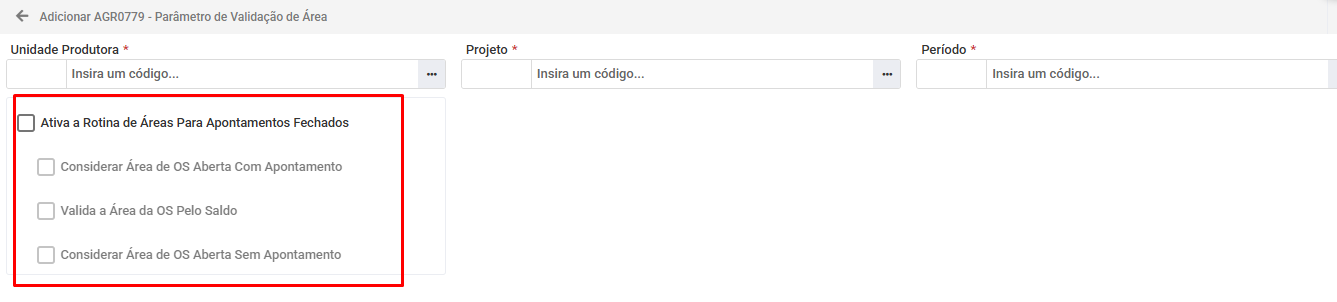
- Area Balance Generation: the parameter in question considers all closed work logs of each KEY for the generation of the area balance. This ensures that only finalized work logs are taken into account in the calculation of areas.
- Parameter Activation: when the parameter is activated, a marker is released on the ADM0041 - Operação screen. This marker allows the user to select the operations that will be considered as main in the process.
- Work Log Finalization: With the parameter active, when finalizing the work order work logs, the information is saved and the areas are automatically accounted for.
This parameter is not activated at the time of closing the work order work log.
This parameter can only be enabled if the parameter of the Activate the area routine for closed work logs item is active and the parameter Consider work order area open without work log is disabled.
As soon as it is enabled, when opening a new work order for a given KEY, this total W.O. area must be accounted for in our balance. That is, when this parameter is also active, in addition to the previous validations, the area of the open W.O.s will be considered in its entirety for the balance calculation, and not just the area of the closed work logs.
When both parameters are active, the system should work as follows:
- CLOSED W.O.s: account for only the area of closed work logs;
- OPEN W.O.s: account for the total W.O. area;
This parameter does not prevent the opening of WO with duplicate area.
This parameter will be used so that when opening a service order, it validates whether the key entered in the S.O. has available area balance to perform the activity, not allowing the opening of one that does not have area balance. It will only be possible to activate it if the parameter Enable area routine for closed work logs is active.
When it is activated, it will release a marker on the ADM0043 - Árvore de processo screen for the user to select the operations that will not have area validation and, consequently, no opening/modification lock for duplicate KEY.
The validation of the available area balance for a KEY will only be performed if the validation parameter is active. This rule does not apply to S.O.s of the “Harvest” and “Irrigation” types, which continue to work as currently.
- Validation Steps:
The validation occurs at two distinct moments:
- When saving the opening of the S.O..
- When changing the “Locations” and/or “Operation” tabs of an already saved S.O.
- Validation Rules:
If there is available balance:
- The S.O. can be opened or modified with an area equal to or less than the balance.
- If there is no balance:
- The system will block the opening or modification of the S.O. Validation will not be performed if the operation marker that deactivates validation is active.
- Warning Message:
When the opening or modification of the S.O. is blocked due to lack of balance:
- A message will be displayed explaining the reason for the block.
- Lines with zero balance will be highlighted in red.
- If there is a non-zero balance, the system will offer the option to update the S.O. area to the available value of the KEY.
This parameter considers the areas of open service orders that have not yet had closed work logs.This parameter will only be enabled if the parameter Enable area routine for closed work logs is active and the parameter Consider Area of Open S.O. with Work Log is deactivated.
As soon as it is enabled, when opening a new service order for a given KEY, this total S.O. area must be accounted for in our balance. That is, when this parameter is also active, in addition to the previous validations, the area of open S.O.s will be considered in its entirety for the balance calculation, and not only the area of closed work logs. Therefore, the accounting of areas will be as follows:
- CLOSED S.O.s: account only for the area of closed work logs;
- OPEN S.O.s and without closed work logs: account for the total area of the S.O.;
- OPEN S.O.s and with closed work logs: account only for the area of closed work logs;
- Click on Save ;
 English
 Español

