 English
 Español

Basic Registrations
To use the irrigation module, we must register and/or parameterize some basic system entities using entries from the Administration menu:
-
On the ADM0006 – Unidades de Medida screen, the units of measure are registered that will be consumed in the characterization of equipment model versions, in service orders and in daily irrigation reports of Simple Farm, therefore, we must pay attention to the compatibility between the types of units of measure and the dimensions we want to represent. The theoretical reference is under the topic Análise Dimensional.
In the table below we have examples of physical quantities (types of unit of measure), their dimensions in the MLT system (mass, length, and time), and units of measure used to represent them:
Type Dimensions Examples Pressure ML⁻¹T⁻² Pa, kgf/m², bar, atm, psi Length L m, km, mi, ft, knot Dimensionless - percentage, density Frequency T⁻¹ RPM, Hertz Flow Rate L³ T⁻¹ m³/h, l/h, l/s Time T min, h, s Volume L³ m³, l, acre-ft
-
On the ADM0041 – Operação screen we register productive and unproductive operations, often called “downtime reasons”.
-
Productive operations must be marked as Irrigation Entry. This marking is used to filter irrigation operations when opening service orders, with type enumerators irrigation and irrigation with project and in daily irrigation reports. Examples of operations that would be marked for irrigation entries:
- Drip Irrigation;
- Fertigation;
- Center-pivot Irrigation;
-
Unproductive operations are shared with other system tools and do not have marking for Irrigation Entry. During the registration of unproductive operations, we must pay attention to the efficiency classification. The efficiency classification determines how the system accounts for the hours of unproductive operations, directly impacting the values presented in reports.
- On the Item registration screen (ADM0034), we have two markers to filter items on system movement screens:
- Irrigation;
- Chemigation;
- The irrigation marker will be used to identify items consumed in irrigation operations, these items will be filtered for display on the service order irrigation screens, examples of items that can be marked as irrigation are: fresh water, reuse water, vinasse and diluted vinasse.
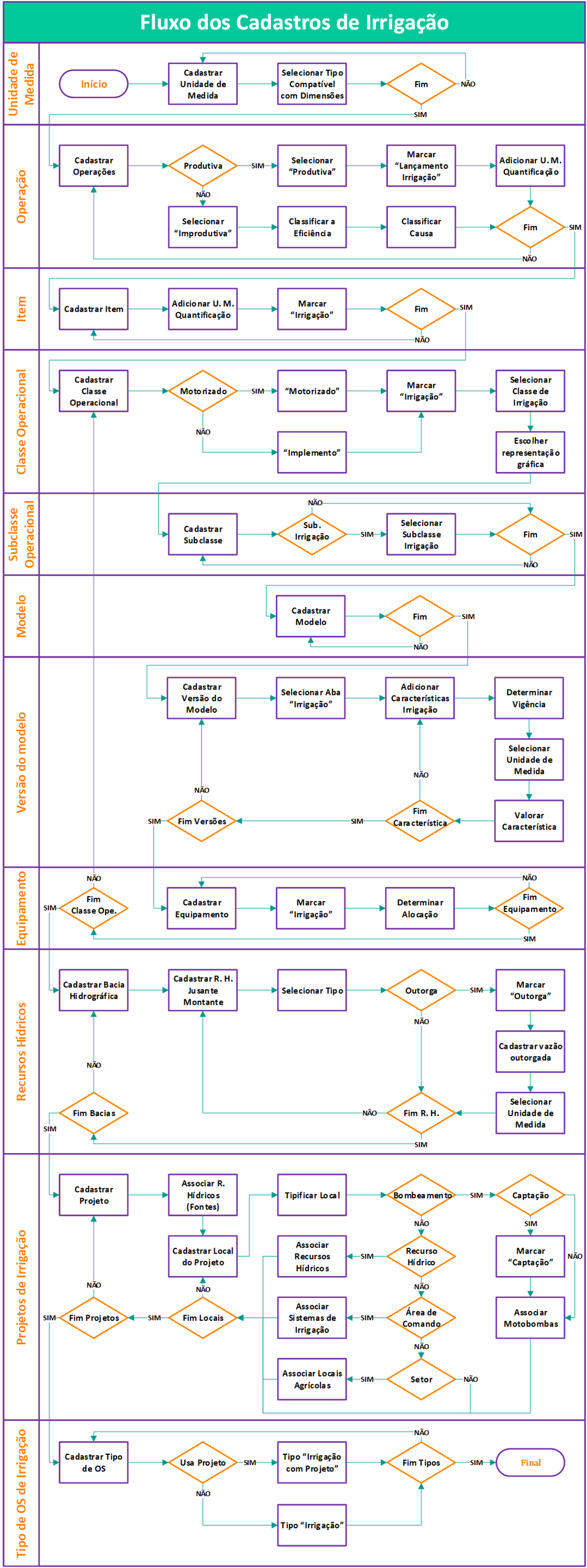
To ensure proper use of the irrigation tool, it is essential to correctly follow the registration steps. In the button below, you will find a complete detailing of these steps, as well as the suggested flow for carrying out the necessary registrations:
 English
 Español

