 English
 Español

ADM0034 - Item
The item register (ADM0034) is one of the main registers of the SimpleFarm system, acting as the central repository of all products, agricultural inputs and services that will be consumed/logged in different movements within the system. By default, this register is received via integration with the ERP, but its manual registration is also allowed.
What can you do?
Initial Item Registration
- To register the Item, access the menu Administrative > Resources > Item (ADM0034);
- Click on Add and fill in:
- Type: defines whether the register is a product or service;
- Company;
- Code ;
- Abbreviation ;
- Description ;
- Unit of Measure: (ADM0006);
- Application Unit;
- Default Item;
- Default Category: classifies the product and enables its consumption on specific screens of the system;
- For example: for products directed to automotive control, when classified as fuel, its consumption will be restricted to refueling movements when classified as part, its consumption will be restricted to requisition movements of Maintenance Orders, and so on.
- Group : (ADM0026);
- Family : (ADM0027);
- Manufacturer : (ADM0061);
- It is possible to select the location where the item can be used in the system:
- Agricultural Input Application;
- Commercialization ;
- Weighing ;
- Processing ;
- Industry ;
- Automotive ;
- Irrigation ;
- Chemigation ;
- Still on this screen, some important markers are available:
- Active: controls whether the register is suitable or not for use within the system. According to the rules and classifications of each product, only active products can be moved and consumed;
- Uses Batch : controls products that are moved/consumed from production batches, thus, the product withdrawal will occur in specific batches (considering the key Storage Location | Item | Batch). When checking this parameter, filling in the Lote de Item tab becomes mandatory;
- Does Not Control Inventory : controls products that will not perform balance control. When checking this parameter, the product balance will not be validated during its consumption and, after consumption is executed, there will be no inventory withdrawal in the ERP.
- The register allows the inclusion of a flexfield, a dynamic field linked to a specific record, used as an extension of the standard fields.
- Click on Save to register the entry.
- Click on Add ;
- To register in the conversions tab, it is necessary to fill in the fields:
- Unit From : Unidades de medida (ADM0006)
- Unit To :Unidades de medida (ADM0006)
- Factor ;
- Click on Save to register the entry.
- Click on Add ;
- To add the warning, it is necessary to fill in the field:
- Warning : check the locations where the warning will be displayed;
- Click on Save to register the entry.
- In the Usage Instructions tab, the following tabs are displayed:
- In the tab, it will be necessary to fill in the fields:
- Chemical group;
- Mode of action ;
- Toxicological class ;
- Item Formulation ;
- Application standards are defined as:
- Harvest waiting period ;
- Tolerance window ;
- Re-entry ;
- Residual effect ;
- Application interval ;
- If there is a waiting period, the Re-entry field will need to be filled in;
- For agronomic prescription information, it will be necessary to fill in the fields:
- UN Product ;
- Diagnosis ;
- Antidote ;
- Click on Save to register the entry.
- Click on Add ;
- If necessary, the following fields must be filled in:
- Active Ingredient;
- Incompatible Active Ingredient ;
- Click on Save to register the record.
- Click on Add ;
- In the tab, the following fields must be filled in:
- Crop ;
- Dose : will be used as a base when inserting as resources in a service order Painel Gráfico da Ordem de Serviço (AGR0090);
- Click on Save to register the record.
- Click on Add ;
- In the tab, the following field must be filled in:
- PPE Item :
- Click on Save to register the record.
- This record will not be displayed on any other system screen.
- Click on Add ;
- In the tab, the following fields must be filled in:
- Nutrient : nutrients are registered on the ADM0033 screen, entering the percentage manually.
- Percentage ;
- Click on Save to register the record.
- This record will not be displayed on any other system screen.
- Click on Add ;
- In the tab, the following fields must be filled in:
- Item;
- Species : species registered on the cadastro de espécies (AGR0172) screen;
- Dose ;
- Click on Save to register the record.
- This record will not be displayed on any other system screen.
To enable the Commercialization Item tab, it is necessary that, in the Basic Information tab, the Commercialization field is checked.
This tab displays the following information:
- Pricing Unit;
- Volume Unit;
-
In the Derivation tab, the by-products of the registered item are registered.
- Code;
- Description;
- Marker Active ;
For example: Register petroleum, its by-products will be: gasoline and diesel.
- This record will not appear on any other system screen.
-
A previously registered batch is added on the Lote (ADM0127) screen, being possible to add more than one batch per item.
-
If the use batch option from the Basic Information tab is unchecked, this registration will be optional.
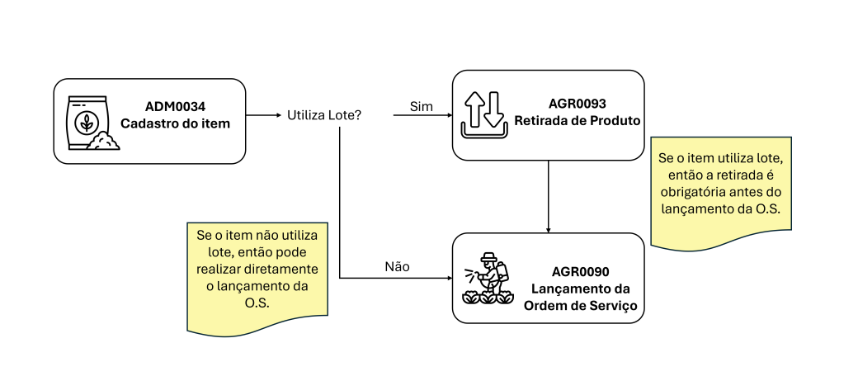
For more details access: Seção Fluxo de utilização.
The history of current integrated prices for the registered item is consulted (does not include prices informed on the Entrada de Produto (ADM0092) screen, and it is not possible to add new prices). Item prices will come through integration with the client’s SimpleFarm ERP module.
- When the Consult History option is active, the Start Date and End Date fields are released for filling.
- When clicking on the Filter button, the screen will filter the period, and will present the item prices in the filtered period.
- Click on Add ;
- The accounting account is a registration performed in the client’s SimpleFarm ERP, coming through integration. When associating the item to an accounting account, its cost will be directed to that account.
- The visibility of the accounting accounts tab can be changed through a Parâmetro na tela ADM0088.
- The Supplier tab will be available in the Item Registration only when it is of Service type;
- It is not possible to add a supplier to an item in this tab, making it possible only through integration with the client’s SimpleFarm ERP. The tab will serve as a supplier query, by item validity.
 English
 Español

